Windows 7 Forums


Windows 7: Shift keys not working with certain letters

21 Sep 2010   #1

Windows 7 Premium 64 bit
 
 
Shift keys not working with certain letters

Hi. I browsed some other threads concerning this problem, but none of those solutions has worked for me. The problem affects only the letters z,x,c,v, and the numbers 1,2,3,4,7,8,9,0. I can't make an uppercase version of those characters. When i launched the on-screen keyboard, I see the shift keys lighting up when I touch them, so it isn't a matter of physical damage to the keys... I went into the device manager and uninstalled all the keyboard drivers there - at least I think I did... and they just came back with the same problem... And i plugged in a Logitech keyboard and its drivers worked just fine. So short of wiping the entire drive with a fresh install of Windows 7, what can i do? I had to use the onscreen keyboard just to type the question mark. Thank

My System SpecsSystem Spec

21 Sep 2010   #2

Main - Windows 7 Pro SP1 64-Bit; 2nd - Windows Server 2008 R2
Westlake, Ohio


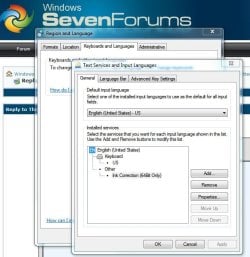
What language is your keyboard layout set to?
Attached Thumbnails
Shift keys not working with certain letters-keyboard-language.jpg  
My System SpecsSystem Spec
21 Sep 2010   #3

Windows 7 Premium 64 bit


English. I tried French just to see what would happen. But definitely English.
My System SpecsSystem Spec
.


21 Sep 2010   #4

Main - Windows 7 Pro SP1 64-Bit; 2nd - Windows Server 2008 R2
Westlake, Ohio


Does your keyboard have a Function (often labeled Fn) key to toggle certain keys for use by something like a multimedia program?
My System SpecsSystem Spec
21 Sep 2010   #5

Windows 7 Premium 64 bit


indeed it does I'll fool with that a while and see what happens. But did you have a specific idea how it could be involved ?
My System SpecsSystem Spec
21 Sep 2010   #6

Windows 7 Premium 64 bit


I looked over all the extra functions on top of the keys and can't imagine what I did to screw things up. Hope you have something up your sleeve!
My System SpecsSystem Spec
28 Sep 2010   #7

Windows 7 64


I had this exact same problem and the cause were the Play/Pause, Stop, Rewind, Fast Forward buttons where the multimedia functions are (volume, mute buttons etc) . I have a Logitech Media Elite keyboard.

After i cleaned the keyboard using my own special technique everything was fine, then i tried to reproduce the problem and held in some of the media keys that don't have any apparent effects (for example, if the Mute key was stuck i would have noticed it) like the Play/Pause, Stop and Fast Forward/Rewind buttons and tried to use the Shift + letters that didn't work last time and the same thing happened. So unstick the button and clean your keyboard.

Last edited by Solinari; 28 Sep 2010 at 10:39 AM..
My System SpecsSystem Spec
01 Oct 2010   #8

Windows 7 64


You try to help someone out and you don't get any replies, meh.
My System SpecsSystem Spec
01 Oct 2010   #9

Windows 7 Premium 64 bit


yeh I know - happens to me all the time in other forums. I got a "new message" notification this morning, but none for your other message and none for a lot of earlier messages in the thread. Woops. Thx though. Turned out to be a broken keyboard after all. 15$ replacement. I used evas computer parts on ebay. Santa Ana. Drove to their warehouse to pick the part up. I can recommend them.
My System SpecsSystem Spec
18 Jun 2011   #10

Windows 7 64bit
 
 
Thank You

Hey, Solinari.

Just wanted you to know that your post helped me solve this problem before I even had to sign up to ask the question.

Don't know if you will see this but I signed up so I could thank you.

Batlaxe
My System SpecsSystem Spec
Reply

 Shift keys not working with certain letters problems?


Thread Tools


Similar help and support threads for: Shift keys not working with certain letters
Thread Forum
Keyboard Problem (Ctrl and Shift keys don't work correctly) Hardware & Devices
Problems with Fn and shift keys Hardware & Devices
shift keys not working suddenly, tried the usual General Discussion
Keyboard - Shift & Alt keys stopped working for keyboard shortcuts Hardware & Devices


All times are GMT -5. The time now is 04:05 PM.


Seven Forums Android App Seven Forums IOS App Follow us on Facebook

Windows 7 Forums is an independent web site and has not been authorized,
sponsored, or otherwise approved by Microsoft Corporation.
"Windows 7" and related materials are trademarks of Microsoft Corp.
© Designer Media Ltd
  

1 2 3 4 5 6 7 8 9 10 11 12 13 14 15 16 17 18 19 20 21 22 23 24 25 26 27 28 29 30 31 32