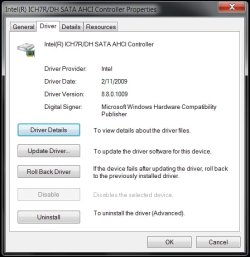
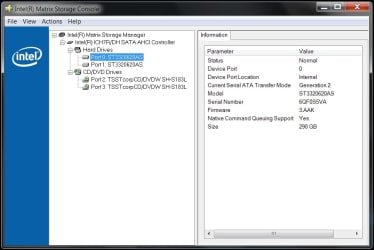
Does anyone know of any chance that Intel will release Matrix Storage Manager drivers for 7? I have to use the latest 8.8 Vista driver in Vista SP2 compatability mode to install and detect my Hitachi HD drivers too. I know Intel is continuing the Chipset drivers and GM965 graphic drivers for 7..
As a matter of a fact Yes, they have released Windows 7 Beta drivers, BUT the Vista drivers are more stable so I'd stick with them as the Windows 7 drivers are still in Alpha development stage...
I installed the Intel Matrix Storage Manager Vista drivers without being in compatibility mode & they installed & work perfectly.
Yes, I've already tested them out on my Badaxe 2 setup, but if you want to give them a go here they are!

Btw, the new Intel chipset drivers below are the same for Windows 7 as they are for Vista & XP if you look at the version numbers! Exactly the same drivers!
Windows 7 Beta Drivers
[FONT=Arial,helvetica]
Chipset: INF Update Utility for Intel® Desktop Boards (Windows* 7 Beta)[/FONT][FONT=Arial,helvetica]
(2675KB)[/FONT]
[FONT=Arial,helvetica]
9.1.1.1014[/FONT][FONT=Arial,helvetica]
6/16/2009[/FONT][FONT=Arial,helvetica]
Download[/FONT]
[FONT=Arial,helvetica]
Installs the chipset INF driver version 9.1.1.1014 for Intel® Desktop Boards.[/FONT]
[FONT=Arial,helvetica]
OS:[/FONT][FONT=Arial,helvetica]
Windows 7, 32-bit*, Windows 7, 64-bit*[/FONT]
[FONT=Arial,helvetica]
12.[/FONT]
[FONT=Arial,helvetica]
RAID: Intel® Matrix Storage Manager Driver for Intel Desktop Boards (Windows* 7 Beta)[/FONT][FONT=Arial,helvetica]
(197KB)[/FONT]
[FONT=Arial,helvetica]
8.9.0.1014[/FONT][FONT=Arial,helvetica]
4/15/2009[/FONT]
[FONT=Arial,helvetica]
Installs the Intel® Matrix Storage Technology (RAID) driver version 8.9.0.1014 for Intel® Desktop Boards.[/FONT]
[FONT=Arial,helvetica]
OS:[/FONT][FONT=Arial,helvetica]
Windows 7, 32-bit*, Windows 7, 64-bit*, Windows Vista* 32, Windows Vista* 64, Windows* XP Home Edition, Windows* XP Media Center Edition, Windows* XP Professional, Windows* XP Professional x64 Edition[/FONT]
[FONT=Arial,helvetica]
Download File(s):English(1 of 3)[FONT=Arial,helvetica] 197KB[/FONT], English(2 of 3)[FONT=Arial,helvetica] 226KB[/FONT], English(3 of 3)[FONT=Arial,helvetica] 23623KB[/FONT]
[/FONT]
[FONT=Arial,helvetica]
13.[/FONT]
[FONT=Arial,helvetica]
RAID: Marvell* 88SE6145 SATA Driver (Windows* 7 Beta)[/FONT][FONT=Arial,helvetica]
(280KB)[/FONT]
[FONT=Arial,helvetica]
1.2.0.60[/FONT][FONT=Arial,helvetica]
1/6/2009[/FONT]
[FONT=Arial,helvetica]
Installs the Marvell* (RAID) driver version 1.2.0.60 for Intel® Desktop Boards.[/FONT]
[FONT=Arial,helvetica]
OS:[/FONT][FONT=Arial,helvetica]
Windows 7, 32-bit*, Windows 7, 64-bit*, Windows Vista* 32, Windows Vista* 64, Windows* XP Home Edition, Windows* XP Media Center Edition, Windows* XP Professional, Windows* XP Professional x64 Edition[/FONT]
[FONT=Arial,helvetica]
Download File(s):English(1 of 2)[FONT=Arial,helvetica] 280KB[/FONT], English(2 of 2)[FONT=Arial,helvetica] 13584KB
Same as Windows 7 Beta drivers
[/FONT][/FONT][FONT=Arial,helvetica]
.[/FONT][FONT=Arial,helvetica]
Chipset: INF Update Utility for Intel® Desktop Boards[/FONT][FONT=Arial,helvetica]
(2675KB)[/FONT]
[FONT=Arial,helvetica]
9.1.1.1014[/FONT][FONT=Arial,helvetica]
6/16/2009[/FONT][FONT=Arial,helvetica]
Download[/FONT]
[FONT=Arial,helvetica]
Installs the chipset INF driver version 9.1.1.1014 for Intel® Desktop Boards.[/FONT]
[FONT=Arial,helvetica]
OS:[/FONT][FONT=Arial,helvetica]
Windows Vista* 32, Windows Vista* 64, Windows* 2000, Windows* XP Home Edition, Windows* XP Media Center Edition, Windows* XP Professional, Windows* XP Professional x64 Edition[/FONT]
[FONT=Arial,helvetica]
[/FONT]


 Crash report shows that ctoss2k.sys caused it (I have Creative Audigy 2 ZS)