BasherClavain
New member
- Local time
- 4:27 PM
- Messages
- 4
Hi there,
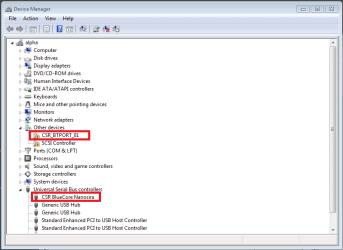
I have just applied some Windows Updates today (25/01/2011), and have found that my USB Bluetooth dongle has stopped working. It was working fine before the updates, but now all I have is the device in the Device Manager list, showing Bluetooth Radios, then CSR Bluetooth 3.0 with a question mark next to it.
The updates I applied are:
- Cambridge Silicon Radio Limited - Audio, Other hardware - CSR BlueCore Nanosira
and then immediately after came this one:
- Cambridge Silicon Radio Limited - Audio, Other hardware - CSR Bluetooth 3.0
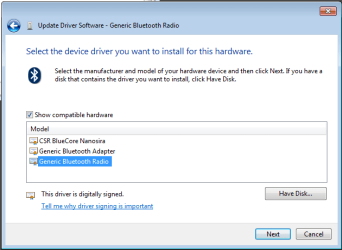
Now I am unable to roll back the drivers, and after a trawl of the Internet I can't find a replacement. Please can anyone let me know if they have experienced the same issue, and if they have been able to find a resolution?
Thanks,
CB.
I have just applied some Windows Updates today (25/01/2011), and have found that my USB Bluetooth dongle has stopped working. It was working fine before the updates, but now all I have is the device in the Device Manager list, showing Bluetooth Radios, then CSR Bluetooth 3.0 with a question mark next to it.
The updates I applied are:
- Cambridge Silicon Radio Limited - Audio, Other hardware - CSR BlueCore Nanosira
and then immediately after came this one:
- Cambridge Silicon Radio Limited - Audio, Other hardware - CSR Bluetooth 3.0
Now I am unable to roll back the drivers, and after a trawl of the Internet I can't find a replacement. Please can anyone let me know if they have experienced the same issue, and if they have been able to find a resolution?
Thanks,
CB.
My Computer
At a glance
Windows 7 Home Premium 32bit
- OS
- Windows 7 Home Premium 32bit