
Windows 7 Forums


Windows 7: USB 2.0 Not Working (Screenshots)

20 Mar 2011   #1

Windows 7 Home Premium 64bit
 
 
USB 2.0 Not Working (Screenshots)

Hi, basically my problem is that my relatively new 640GB external hdd when plugged in comes up with a message saying the USB device is not recognizable. Help is appreciated. This is a problem on both my old laptop and my new computer and happened just after I updated a game on my friends external hdd through my laptop and computer. I have already re-installed windows on my computer but with no avail. I await your response and thanks in advance.
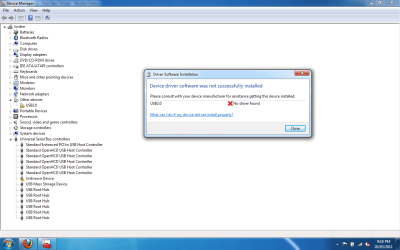
USB 2.0 Not Working (Screenshots)-devman.png

My System SpecsSystem Spec

20 Mar 2011   #2

Operating System : Windows 7 Home Premium Edition 6.01.7600 SP1 (x64)
MILTON KEYNES


hi there
try this windows fix >>>> Hardware devices are not working or are not detected in Windows >>> Hardware devices are not working or are not detected in Windows
Quote:
What it fixes...
When you install a hardware device, it is not detected
Determine if your audio device is plugged in
Driver updates aren't automatically installed by Windows Update
You receive one of the following errors:
Your <Device Name> is currently disabled or turned off in Windows
Your <Device Name> has a driver problem and needs to be reinstalled
Windows has detected a problem with your <Device Name>, it is not working properly
There is no driver installed for your <Device Name>

Welcome to the Fix it Solution Center >>> http://support.microsoft.com/fixit/en-us
My System SpecsSystem Spec
20 Mar 2011   #3

Windows 7 Home Premium 64bit


Quote   Quote: Originally Posted by brianzion View Post
hi there
try this windows fix >>>> Hardware devices are not working or are not detected in Windows >>> Hardware devices are not working or are not detected in Windows
Quote:
What it fixes...
When you install a hardware device, it is not detected
Determine if your audio device is plugged in
Driver updates aren't automatically installed by Windows Update
You receive one of the following errors:
Your <Device Name> is currently disabled or turned off in Windows
Your <Device Name> has a driver problem and needs to be reinstalled
Windows has detected a problem with your <Device Name>, it is not working properly
There is no driver installed for your <Device Name>

Welcome to the Fix it Solution Center >>> Microsoft Fix it Solution Center: troubleshooting software issues
Thanks for the reply, i will test it out tomorrow when i wake up and let you know if it worked
My System SpecsSystem Spec
.


20 Mar 2011   #4

Operating System : Windows 7 Home Premium Edition 6.01.7600 SP1 (x64)
MILTON KEYNES


there are manual ways to get the drive to work but try the fix and if no luck post back and we will go from there, probably be more answers to this thread to help you also
My System SpecsSystem Spec
21 Mar 2011   #5

Windows 7 Home Premium 64bit


No luck so far, the fix didn't work just said Unknown Device has a problem or something, this makes me think that the problem is the hdd itself as my friends hdd works on my laptop perfectly. It is a new ext hdd and i think has a warranty but I have files on there that I need. Any help is appreciated.
My System SpecsSystem Spec
21 Mar 2011   #6

Operating System : Windows 7 Home Premium Edition 6.01.7600 SP1 (x64)
MILTON KEYNES


hi again
leave the hard drive plugged in go to device manager un-install the driver for the hdd then reboot and see if windows resets and installs the driver.
My System SpecsSystem Spec
21 Mar 2011   #7

Windows 7 Home Premium 64bit


thanks again for your contribution but it is still not working, just stated that it failed to install when windows update tries to update the unknown device
My System SpecsSystem Spec
21 Mar 2011   #8

Operating System : Windows 7 Home Premium Edition 6.01.7600 SP1 (x64)
MILTON KEYNES


ok try this disabling/enabling the USB ports.
My System SpecsSystem Spec
21 Mar 2011   #9

Windows 7 Home Premium 64bit


Still no luck, would there be a way to somehow access the data on the hdd, as i do not think it is a problem with the usb port just the actual hdd, if not is there a way to format it so i can at least use it or delete the partition and recover it using a partition recovery tool such as ARAX Disc Doctor.
My System SpecsSystem Spec
21 Mar 2011   #10

Operating System : Windows 7 Home Premium Edition 6.01.7600 SP1 (x64)
MILTON KEYNES


does the drive come on and the disc spin?
My System SpecsSystem Spec
Reply

 USB 2.0 Not Working (Screenshots) problems?


Thread Tools


Similar help and support threads for: USB 2.0 Not Working (Screenshots)
Thread Forum
Games screenshots Gaming
Screenshots used in forum General Discussion
Can't take screenshots... Music, Pictures & Video
Leaked IE9 Screenshots Browsers & Mail


All times are GMT -5. The time now is 09:12 AM.


Seven Forums Android App Seven Forums IOS App Follow us on Facebook

Windows 7 Forums is an independent web site and has not been authorized,
sponsored, or otherwise approved by Microsoft Corporation.
"Windows 7" and related materials are trademarks of Microsoft Corp.
© Designer Media Ltd
  

1 2 3 4 5 6 7 8 9 10 11 12 13 14 15 16 17 18 19 20 21 22 23 24 25 26 27 28 29 30 31 32