YozMan
New member
System Specs:
A couple of days ago I posted a BSOD report in the appropriate section (here) and was told it was my WiFi adapter so I uninstalled and reinstalled it.
(The driver was automatically reinstalled by windows update, but I also have a copy of the driver from HP which I installed afterwards.)
(One thing to note is that the date of the driver from before I uninstalled it, is different than the date of the current driver I have installed, even though before uninstalling I tried to update it and windows said everything was up to date. Sadly I don't remember the version number [of the previous driver] but I know it started with a nine.)
Now though, I can no longer connect to any network wirelessly. When I "diagnose the adapter" I get the following message(I underlined the part that seemed important):
Notice: I windows recognizes the adapter:
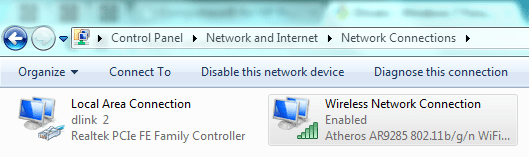
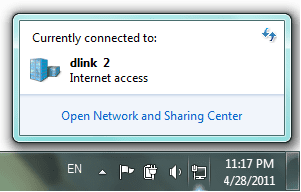
But it doesn't give any wireless conection options:
Attached: A PDF of the above report
Thanks,
Code:
Manufacturer:      HP
OS:                Windows 7 (SP1 wont update)
WiFi Adapter:      Atheros AR9285 802.11b/g/n WiFi Adapter
	Driver Date:    2/22/2011
Driver Version: 9.2.0.310(The driver was automatically reinstalled by windows update, but I also have a copy of the driver from HP which I installed afterwards.)
(One thing to note is that the date of the driver from before I uninstalled it, is different than the date of the current driver I have installed, even though before uninstalling I tried to update it and windows said everything was up to date. Sadly I don't remember the version number [of the previous driver] but I know it started with a nine.)
Now though, I can no longer connect to any network wirelessly. When I "diagnose the adapter" I get the following message(I underlined the part that seemed important):
Code:
Windows Network Diagnostics
Issues found
There might be a problem with the driver for the Wireless N... Detected
Set up the wireless network adapter Completed
The wireless network adapter is experiencing problems Completed
Issues found
There might be a problem with the driver for the Wireless
Network Connection adapter Detected
[b][u]Windows couldn't automatically bind the IP protocol stack to the network
adapter.[/u][/b]
Set up the wireless network adapter Completed
Set up the network adapter to communicate with this network. This ensures
that both Internet Protocol Version 4 (TCP/IPv4) and Internet Protocol Version
6 (TCP/IPv6) can be used on the network adapter.
Network Diagnostics Log
File Name: F27D8388-FA27-4799-9FFB-BBB99032F58B.Repair.Admin.1.etl
The wireless network adapter is experiencing problems Completed
Windows Help and Support can provide more information about resolving
driver or hardware issues.
Detection details
Diagnostics Information (Network Adapter)
Details about network adapter diagnosis:
Network adapter Wireless Network Connection driver information:
Description . . . . . . . . . . : Atheros AR9285 802.11b/g/n WiFi Adapter
Manufacturer . . . . . . . . . : Atheros Communications Inc.
Provider . . . . . . . . . . . : Atheros Communications Inc.
Version . . . . . . . . . . . : 8.0.0.172
Inf File Name . . . . . . . . . : C:\Windows\INF\oem46.inf
Inf File Date . . . . . . . . . : Thursday, September 24, 2009 12:42:04 AM
Section Name . . . . . . . . . : ATHR_DEV_OS61_H30A1.ndi
Hardware ID . . . . . . . . . . : pci\ven_168c&dev_002b&subsys_3040103c
Instance Status Flags . . . . . : 0x180200a
Device Manager Status Code . . : 0
IfType . . . . . . . . . . . . : 71
Physical Media Type . . . . . . : 9
Network Diagnostics Log
File Name: F27D8388-FA27-4799-9FFB-BBB99032F58B.Diagnose.Admin.0.etl
Other Networking Configuration and Logs
File Name: NetworkConfiguration.cab
Collection information
Computer Name: [Computer Name]
Windows Version: 6.1
Architecture: amd64
Time: Thursday, April 28, 2011 8:31:23 PM
Publisher details
Windows Network Diagnostics
Detects problems with network connectivity.
Package Version: 1.0
Publisher: Microsoft WindowsBut it doesn't give any wireless conection options:
Attached: A PDF of the above report
Thanks,
Attachments
My Computer
At a glance
Windows 7 Home Premium 6.1.7.7600 Build 7600AMD Athelon II P340 Dual-Core Processor, 2200...3GB
- Computer Manufacturer/Model Number
- HP G62
- OS
- Windows 7 Home Premium 6.1.7.7600 Build 7600
- CPU
- AMD Athelon II P340 Dual-Core Processor, 2200 MHz
- Memory
- 3GB
- Sound Card
- ATI High Definition Audio Device
- Monitor(s) Displays
- Laptop Display
- Screen Resolution
- 1366x768x59 hertz
- Hard Drives
- WD C: Size 280.47GB NTFS
D: Size 17.320GB NTFS
- Keyboard
- laptop keybaord
- Mouse
- Wireless Microsoft Mouse
- Other Info
- WiFi Adapter: Atheros AR9285 802.11b/g/n