Windows 7 Forums Search
Welcome to Windows 7 Forums. Our forum is dedicated to helping you find solutions with any problems, errors or issues you are experiencing with Windows 7. The Windows 7 forum also covers news and updates and has an extensive Windows 7 tutorial section that covers a wide range of tips and tricks.


Windows 7 - Installing AHCI driver for windows7 help via usb bootup

 
07-04-2011   #1


windows 7 Ultimate X64


Installing AHCI driver for windows7 help via usb bootup

Need in some serious help, bought a SSD drive and i simply cannot put it into AHCI mode, i've flashed the drive, updated firmware, done a secure erase, i've switched the ahci mode in the bios to ide / raid and ahci mode but it just simply will not use the drive in this mode, it doesn't recognise it, it doesn't see it, wont let me use it in this mode, i've got ahci drivers from the motherboard disk, but i have absolutely no idea on how to get these drivers installed from a usb on bootup, i've followed a tone of instructions and spent hte last 4 days trying to install the AHCI drivers and every time i've copied the drivers onto the usb, rebooted the system, it still will not see the USB to install... i've even tried to to boot up to dos via start up and it will not see the usb drive to install the drivers. Tutorials up the buttocks for intel but when it comes to AMD chipsets for Nforce, there is absolutely nothing to show you on how to get this driver installed. I've plugged it correctly into the AHCI/RAID only sata ports and it still will not see it, when its in IDE mode, no farkin problem, except its read write speed is 117 and 109, not even half of the 550MB speeds its support to be getting. Its a OCZ VERTEX 3 120GB SSD, and my motherboard is an ASUS M4N75TD Sli motherboard.

I need help in getting these drivers installed, if i can get them installed via the bios im sure i can get this thing to work properly, but i have no idea how to do that, especially since i dont have a floppy drive, or even any floppy anymore, i mean who the hell even uses that crap anymore? maybe 20 years ago yea... ANY ANY HELP would be apreciated, i looked on so many forums, looked on asus forums, cant find ANYTHING on how to get the driver installed to the bios and you guys are my last hope b4 i return or sell the thing on ebay

Just as a side note, changing the registry in windows 7 from a 3 to a 0 doesn't work because the bios wont even bootup, doesn't recognise the drive in AHCI mode hence why i need to know how to install it to the bios, when i try to install windows in AHCI mode, it says the controller isn't available or supported for this device, make sure the controller has been enabled via the bios.

thanks for any replys

My System SpecsSystem Spec
07-04-2011   #2


Win 7 Ultimate x64


vackillers, welcome to the Seven Forums.

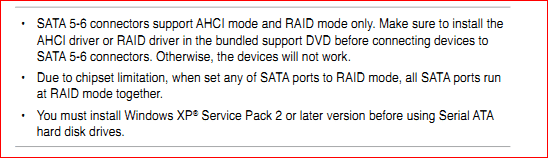
You have it connected to SATA port 5 or 6? If not that would be why it isn't working. from the manual for your motherboard,

Installing AHCI driver for windows7 help via usb bootup-sata.png
My System SpecsSystem Spec
07-04-2011   #3


windows 7 Ultimate X64


thanks man..

yeah its connected to SATA port 5, at first i actually DID miss that, but yeah its connected to the RAID/AHCI port only
My System SpecsSystem Spec
.


07-04-2011   #4


Win 7 Ultimate x64


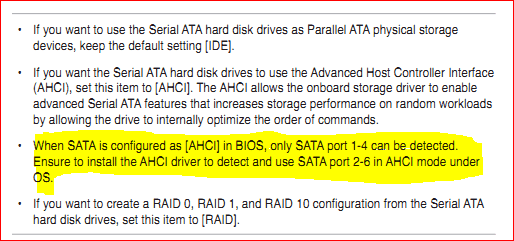
If you haven't try it on ports 1-4. I have a feeling that 5 and 6 may support AHCI and RAID, they operate on your board the same as mine. This is from the manual for my board,

Installing AHCI driver for windows7 help via usb bootup-sata1.png

Basically means that 5-6 are not available as boot drives and not seen by the bios when AHCI is enabled, but they can be seen and used by the OS. I have my storage drives connected to them on mine so that they can't be seen by Windows when installing, other than that they are there once Windows is installed.
My System SpecsSystem Spec
07-04-2011   #5


windows 7 Ultimate X64


ahhhh ok now we're getting somewhere a little bit then.. Because i thought it was saying IF YOU WANT AHCI, place them in those two ports... ok well when i have them in the 1-4 ports yes sees the drive no problem, but the issue is its only in IDE mode, the SECOND i change that to the AHCI mode or RAID, it will not see the drive anymore, at all, when i try to install windows, i get the error message "windows cannot be installed on this device, make sure the correct device controller has been installed"

If i can just get the AHCI drivers installed, i can probably get this thing to work ok... but when im in AHCI mode, the bios just refuses to see anything but a cd/dvd drive
My System SpecsSystem Spec
07-04-2011   #6


Win 7 Ultimate x64


Have you run the Windows install and tried installing the driver when it asks if you want to or not?

SATA Driver - Load in Windows 7 or Vista Setup
My System SpecsSystem Spec
07-04-2011   #7


windows 7 Ultimate X64


no, unless im in IDE mode, for which it does something but i still get the error message about not having the correct controller for the device in the bios in ahci mode when i go to install...

edit: it'll let me install in IDE mode but didn't recognise the driver, i clicked to install it anyway but not sure if it'll let me in ahci mode still will find out in a few mins

EDIT 2: installed, but second i go to AHCI MODE, it again will NOT see a harddrive, and is asking for me to insert a bootable device after switching to AHCI mode and doing the registry fix again using the windows startup install to install the drivers under IDE mode.

Last edited by vackillers; 07-04-2011 at 10:06 PM..
My System SpecsSystem Spec
07-05-2011   #8


Windows 7 Ultimate x64


Hello vackillers,

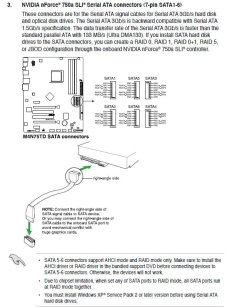
Firstly your motherboard does not support this drive your SATA ports are only 3Gb/s and not the 6Gb/s required to run this disk at its full speed (see snip)
Secondly I guess the drive may still work at slower speeds. Have you had a look here; OCZ Forum - SSD ABC Guide
This may also help you; http://www.ocztechnology.com/ocz-ver...i-2-5-ssd.html
One solution maybe to get a PCIe SATA 3 card. I am not sure, but your BIOS may need to be capable of booting from a PCIe card you will have to check into this.
Attached Thumbnails
Installing AHCI driver for windows7 help via usb bootup-capture.jpg  

Last edited by pooch; 07-05-2011 at 05:49 PM.. Reason: added more info
My System SpecsSystem Spec
07-05-2011   #9


windows 7 Ultimate X64


Thanks a lot for the reply pooch but yeah sadly already seen that picture, is in my mobo manual which i did connect it right, and yeah i know its SATA III but it should still run in SATA II mode or i would think it would, obviously no where near the 500MB read/write as advertised speed, but i would think seems as SATA II is 3gbs i could still get around 250MB read/write speed from it which im not even getting half of that from the IDE mode, but im thinking of just changing the motherboard entirely now anyway, one that has SATA 3 ports on it with better drivers and better bios.
My System SpecsSystem Spec
07-05-2011   #10


Windows 7 Ultimate x64


Yes you are right it should still run at SATA 2 speeds, did you see the link to the OCZ forums? there is a lot of use full info there
My System SpecsSystem Spec
Reply

 Installing AHCI driver for windows7 help via usb bootup problems?


Thread Tools


Similar Threads for: Installing AHCI driver for windows7 help via usb bootup
Thread Forum
BSOD when installing Windows 7 in AHCI mode Installation & Setup
Can't find driver when installing windows7 Installation & Setup
Reverting to MS AHCI driver? Drivers
Installing Windows 7 Ultimate 32 Bit With AHCI Installation & Setup
Does Windows7 have AHCI issues? Drivers


All times are GMT -5. The time now is 03:21 PM.


Windows 7 Forums is an independent web site and has not been authorized,
sponsored, or otherwise approved by Microsoft Corporation.
"Windows 7" and related materials are trademarks of Microsoft Corp.
© Designer Media Ltd
  

1 2 3 4 5 6 7 8 9 10 11 12 13 14 15 16 17 18 19 20 21 22 23 24 25 26 27 28 29 30