Hi Zephryus, Welcome to the forum
You are trying to find a driver that does not exist (at least not from Gigabyte nor Windows 7x64 )
You can however use this to get rid of the exclamation mark that is being displayed in Device Manager;
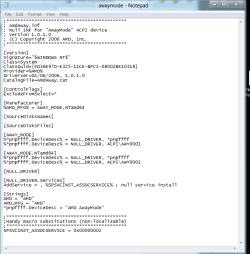
Copy the following and paste in a new text document. Name the document awaymode.inf, and save it to your desktop then go to Device Manager and update the driver, pointing it to the inf file on your desktop
;*******************************************
; AmdAway.inf
; Null INF for "AwayMode" ACPI device
; Version 1.0.1.0
; (C) Copyright 2006 AMD, Inc.
;*******************************************
[Version]
Signature="$WINDOWS NT$"
Class=System
ClassGuid={4D36E97D-E325-11CE-BFC1-08002BE10318}
Provider=%AMD%
DriverVer=04/06/2006, 1.0.1.0
CatalogFile=AmdAway.cat
[ControlFlags]
ExcludeFromSelect=*
[Manufacturer]
%AMD_MFG% = AWAY_MODE,NTamd64
[SourceDisksNames]
[SourceDisksFiles]
[AWAY_MODE]
%*pnpffff.DeviceDesc% = NULL_DRIVER, *pnpffff
%*pnpffff.DeviceDesc% = NULL_DRIVER, ACPI\AWY0001
[AWAY_MODE.NTamd64]
%*pnpffff.DeviceDesc% = NULL_DRIVER, *pnpffff
%*pnpffff.DeviceDesc% = NULL_DRIVER, ACPI\AWY0001
[NULL_DRIVER]
[NULL_DRIVER.Services]
AddService = , %SPSVCINST_ASSOCSERVICE% ; null service install
[Strings]
AMD = "AMD"
AMD_MFG = "AMD"
*pnpffff.DeviceDesc = "AMD AwayMode"
;*******************************************
;Handy macro substitutions (non-localizable)
;*******************************************
SPSVCINST_ASSOCSERVICE = 0x00000002

I copied this from here;
Inspiron 531 AMD away mode drivers for windows 7 64 bit? - Microsoft OS Forum - Software & Operating Systems - Dell Community


