
You are using an out of date browser. It may not display this or other websites correctly.
You should upgrade or use an alternative browser.
You should upgrade or use an alternative browser.
Drivers for HP photosmart C3180
- Thread starter flaubert
- Start date


- Local time
- 3:39 AM
- Messages
- 748
Try these drivers for Vista x64 Select software and drivers
My Computer
At a glance
Windows 7 Professional x64 PLAMD Athlon 4450eGoodRam DDR2 2x2048MB (FSB 800MHz)nVidia GeForce 9600GT (G94-300) 1024 MB
- Computer Manufacturer/Model Number
- Custom made
- OS
- Windows 7 Professional x64 PL
- CPU
- AMD Athlon 4450e
- Motherboard
- Giga-Byte GA-MA69G-S3H
- Memory
- GoodRam DDR2 2x2048MB (FSB 800MHz)
- Graphics Card(s)
- nVidia GeForce 9600GT (G94-300) 1024 MB
- Monitor(s) Displays
- SAMSUNG SyncMaster HS2P301688
- Hard Drives
- Seagate ST3750330AS 750GB
- PSU
- Corsair 550W
- Cooling
- AeroCool ExtremeEngine 3T
I have written a mail to HP about the problem of drivers. Here is the answer I have given:
"Flaubert,I would like to inform you that the Windows 7 is still under the testing conditions under Microsoft. Full version of the Windows 7 is still not officially released by the Microsoft; only Candidate version of the Windows 7 is released as of now. Therefore, HP All-In-One is not compatible with the Windows 7 installed on your computer, since it is only the Candidate version.
Once the Windows 7 is officially released then the drivers for the all-in-one will be released. Also, HP does not announce product releases before the official introduction date because HP does not want to set customers' expectations and then not be able to deliver a product.
Unfortunately, we at Technical support do not have an estimated date from the software team. I apologize for any inconvenience that this may have caused. But I can assure you that it should be available anytime in the near future.
The information I have provided should answer your question. If you have further questions, please reply to this message. We will be happy to assist you further."
"Flaubert,I would like to inform you that the Windows 7 is still under the testing conditions under Microsoft. Full version of the Windows 7 is still not officially released by the Microsoft; only Candidate version of the Windows 7 is released as of now. Therefore, HP All-In-One is not compatible with the Windows 7 installed on your computer, since it is only the Candidate version.
Once the Windows 7 is officially released then the drivers for the all-in-one will be released. Also, HP does not announce product releases before the official introduction date because HP does not want to set customers' expectations and then not be able to deliver a product.
Unfortunately, we at Technical support do not have an estimated date from the software team. I apologize for any inconvenience that this may have caused. But I can assure you that it should be available anytime in the near future.
The information I have provided should answer your question. If you have further questions, please reply to this message. We will be happy to assist you further."
My Computer
At a glance
windows 7
- OS
- windows 7

A workaround until HP publishes Win7 drivers:
Photosmart C3180 should work with drivers for PS C2500; I believe it works also with Photosmart 3300 drivers from Microsoft.
Go to Start Menu > Devices and printers > Add a printer, choose HP PSC 2500 series and let Windows install the drivers.
Kari
Photosmart C3180 should work with drivers for PS C2500; I believe it works also with Photosmart 3300 drivers from Microsoft.
Go to Start Menu > Devices and printers > Add a printer, choose HP PSC 2500 series and let Windows install the drivers.
Kari
My Computer
At a glance
Windows 10 Pro x64 EN-GB1.6 GHz Intel Core i7-720QM Processor6 GBATI Mobility Radeon HD 5850 Graphics
- Computer type
- Laptop
- Computer Manufacturer/Model Number
- HP ENVY 17-1150eg
- OS
- Windows 10 Pro x64 EN-GB
- CPU
- 1.6 GHz Intel Core i7-720QM Processor
- Memory
- 6 GB
- Graphics Card(s)
- ATI Mobility Radeon HD 5850 Graphics
- Sound Card
- Beats sound system with integrated subwoofer
- Monitor(s) Displays
- 17" laptop display, 22" LED and 32" Full HD TV through HDMI
- Screen Resolution
- 1600*900 (1), 1920*1080 (2&3)
- Hard Drives
- Internal: 2 x 500 GB SATA Hard Disk Drive 7200 rpm
External: 2TB for backups, 3TB USB3 network drive for media
- Cooling
- As Envy runs a bit warm, I have it on a Cooler Master pad
- Keyboard
- Logitech diNovo Media Desktop Laser (bluetooth)
- Mouse
- Logitech Performance Mouse MX
- Internet Speed
- 50/10 Mbps VDSL
- Antivirus
- Windows Defender 4.3.9431.0
- Browser
- Maxthon 3.5.2., IE11

- Local time
- 7:39 PM
- Messages
- 8,608
I have HP Photosmart C4140. I installed the drivers that came on the CD. Then I plugged the printer into my machine (computer has to be on)... then I plugged in the USB cable, turned the printer on and it was recognized.
My Computer
At a glance
Windows 7 Ultimate 32bit SP1Intel(R) Core(TM)2 Quad CPU @ 2.40GHz, 2400 MHz4 GBATI Radeon HD 2600 Pro
- Computer type
- PC/Desktop
- Computer Manufacturer/Model Number
- Bruce ... somewhere in his 40's
- OS
- Windows 7 Ultimate 32bit SP1
- CPU
- Intel(R) Core(TM)2 Quad CPU @ 2.40GHz, 2400 MHz
- Motherboard
- INTEL/D975XBX2
- Memory
- 4 GB
- Graphics Card(s)
- ATI Radeon HD 2600 Pro
- Monitor(s) Displays
- Samsung SyncMaster 914v
- Screen Resolution
- 1280 x 1024
- Hard Drives
- 2/500GB each ... ST3500630AS ATA Device.
One is not connected
- PSU
- Rocketfish 700 W
- Case
- G.Skill Gigabyte Chassis
- Keyboard
- Standard PS/2 Keyboard
- Mouse
- Microsoft PS/2 Mouse
- Internet Speed
- DSL
- Antivirus
- Avira Internet Security
- Browser
- IE 11
- Other Info
- ATI HDMI Audio
Thanks for your reply guys!
Kari...I followed your proceeding exactly: But Windows 7 RTM me always this message when I switch on the printer: "USB unknow device.. Windows 7 is not able to recognize the USB device connected".
:shock:
A workaround until HP publishes Win7 drivers:
Photosmart C3180 should work with drivers for PS C2500; I believe it works also with Photosmart 3300 drivers from Microsoft.
Go to Start Menu > Devices and printers > Add a printer, choose HP PSC 2500 series and let Windows install the drivers.
Kari
Kari...I followed your proceeding exactly: But Windows 7 RTM me always this message when I switch on the printer: "USB unknow device.. Windows 7 is not able to recognize the USB device connected".
:shock:
My Computer
At a glance
windows 7
- OS
- windows 7
OK. Let's try someting else.
- uninstall all drivers and software for your printer
- disconnect printer USB cable from computer
- reboot
- download latest Vista x64 drivers and software for your printer here
- right click the downloaded file
- choose "Properties" from context menu
- choose "Compatibility"
- choose "Run this program in compatibility mode for:"
- choose "Windows Vista", click OK
- start installing by double clicking the downloaded file
- ONLY CONNECT USB CABLE WHEN PROMPTED! Be sure printer is on when you connect the cable
- follow all the instructions on your screen
Try this, tell us what happens.
Good luck, Kari
- uninstall all drivers and software for your printer
- disconnect printer USB cable from computer
- reboot
- download latest Vista x64 drivers and software for your printer here
- right click the downloaded file
- choose "Properties" from context menu
- choose "Compatibility"
- choose "Run this program in compatibility mode for:"
- choose "Windows Vista", click OK
- start installing by double clicking the downloaded file
- ONLY CONNECT USB CABLE WHEN PROMPTED! Be sure printer is on when you connect the cable
- follow all the instructions on your screen
Try this, tell us what happens.
Good luck, Kari
My Computer
At a glance
Windows 10 Pro x64 EN-GB1.6 GHz Intel Core i7-720QM Processor6 GBATI Mobility Radeon HD 5850 Graphics
- Computer type
- Laptop
- Computer Manufacturer/Model Number
- HP ENVY 17-1150eg
- OS
- Windows 10 Pro x64 EN-GB
- CPU
- 1.6 GHz Intel Core i7-720QM Processor
- Memory
- 6 GB
- Graphics Card(s)
- ATI Mobility Radeon HD 5850 Graphics
- Sound Card
- Beats sound system with integrated subwoofer
- Monitor(s) Displays
- 17" laptop display, 22" LED and 32" Full HD TV through HDMI
- Screen Resolution
- 1600*900 (1), 1920*1080 (2&3)
- Hard Drives
- Internal: 2 x 500 GB SATA Hard Disk Drive 7200 rpm
External: 2TB for backups, 3TB USB3 network drive for media
- Cooling
- As Envy runs a bit warm, I have it on a Cooler Master pad
- Keyboard
- Logitech diNovo Media Desktop Laser (bluetooth)
- Mouse
- Logitech Performance Mouse MX
- Internet Speed
- 50/10 Mbps VDSL
- Antivirus
- Windows Defender 4.3.9431.0
- Browser
- Maxthon 3.5.2., IE11

Thanks for your reply guys!
Kari...I followed your proceeding exactly: But Windows 7 RTM me always this message when I switch on the printer: "USB unknow device.. Windows 7 is not able to recognize the USB device connected".
:shock:
I had to try a different usb point.
and used this driver
HP Photosmart Full Feature Software and Drivers
My Computer
At a glance
Windows 7600 x64 Ultimate Activated & 100% Ge...AMD 2 x x644GB RAMNvidia
- Computer Manufacturer/Model Number
- HP IQ770
- OS
- Windows 7600 x64 Ultimate Activated & 100% Genuine
- CPU
- AMD 2 x x64
- Memory
- 4GB RAM
- Graphics Card(s)
- Nvidia
- Sound Card
- Soundmax
- Monitor(s) Displays
- 20" Touch Screen
- Hard Drives
- 500GB internal
500GB external
- Keyboard
- HP Bluetooth
- Mouse
- HP Bluetooth
- Internet Speed
- 5GB
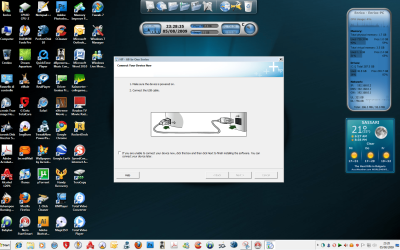
Nothing at all. Does n't work. When I connect the printer to the USB port (I have tried all the USB ports of my Acer) Windows 7 returns the usually error message: Unknown device! And the drivers installation does not go forward: stops at Screen you see in screen Annex. That bad luck!!!
Attachments
My Computer
At a glance
windows 7
- OS
- windows 7
Sorry for you. I'll do some heavy googling. I'll get back to you.
Kari
Kari
My Computer
At a glance
Windows 10 Pro x64 EN-GB1.6 GHz Intel Core i7-720QM Processor6 GBATI Mobility Radeon HD 5850 Graphics
- Computer type
- Laptop
- Computer Manufacturer/Model Number
- HP ENVY 17-1150eg
- OS
- Windows 10 Pro x64 EN-GB
- CPU
- 1.6 GHz Intel Core i7-720QM Processor
- Memory
- 6 GB
- Graphics Card(s)
- ATI Mobility Radeon HD 5850 Graphics
- Sound Card
- Beats sound system with integrated subwoofer
- Monitor(s) Displays
- 17" laptop display, 22" LED and 32" Full HD TV through HDMI
- Screen Resolution
- 1600*900 (1), 1920*1080 (2&3)
- Hard Drives
- Internal: 2 x 500 GB SATA Hard Disk Drive 7200 rpm
External: 2TB for backups, 3TB USB3 network drive for media
- Cooling
- As Envy runs a bit warm, I have it on a Cooler Master pad
- Keyboard
- Logitech diNovo Media Desktop Laser (bluetooth)
- Mouse
- Logitech Performance Mouse MX
- Internet Speed
- 50/10 Mbps VDSL
- Antivirus
- Windows Defender 4.3.9431.0
- Browser
- Maxthon 3.5.2., IE11
HP we know already, only drivers are for Vista. I checked now Microsoft Update Catalog, there's nothing.
"Unknown Device" tells that printer is found but not recognized. I know C3180 works quite well with Vista, so there's of course the possibility to backup everything, install Vista with all possible drivers including C3180, then run a Windows 7 upgrade installation so 7 would be "forced" to use this driver. But it could also backfire; it might as well be so that 7 upgrade tells there is an incompatibility problem and asks to uninstall drivers before install continues.
I hope you understand we are talking about an older model no longer in production. It can be there are not going to be any drivers for your printer to use with 7. Ever.
My sincere recommendation is to buy a new printer to use with Windows 7. If you really want to continue to use your C3180, there is one option. Not so comfortable, but still an option: You could download and install Virtual XP on your Windows 7 system, install printer there and use it as a shared network printer. IF you choose to do this, be reminded that if you keep Virtual XP always on, it reserves a minimum of 256 MB of your system memory.
Good luck, what ever you decide.
Kari
"Unknown Device" tells that printer is found but not recognized. I know C3180 works quite well with Vista, so there's of course the possibility to backup everything, install Vista with all possible drivers including C3180, then run a Windows 7 upgrade installation so 7 would be "forced" to use this driver. But it could also backfire; it might as well be so that 7 upgrade tells there is an incompatibility problem and asks to uninstall drivers before install continues.
I hope you understand we are talking about an older model no longer in production. It can be there are not going to be any drivers for your printer to use with 7. Ever.
My sincere recommendation is to buy a new printer to use with Windows 7. If you really want to continue to use your C3180, there is one option. Not so comfortable, but still an option: You could download and install Virtual XP on your Windows 7 system, install printer there and use it as a shared network printer. IF you choose to do this, be reminded that if you keep Virtual XP always on, it reserves a minimum of 256 MB of your system memory.
Good luck, what ever you decide.
Kari
My Computer
At a glance
Windows 10 Pro x64 EN-GB1.6 GHz Intel Core i7-720QM Processor6 GBATI Mobility Radeon HD 5850 Graphics
- Computer type
- Laptop
- Computer Manufacturer/Model Number
- HP ENVY 17-1150eg
- OS
- Windows 10 Pro x64 EN-GB
- CPU
- 1.6 GHz Intel Core i7-720QM Processor
- Memory
- 6 GB
- Graphics Card(s)
- ATI Mobility Radeon HD 5850 Graphics
- Sound Card
- Beats sound system with integrated subwoofer
- Monitor(s) Displays
- 17" laptop display, 22" LED and 32" Full HD TV through HDMI
- Screen Resolution
- 1600*900 (1), 1920*1080 (2&3)
- Hard Drives
- Internal: 2 x 500 GB SATA Hard Disk Drive 7200 rpm
External: 2TB for backups, 3TB USB3 network drive for media
- Cooling
- As Envy runs a bit warm, I have it on a Cooler Master pad
- Keyboard
- Logitech diNovo Media Desktop Laser (bluetooth)
- Mouse
- Logitech Performance Mouse MX
- Internet Speed
- 50/10 Mbps VDSL
- Antivirus
- Windows Defender 4.3.9431.0
- Browser
- Maxthon 3.5.2., IE11
Sorry to say but it is not so incredible. A lot of us Windows 7 users are seeing this type of problems: a bit older device, no support and/or drivers.
Hope you'll find a solution, I can not think anything else.
Kari
Hope you'll find a solution, I can not think anything else.
Kari
My Computer
At a glance
Windows 10 Pro x64 EN-GB1.6 GHz Intel Core i7-720QM Processor6 GBATI Mobility Radeon HD 5850 Graphics
- Computer type
- Laptop
- Computer Manufacturer/Model Number
- HP ENVY 17-1150eg
- OS
- Windows 10 Pro x64 EN-GB
- CPU
- 1.6 GHz Intel Core i7-720QM Processor
- Memory
- 6 GB
- Graphics Card(s)
- ATI Mobility Radeon HD 5850 Graphics
- Sound Card
- Beats sound system with integrated subwoofer
- Monitor(s) Displays
- 17" laptop display, 22" LED and 32" Full HD TV through HDMI
- Screen Resolution
- 1600*900 (1), 1920*1080 (2&3)
- Hard Drives
- Internal: 2 x 500 GB SATA Hard Disk Drive 7200 rpm
External: 2TB for backups, 3TB USB3 network drive for media
- Cooling
- As Envy runs a bit warm, I have it on a Cooler Master pad
- Keyboard
- Logitech diNovo Media Desktop Laser (bluetooth)
- Mouse
- Logitech Performance Mouse MX
- Internet Speed
- 50/10 Mbps VDSL
- Antivirus
- Windows Defender 4.3.9431.0
- Browser
- Maxthon 3.5.2., IE11

It works for me
I did install the Vista 64 software and driver in Vista Compatibility mode.
Windows 7 detected my printer without any problem.
I can scan and print.
EDIT:
HP Solution Center works now. All software in HP X64 testet ok.
Scanning via the built in program in windows 7 also works well.

Regards,
Arcus
I did install the Vista 64 software and driver in Vista Compatibility mode.
Windows 7 detected my printer without any problem.
I can scan and print.
EDIT:
HP Solution Center works now. All software in HP X64 testet ok.
Scanning via the built in program in windows 7 also works well.
Regards,
Arcus
Last edited:
My Computer
At a glance
Windows 7 Professional RTM MSDN AAIntel(R) Core(TM)2 Quad CPU Q9400 @ 2.66GHz8GB (4x Corsair CM2X2048-6400C4DHX)NVIDIA GeForce GTX 285 1GB
- Computer Manufacturer/Model Number
- Selfbuild
- OS
- Windows 7 Professional RTM MSDN AA
- CPU
- Intel(R) Core(TM)2 Quad CPU Q9400 @ 2.66GHz
- Motherboard
- ASUS P5Q DELUXE
- Memory
- 8GB (4x Corsair CM2X2048-6400C4DHX)
- Graphics Card(s)
- NVIDIA GeForce GTX 285 1GB
- Monitor(s) Displays
- Benq G2412HD
- Hard Drives
- 4TB (4 x SAMSUNG HD103UJ)
- PSU
- 850W
- Case
- Cooler Master Storm Sniper Case
- Cooling
- Air
- Keyboard
- Logitech Media Keyboard 600
- Mouse
- Logitech MX™518 Optical Gaming Mouse
- Internet Speed
- 12 000/2500 kbps
I did install the Vista 64 software and driver in Vista Compatibility mode.
Windows 7 detected my printer without any problem.
I can scan and print.
God dag Arcus, og velkommen til forumet!
I hope Flaubert sees this. Nice to know you got it working.
Kari
My Computer
At a glance
Windows 10 Pro x64 EN-GB1.6 GHz Intel Core i7-720QM Processor6 GBATI Mobility Radeon HD 5850 Graphics
- Computer type
- Laptop
- Computer Manufacturer/Model Number
- HP ENVY 17-1150eg
- OS
- Windows 10 Pro x64 EN-GB
- CPU
- 1.6 GHz Intel Core i7-720QM Processor
- Memory
- 6 GB
- Graphics Card(s)
- ATI Mobility Radeon HD 5850 Graphics
- Sound Card
- Beats sound system with integrated subwoofer
- Monitor(s) Displays
- 17" laptop display, 22" LED and 32" Full HD TV through HDMI
- Screen Resolution
- 1600*900 (1), 1920*1080 (2&3)
- Hard Drives
- Internal: 2 x 500 GB SATA Hard Disk Drive 7200 rpm
External: 2TB for backups, 3TB USB3 network drive for media
- Cooling
- As Envy runs a bit warm, I have it on a Cooler Master pad
- Keyboard
- Logitech diNovo Media Desktop Laser (bluetooth)
- Mouse
- Logitech Performance Mouse MX
- Internet Speed
- 50/10 Mbps VDSL
- Antivirus
- Windows Defender 4.3.9431.0
- Browser
- Maxthon 3.5.2., IE11
My Computer
At a glance
Windows 7600 x64 Ultimate Activated & 100% Ge...AMD 2 x x644GB RAMNvidia
- Computer Manufacturer/Model Number
- HP IQ770
- OS
- Windows 7600 x64 Ultimate Activated & 100% Genuine
- CPU
- AMD 2 x x64
- Memory
- 4GB RAM
- Graphics Card(s)
- Nvidia
- Sound Card
- Soundmax
- Monitor(s) Displays
- 20" Touch Screen
- Hard Drives
- 500GB internal
500GB external
- Keyboard
- HP Bluetooth
- Mouse
- HP Bluetooth
- Internet Speed
- 5GB
This is valuable information for me, too. Home and office full of HP devices.
Thanks Fisherking.
Kari
My Computer
At a glance
Windows 10 Pro x64 EN-GB1.6 GHz Intel Core i7-720QM Processor6 GBATI Mobility Radeon HD 5850 Graphics
- Computer type
- Laptop
- Computer Manufacturer/Model Number
- HP ENVY 17-1150eg
- OS
- Windows 10 Pro x64 EN-GB
- CPU
- 1.6 GHz Intel Core i7-720QM Processor
- Memory
- 6 GB
- Graphics Card(s)
- ATI Mobility Radeon HD 5850 Graphics
- Sound Card
- Beats sound system with integrated subwoofer
- Monitor(s) Displays
- 17" laptop display, 22" LED and 32" Full HD TV through HDMI
- Screen Resolution
- 1600*900 (1), 1920*1080 (2&3)
- Hard Drives
- Internal: 2 x 500 GB SATA Hard Disk Drive 7200 rpm
External: 2TB for backups, 3TB USB3 network drive for media
- Cooling
- As Envy runs a bit warm, I have it on a Cooler Master pad
- Keyboard
- Logitech diNovo Media Desktop Laser (bluetooth)
- Mouse
- Logitech Performance Mouse MX
- Internet Speed
- 50/10 Mbps VDSL
- Antivirus
- Windows Defender 4.3.9431.0
- Browser
- Maxthon 3.5.2., IE11

My Computer
At a glance
Windows 7600 x64 Ultimate Activated & 100% Ge...AMD 2 x x644GB RAMNvidia
- Computer Manufacturer/Model Number
- HP IQ770
- OS
- Windows 7600 x64 Ultimate Activated & 100% Genuine
- CPU
- AMD 2 x x64
- Memory
- 4GB RAM
- Graphics Card(s)
- Nvidia
- Sound Card
- Soundmax
- Monitor(s) Displays
- 20" Touch Screen
- Hard Drives
- 500GB internal
500GB external
- Keyboard
- HP Bluetooth
- Mouse
- HP Bluetooth
- Internet Speed
- 5GB
isamuelson
New member
- Local time
- 10:39 PM
- Messages
- 3
For some reason, I never had any problems, even with the RC or the Beta version using my C3180. It always downloaded the drivers.
To get the scanning software to work, I had to go to the C3180 support page and download the latest Driver and Software update. You MUST ensure you are logged into an account that has administrator privileges or it will not install under Windows 7. You must also right click on the executable file and set it's compatibility mode to Vista SP 2. Also, ensure the printer is turned off or unplugged from the computer. Do NOT turn it on when it comes to the point that it asks you to plug in/turn on your printer. Just click on the check box to say you'll do it later and continue on installing.
Once I did all that, the software worked. The only problem is pressing the scan button does NOT launch the HP Scanning software, so you have to launch that separately and initiate the scan from within the software. Otherwise, it all works!
The link to the software is here:
Vista 64-bit: HP Photosmart Full Feature Software and Drivers HP Photosmart C3180 All-in-One Printer - HP Customer Care (United States - English)
Vista 32-Bit: HP Photosmart Full Feature Software and Drivers HP Photosmart C3180 All-in-One Printer - HP Customer Care (United States - English)
Remember, the two important things are:
Hope this helps!
To get the scanning software to work, I had to go to the C3180 support page and download the latest Driver and Software update. You MUST ensure you are logged into an account that has administrator privileges or it will not install under Windows 7. You must also right click on the executable file and set it's compatibility mode to Vista SP 2. Also, ensure the printer is turned off or unplugged from the computer. Do NOT turn it on when it comes to the point that it asks you to plug in/turn on your printer. Just click on the check box to say you'll do it later and continue on installing.
Once I did all that, the software worked. The only problem is pressing the scan button does NOT launch the HP Scanning software, so you have to launch that separately and initiate the scan from within the software. Otherwise, it all works!
The link to the software is here:
Vista 64-bit: HP Photosmart Full Feature Software and Drivers HP Photosmart C3180 All-in-One Printer - HP Customer Care (United States - English)
Vista 32-Bit: HP Photosmart Full Feature Software and Drivers HP Photosmart C3180 All-in-One Printer - HP Customer Care (United States - English)
Remember, the two important things are:
- Run the installer from an account with admin privileges
- Set the compatibility mode to Vista SP 2
Hope this helps!
Last edited:
My Computer
At a glance
Windows 7 Professional x64AMD Phenom II X3 720 Black Edition w/4th core...4 gigs DDR2-800ATI Radeon HD3870 w/512mb DDR4 RAM
- Computer Manufacturer/Model Number
- Home built
- OS
- Windows 7 Professional x64
- CPU
- AMD Phenom II X3 720 Black Edition w/4th core unlocked
- Motherboard
- Gigabyte GA-MA78LM-S2H
- Memory
- 4 gigs DDR2-800
- Graphics Card(s)
- ATI Radeon HD3870 w/512mb DDR4 RAM
- Sound Card
- Integrated Realtek 7.1
- Monitor(s) Displays
- 17" Acer
- Screen Resolution
- 1280x1024
- Hard Drives
- 2x320gb SATA II
1x250gb SATA II
- PSU
- 500 Watt Antec
- Case
- Antec
- Cooling
- Cooler Master Hyper 212+
Similar threads

- Replies
- 3
- Views
- 6K

