| Windows 7: Clean install - High Definition Audio Device listed twice!? |
10 Nov 2011
|
#1 | | Windows 7 Ultimate x64 SP1 San Francisco |
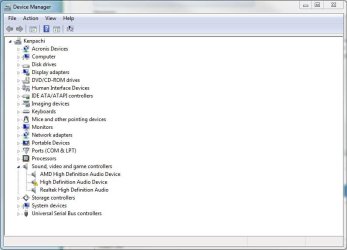
Clean install - High Definition Audio Device listed twice!? I am running a clean install of Windows 7 Pro x64 SP1 on a Asus P8Z68 Deluxe. When I first installed Windows, first thing I did was install Intel's chipset drivers and IRST drivers, then all other mobo drivers. Checked Device Manager and everything is detected.
Here's where it gets weird, I had a MSI R6970 installed on a workbench and when it was time to put everything in the case the video card wouldn't fit.
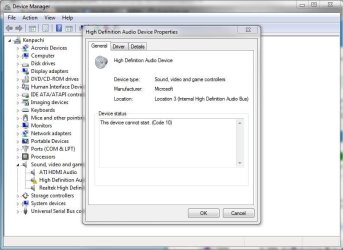
I had spare GPUs lying around so I used a ATI 5450 in the meantime. However once I installed the 5450 and booted the system, then restart after detection, device manager is showing there's a unknown High Definition Audio Device in device manager.
I tried uninstall Realtek's drivers (R266) and reinstalling them, didn't work. I tried installing 'ATI HDMI Audio Device' from Realtek's website, didn't work.
Now I'm starting to think, does this have something to do with AMD's drivers? | My System Specs |
| System Manufacturer/Model Number Less is more OS Windows 7 Ultimate x64 SP1 CPU Core i7 2600k (4.6GHz) Motherboard ASUS P8Z68 Deluxe (3603) Memory 16GB G.SKILL Ares 1600MHz Graphics Card MSI R6970 Lightning Sound Card Asus Xonar Essence ST (UNi drivers 1.41) Monitor(s) Displays Samsung P2570, Samsung 226BW Screen Resolution 1920*1080, 1680*1050 Keyboard CM Storm Trigger (Brown Switch) Mouse Logitech G400 PSU Seasonic X750 Case Lian-Li PC-P80N Cooling NZXT HAVIK 140 (2x GELID Wing12PL) Hard Drives 256GB OCZ Vector, Hitachi 4TB (7K4000), Hitachi 3TB (7K3000), Hitachi 2TB (5K3000), 2x WD Black 1TB Internet Speed 35Mbps/6Mbps Other Info Klipsch ProMedia 2.1, Sennheiser HD595, Linksys WRT54GL (DD-WRT), Logitech C910 |
10 Nov 2011
|
#2 | | Windows 7 Professional SP1 32-bit Fantasyland |
You're correct - this ATI card supports HDMI 1.3 which can transfer video and audio over a single cable. For that reason the card has its own audio device onboard, which requires drivers from AMD.
It will not conflict in any way with your existing Realtek audio, it's simply an additional audio device you may instruct Windows to use instead. | My System Specs | | System Manufacturer/Model Number Custom-built OS Windows 7 Professional SP1 32-bit CPU Intel Core 2 Duo E6600 2.4GHz, overclocked to 2.7GHz Motherboard Asus PL5D2 Memory 4GB DDR2-667 (4x1GB in dual-channel config) Graphics Card nVidia GeForce 9800 GT Sound Card Creative X-Fi XtremeMusic Monitor(s) Displays Acer Screen Resolution 1920x1200 (DVI) Keyboard Standard Mouse Microsoft wireless optical mouse PSU Antec TruePower 2.0 Case Cooler Master Centurion Cooling various fans Hard Drives OCZ SSD Vertex Plus 60GB SATA (Firmware 3.55), 64MB cache
Hitachi HD321KJ SATA, 320GB, 7200rpm, 16MB cache Internet Speed DSL; ~330KB/sec down, ~110KB/sec up Other Info Have a laptop too :) (Compaq CQ60 also with Win7 Pro SP1 32-bit)
Drives in both systems:
C: - Windows 7 + apps. Pagefile is fixed size and located at the very end of the partition.
D: - various temp files/cache for Firefox and apps/games.
E: - videos, music, misc. storage, torrent downloads, etc. |
10 Nov 2011
|
#3 | | Windows 7 Ultimate x64 SP1 San Francisco |
The problem I'm having now is how to get it to detect? I tried uninstalling Realtek and AMD's drivers and reinstalling, doesn't work, '?' is still there. | My System Specs | | System Manufacturer/Model Number Less is more OS Windows 7 Ultimate x64 SP1 CPU Core i7 2600k (4.6GHz) Motherboard ASUS P8Z68 Deluxe (3603) Memory 16GB G.SKILL Ares 1600MHz Graphics Card MSI R6970 Lightning Sound Card Asus Xonar Essence ST (UNi drivers 1.41) Monitor(s) Displays Samsung P2570, Samsung 226BW Screen Resolution 1920*1080, 1680*1050 Keyboard CM Storm Trigger (Brown Switch) Mouse Logitech G400 PSU Seasonic X750 Case Lian-Li PC-P80N Cooling NZXT HAVIK 140 (2x GELID Wing12PL) Hard Drives 256GB OCZ Vector, Hitachi 4TB (7K4000), Hitachi 3TB (7K3000), Hitachi 2TB (5K3000), 2x WD Black 1TB Internet Speed 35Mbps/6Mbps Other Info Klipsch ProMedia 2.1, Sennheiser HD595, Linksys WRT54GL (DD-WRT), Logitech C910 |
10 Nov 2011
|
#4 | | Windows 7 Professional SP1 32-bit Fantasyland |
The drivers for the videocard should take care of this for you. To download them, go here: AMD Graphics Drivers & Software
The drivers installed by Windows tend to be more basic and not include the audio device component.
However, if you're simply going to use your laptop normally and not connect it to a HDMI output device such as a TV, then you might simply ignore the missing audio device as it does no harm to your system.
Again, the ATI HDMI audio device is completely separate from the Realtek audio and there's no need to uninstall the Realtek drivers. | My System Specs | | System Manufacturer/Model Number Custom-built OS Windows 7 Professional SP1 32-bit CPU Intel Core 2 Duo E6600 2.4GHz, overclocked to 2.7GHz Motherboard Asus PL5D2 Memory 4GB DDR2-667 (4x1GB in dual-channel config) Graphics Card nVidia GeForce 9800 GT Sound Card Creative X-Fi XtremeMusic Monitor(s) Displays Acer Screen Resolution 1920x1200 (DVI) Keyboard Standard Mouse Microsoft wireless optical mouse PSU Antec TruePower 2.0 Case Cooler Master Centurion Cooling various fans Hard Drives OCZ SSD Vertex Plus 60GB SATA (Firmware 3.55), 64MB cache
Hitachi HD321KJ SATA, 320GB, 7200rpm, 16MB cache Internet Speed DSL; ~330KB/sec down, ~110KB/sec up Other Info Have a laptop too :) (Compaq CQ60 also with Win7 Pro SP1 32-bit)
Drives in both systems:
C: - Windows 7 + apps. Pagefile is fixed size and located at the very end of the partition.
D: - various temp files/cache for Firefox and apps/games.
E: - videos, music, misc. storage, torrent downloads, etc. |
10 Nov 2011
|
#5 | | Windows 7 Home Premium 64 bit Illinois |
Delete/uninstall the driver "ATI HDMI Audio" using the Device manager. Reboot.
Use the link that Corazon posted and download the CCC package which has the AMD HDMI driver included.
If all goes well, your driver should read "AMD High Definition Audio Device" | My System Specs | | System Manufacturer/Model Number Self-built OS Windows 7 Home Premium 64 bit CPU Intel Core i7-3770 Motherboard MSI Z77A-G45 Memory G.SKILL 8GB (2 x 4GB) DDR3 F3-10666CL9D-8GBNT Graphics Card Sapphire ATI Radeon HD 6670 Sound Card On-Board Realtek Monitor(s) Displays Samsung SyncMaster P2370HD, Dell 1703FPT Screen Resolution 1920 x 1080, 1280 x 1024 Keyboard Logitech K270 Mouse Logitech M705 PSU SeaSonic M12II SS-500GM Case Lian Li PC-9F Cooling Zalman CNPS9900ALED Hard Drives Samsung HD103SJ Internet Speed 16 Mbps Other Info Bose Companion 2 Multimedia Speakers |
10 Nov 2011
|
#6 | | Windows 7 Ultimate x64 SP1 San Francisco |
I did exactly that and it's still and it still undetected. I tried disabling onboard in the BIOS and it goes away so I'm stumped as to why it shows up twice in Device Manager. | My System Specs | | System Manufacturer/Model Number Less is more OS Windows 7 Ultimate x64 SP1 CPU Core i7 2600k (4.6GHz) Motherboard ASUS P8Z68 Deluxe (3603) Memory 16GB G.SKILL Ares 1600MHz Graphics Card MSI R6970 Lightning Sound Card Asus Xonar Essence ST (UNi drivers 1.41) Monitor(s) Displays Samsung P2570, Samsung 226BW Screen Resolution 1920*1080, 1680*1050 Keyboard CM Storm Trigger (Brown Switch) Mouse Logitech G400 PSU Seasonic X750 Case Lian-Li PC-P80N Cooling NZXT HAVIK 140 (2x GELID Wing12PL) Hard Drives 256GB OCZ Vector, Hitachi 4TB (7K4000), Hitachi 3TB (7K3000), Hitachi 2TB (5K3000), 2x WD Black 1TB Internet Speed 35Mbps/6Mbps Other Info Klipsch ProMedia 2.1, Sennheiser HD595, Linksys WRT54GL (DD-WRT), Logitech C910 |
10 Nov 2011
|
#7 | | Windows 7 Ultimate X64 SP1 Mt. Crumpit/Whoville |
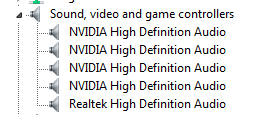
The AMD audio is for HDMI, Realtek is for other (on board) audio, speakers, headphones and such. It is normal and causes no harm, here's mine...
...so twice ain't so bad. | My System Specs | | Computer type PC/Desktop System Manufacturer/Model Number Home Built Desktop By DataTech OS Windows 7 Ultimate X64 SP1 CPU Intel i5-2550K, Differing ~4.4-4.8GHz No built in GPU Motherboard ASUS P8Z68-V PRO/GEN3 Memory 16GB G.Skill Sniper 2133MHz 4x4GB Graphics Card ASUS ENGTX460 DirectCU/2DI/1GD5 GeForce GTX 460 Sound Card Onboard Realtek 5-1 Monitor(s) Displays Samsung P2570HD Screen Resolution 1920x1080 Keyboard Old, beat-up Dell USB From 10 yrs Ago Mouse Gigabyte m6900 wired PSU Corsair HX650W Case Inwin Dragon Rider Cooling Hyper 212 EVO w/two Noctua fans, push-pull, @1300 RPM Hard Drives Crucial M4 128GB for OS, 750GB Seagate MomentusXT for data, 500GB Seagate Constellation for storage Internet Speed 8-19 Mbs down, 3-4 Mbs up Comcast Cable Antivirus Norton Internet Security Browser IE 9, Opera when needed Other Info 4 case fans, LG BluRay-RE, ASUS DVD-RW, Mr. Fusion power generator with flux capacitor, 1.21 gigawatts. |
10 Nov 2011
|
#8 | | Windows 7 Ultimate x64 SP1 San Francisco |
The difference is yours are detected, I can't get mine to detect.
I'm going to do a reinstall since I haven't started putting any serious information on the OS.
I just thought this problem was weird since swapping out my 6970 for a 5450 shouldn't cause any issues because AMD uses unified drivers. Now that it's happened I don't know how to remedy it and being a perfectionist it's annoying having a exclamation mark in Device Manager. | My System Specs | | System Manufacturer/Model Number Less is more OS Windows 7 Ultimate x64 SP1 CPU Core i7 2600k (4.6GHz) Motherboard ASUS P8Z68 Deluxe (3603) Memory 16GB G.SKILL Ares 1600MHz Graphics Card MSI R6970 Lightning Sound Card Asus Xonar Essence ST (UNi drivers 1.41) Monitor(s) Displays Samsung P2570, Samsung 226BW Screen Resolution 1920*1080, 1680*1050 Keyboard CM Storm Trigger (Brown Switch) Mouse Logitech G400 PSU Seasonic X750 Case Lian-Li PC-P80N Cooling NZXT HAVIK 140 (2x GELID Wing12PL) Hard Drives 256GB OCZ Vector, Hitachi 4TB (7K4000), Hitachi 3TB (7K3000), Hitachi 2TB (5K3000), 2x WD Black 1TB Internet Speed 35Mbps/6Mbps Other Info Klipsch ProMedia 2.1, Sennheiser HD595, Linksys WRT54GL (DD-WRT), Logitech C910 |
10 Nov 2011
|
#9 | | Windows 7 Ultimate x64 SP1 San Francisco |
Figured out the problem! It's Sandy Bridge's integrated audio. Run Intel's integrated display driver, reboot and it will detect. | My System Specs | | System Manufacturer/Model Number Less is more OS Windows 7 Ultimate x64 SP1 CPU Core i7 2600k (4.6GHz) Motherboard ASUS P8Z68 Deluxe (3603) Memory 16GB G.SKILL Ares 1600MHz Graphics Card MSI R6970 Lightning Sound Card Asus Xonar Essence ST (UNi drivers 1.41) Monitor(s) Displays Samsung P2570, Samsung 226BW Screen Resolution 1920*1080, 1680*1050 Keyboard CM Storm Trigger (Brown Switch) Mouse Logitech G400 PSU Seasonic X750 Case Lian-Li PC-P80N Cooling NZXT HAVIK 140 (2x GELID Wing12PL) Hard Drives 256GB OCZ Vector, Hitachi 4TB (7K4000), Hitachi 3TB (7K3000), Hitachi 2TB (5K3000), 2x WD Black 1TB Internet Speed 35Mbps/6Mbps Other Info Klipsch ProMedia 2.1, Sennheiser HD595, Linksys WRT54GL (DD-WRT), Logitech C910 |
15 Jan 2012
|
#10 | | Windows 7 starter x32 Manila |
Help me out here guys :)) like him i don't an Mananger hey guys please help with my prob | My System Specs | | System Manufacturer/Model Number Pcworx OS Windows 7 starter x32 Memory 2.02 MB Sound Card Realtek High Definition Audio Driver Monitor(s) Displays LG Keyboard intex Mouse Intex Internet Speed 5mbs Clean install - High Definition Audio Device listed twice!? problems? All times are GMT -5. The time now is 01:36 AM. | |