|
Welcome to Windows 7 Forums. Our forum is dedicated to helping you find solutions with any problems, errors or issues you are experiencing with Windows 7. The Windows 7 forum also covers news and updates and has an extensive Windows 7 tutorial section that covers a wide range of tips and tricks.
Windows 7 - Is APC PowerChute necessary with Win7? |
12-11-2011
|
#1 | | Windows 7 Ultimate x64 SP1 |
Is APC PowerChute necessary with Win7? I know Windows 7 does not have the UPS Utility that was available in earlier versions of Windows, but what are the limits (compared to PowerChute) if I use the Power Profile capability in Windows 7 for my USB connected SmartUPS 1000? I'd rather not have to install the APC software (Agent, Server, Console) if I don't have to, but if others can weigh in on whether that's really needed I'd appreciate it.
| My System Specs | | System Manufacturer/Model Number Custom OS Windows 7 Ultimate x64 SP1 CPU E8400 E0 stepping @ 4.05GHz Motherboard Abit IP35-E, BIOS v.18b1 Memory 2x2GB + 2x1GB Mushkin Graphics Card eVGA GTS 250SC Sound Card Onboard Monitor(s) Displays Sony FW900 Screen Resolution 1600x1024 Keyboard PS2 Mouse PS2 PSU Corsair 550W Case CM Scout Cooling Scythe Mugen2 Hard Drives WD Black 1TB SATA Internet Speed FiOS |
12-11-2011
|
#2 | | Windows 7 Ultimate x64 SP1 |
Hello Tony,
The answer is yes and no. It just depends on if you wanted to use the features specific to the UPS battery that are included in the PowerChute software or not.
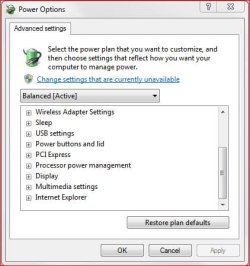
When you do not have PowerChute installed, the advanced power plan settings included in Windows 7 does have settings that you could set for when the computer is running on battery power and when the computer is plugged in.
Hope this helps,
Shawn | My System Specs | | System Manufacturer/Model Number Self built custom OS Windows 7 Ultimate x64 SP1 CPU Intel i7-980X 3.3 Ghz (3.48 Ghz OC'd) Motherboard ASUS P6X58D Premium Memory 12 GB (2GBx6) DDR3 PC3-16000 2000 MHz Kingston HyperX Graphics Card Sapphire HD5870 Eyefinity 6 2GB Sound Card Realtek HD Audio ALC889 Integrated Chip Monitor(s) Displays 3x 27" Asus VE278Q Screen Resolution 1920x1080 Keyboard Logitech Cordless Desktop MX 5500 Revolution Mouse Logitech Cordless Desktop MX 5500 Revolution PSU OCZ Series Gold OCZZ1000M 1000W Case Corsair Obsidian 800D Cooling Thermalright Ultra 120 Extreme Copper CPU heat sink w/120 MM Hard Drives 160GB OCZ RevoDrive X2
** 2 x 1TB Samsung HDD HD154UI SATA Internet Speed 50 Mb/s Download and 2 Mb/s Upload Other Info Microsoft LifeCam Cinema
** Lite-On iHBS212 12x BD Writer
** Samsung CLX-3175FW Printer
** Netgear WNDR3800 Router
** Motorola SBG6580 Cable Modem
** 2x APC Back-UPS XS 1500 |
12-11-2011
|
#3 | | Windows 7 Ultimate x64 SP1 |
Thanks Brink. I read through all your advice and I think I can get by with the Power Profile Advanced features in Windows 7. The only things I'd be missing are the APC alert notification (email or text) if the power goes out, and the monitoring capabilities (power history etc). While those would be nice, I'm not sure it's worth the added bloatware. | My System Specs | | System Manufacturer/Model Number Custom OS Windows 7 Ultimate x64 SP1 CPU E8400 E0 stepping @ 4.05GHz Motherboard Abit IP35-E, BIOS v.18b1 Memory 2x2GB + 2x1GB Mushkin Graphics Card eVGA GTS 250SC Sound Card Onboard Monitor(s) Displays Sony FW900 Screen Resolution 1600x1024 Keyboard PS2 Mouse PS2 PSU Corsair 550W Case CM Scout Cooling Scythe Mugen2 Hard Drives WD Black 1TB SATA Internet Speed FiOS |
12-11-2011
|
#4 | | Windows 7 Home Premium 64-bit |
PowerChute will place your computer into Hibernation if the battery in the UPS is about to be depleted due to utility power failure, thus saving any open documents, etc. | My System Specs | | System Manufacturer/Model Number Not Myself OS Windows 7 Home Premium 64-bit CPU Intel Core i5 Monitor(s) Displays ViewSonic LED 1080p Screen Resolution 1920 x 1080 Keyboard Gateway Mouse Logitech Gaming Hard Drives 1 TB Internet Speed 1.5 DSL |
12-11-2011
|
#5 | | Windows 7 Ultimate x64 SP1 |
What "Not Myself" posted above would be the biggest advantage of having PowerChute installed. Windows 7 will not know how much time is left on the battery without PowerChute. | My System Specs | | System Manufacturer/Model Number Self built custom OS Windows 7 Ultimate x64 SP1 CPU Intel i7-980X 3.3 Ghz (3.48 Ghz OC'd) Motherboard ASUS P6X58D Premium Memory 12 GB (2GBx6) DDR3 PC3-16000 2000 MHz Kingston HyperX Graphics Card Sapphire HD5870 Eyefinity 6 2GB Sound Card Realtek HD Audio ALC889 Integrated Chip Monitor(s) Displays 3x 27" Asus VE278Q Screen Resolution 1920x1080 Keyboard Logitech Cordless Desktop MX 5500 Revolution Mouse Logitech Cordless Desktop MX 5500 Revolution PSU OCZ Series Gold OCZZ1000M 1000W Case Corsair Obsidian 800D Cooling Thermalright Ultra 120 Extreme Copper CPU heat sink w/120 MM Hard Drives 160GB OCZ RevoDrive X2
** 2 x 1TB Samsung HDD HD154UI SATA Internet Speed 50 Mb/s Download and 2 Mb/s Upload Other Info Microsoft LifeCam Cinema
** Lite-On iHBS212 12x BD Writer
** Samsung CLX-3175FW Printer
** Netgear WNDR3800 Router
** Motorola SBG6580 Cable Modem
** 2x APC Back-UPS XS 1500 |
12-11-2011
|
#6 | | Windows 7 Ultimate x64 SP1 |

Quote: Originally Posted by Not Myself PowerChute will place your computer into Hibernation if the battery in the UPS is about to be depleted due to utility power failure, thus saving any open documents, etc. So if the APC is detected by Windows 7 and the driver installed, the OS still doesn't get any information reported to it by the UPS? If so, this is a very good point. If I decide to go with PowerChute, what should I do with the Advanced Battery settings under Power Profile? Set them all to Not Used or Never? | My System Specs | | System Manufacturer/Model Number Custom OS Windows 7 Ultimate x64 SP1 CPU E8400 E0 stepping @ 4.05GHz Motherboard Abit IP35-E, BIOS v.18b1 Memory 2x2GB + 2x1GB Mushkin Graphics Card eVGA GTS 250SC Sound Card Onboard Monitor(s) Displays Sony FW900 Screen Resolution 1600x1024 Keyboard PS2 Mouse PS2 PSU Corsair 550W Case CM Scout Cooling Scythe Mugen2 Hard Drives WD Black 1TB SATA Internet Speed FiOS |
12-12-2011
|
#7 | | Windows 7 Ultimate x64 SP1 |
After you install PowerChute, the "Battery" options in your Advanced Power Plan settings will no longer be there. If you were to uninstall PowerChute in the future, the "Battery" options will return. | My System Specs | | System Manufacturer/Model Number Self built custom OS Windows 7 Ultimate x64 SP1 CPU Intel i7-980X 3.3 Ghz (3.48 Ghz OC'd) Motherboard ASUS P6X58D Premium Memory 12 GB (2GBx6) DDR3 PC3-16000 2000 MHz Kingston HyperX Graphics Card Sapphire HD5870 Eyefinity 6 2GB Sound Card Realtek HD Audio ALC889 Integrated Chip Monitor(s) Displays 3x 27" Asus VE278Q Screen Resolution 1920x1080 Keyboard Logitech Cordless Desktop MX 5500 Revolution Mouse Logitech Cordless Desktop MX 5500 Revolution PSU OCZ Series Gold OCZZ1000M 1000W Case Corsair Obsidian 800D Cooling Thermalright Ultra 120 Extreme Copper CPU heat sink w/120 MM Hard Drives 160GB OCZ RevoDrive X2
** 2 x 1TB Samsung HDD HD154UI SATA Internet Speed 50 Mb/s Download and 2 Mb/s Upload Other Info Microsoft LifeCam Cinema
** Lite-On iHBS212 12x BD Writer
** Samsung CLX-3175FW Printer
** Netgear WNDR3800 Router
** Motorola SBG6580 Cable Modem
** 2x APC Back-UPS XS 1500 |
12-12-2011
|
#8 | | |
I fail to see how PowerChute can be considered bloatware if you are running an APC battery power supply....maybe if you don't run a backup power supply.
PowerChute personal is meant for controlling your apc power supply and monitoring both your house power as well as the backup power supply and it's health.
I have used it for many years and can't really say that I have ever seen a downside to the use of this product.....using the windows power settings is just trying to imitate what PowerChute is designed for and it is really just a pale substitue....can't really see any reason to go there. Do you also avoid using the print drivers for your printer if you can jury rig Windows to print or avoid Burner software just because Windows can do it....it seems that you are forgoing some of the benefits of third party software for some reason....why do it the hard way. | My System Specs | | System Manufacturer/Model Number Systemax N2000 Gaming PC OS Windows 7 Ultimate x64 CPU Q6600 @2.4ghz (G0 stepping) Motherboard XFX nforce 680i LT Memory 8 gb OCZ vista essential sli PC-6400 Graphics Card Dual 9800gt in SLI mode Sound Card Integrated 8.1 High Definition Audio Monitor(s) Displays Dual Sceptre x246w 24 inch monitors Screen Resolution 1920 x 1200 each monitor Keyboard MS Intelitype 6000 v2.0 Mouse MS Intelipoint 6000 PSU Cooler Master Real Power Pro 1250W Case N2000 server tower Cooling Thermaltake Bigwater 760 is Hard Drives 500 GB SATA II / 7500 rpm Internet Speed Wi-power 1.5GB up / 512k down Other Info Windows 7 Ultimate x64, Windows 7 Pro x64, Windows Home Premium X86, Windows XP pro, Windows Home Server x86, Ubuntu 10.4 x86 and x64, Ubuntu server 10.4, SQL Server 2005, MySQL 5.0 |
12-12-2011
|
#9 | | Windows 7 Ultimate x64 SP1 |
Bob, I try to run a relatively lightweight instance of Windows 7. Since I knew Win XP had an actual UPS utility (which I had used), I was hoping the capability in Windows 7 would be as useful. I found the utility in XP to be sufficient for my APC UPS. If Windows 7 has an embedded capability to do something well enough, then for me the tradeoff in using a manufacturer's software usually comes down to asking if I really need to do whatever else it does. Maybe "bloatware" was too strong a term, but I wasn't sure what to think when I saw three separate installations from a 100+ MB file to control a UPS (server, agent, console). Since it looked like the Advanced Power Profile Battery options had the ability to act on Low and Critical notifications, I was hoping that meant there was enough bidirectional communication so that Windows would be getting this info from the SmartUPS. I guess that was assuming too much.
And yes, I do now use WMP12 to burn disks. Not hard at all, reliable, and free. The days of using Nero have since passed in that department. | My System Specs | | System Manufacturer/Model Number Custom OS Windows 7 Ultimate x64 SP1 CPU E8400 E0 stepping @ 4.05GHz Motherboard Abit IP35-E, BIOS v.18b1 Memory 2x2GB + 2x1GB Mushkin Graphics Card eVGA GTS 250SC Sound Card Onboard Monitor(s) Displays Sony FW900 Screen Resolution 1600x1024 Keyboard PS2 Mouse PS2 PSU Corsair 550W Case CM Scout Cooling Scythe Mugen2 Hard Drives WD Black 1TB SATA Internet Speed FiOS |
12-12-2011
|
#10 | | Windows 7 Ultimate x64 SP1 |
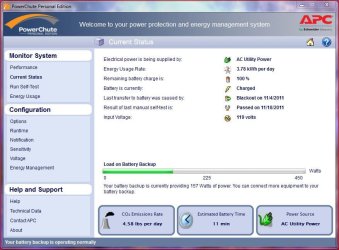
As one who is using Powerchute I've had no issues, it doesn't take up "space", isn't a burden. It just sits quietly and does what it does. As Brink said, you can just use the basics of your Power Plan Windows 7 provides if you don't want, or trust Powerchute. But as you'll see in my screenshot, Powerchute provides a host of info Windows 7's power plan wouldn't.
And I too fail to see where this is "bloatware" - unless you consider any software not associated with Windows to be bloatware - which would include such software as Office or other mainstream software like Adobe Flash, 3rd party browsers, etc.
Screenshot of the latest version (3.0.0.1).....
Info on the software - http://www.apcmedia.com/salestools/S...89HL_R0_EN.pdf
APC forum - APC Discussion Forums : UPS Management & PowerChute Software
Good luck. | My System Specs | | System Manufacturer/Model Number Built by me OS Windows 7 Ultimate x64 SP1 CPU Intel Core i7-950 (3.06GHz) OC to 3.8GHz Motherboard Gigabyte GA-X58A-UD5 rev 1, F6 Bios Memory Corsair Dominator -TR3X6G1600C8D (6GB - 3X2GB) Graphics Card AMD Radeon HD6950 2gig (Sapphire) Sound Card X-Fi Titanium Fatality Pro Monitor(s) Displays HP ZR22w 22" LCD Monitor Screen Resolution 1920 x 1080 Keyboard Logitech Wireless Wave Mouse Logitech Performance MX PSU Antec Signature - SG-850 Case Cooler Master HAF X Cooling Noctua NH-C12P SE14 Hard Drives Primary - OCZ Vertex 2 SSD (120GB). Storage - One 1TB WD Caviar Black, One 750 WD Caviar Black. Internet Speed High Speed Cable Other Info Memory Timings - 1600MHz @ 8-8-8-20-1T @ 1.640 volts Is APC PowerChute necessary with Win7? problems? All times are GMT -5. The time now is 01:31 PM. |  |