| Windows 7: Too old to crawl under the desk |
05 Jan 2012
|
#1 | | Vista, Windows7, Mint Mate, Zorin, Windows 8 Florida in winter, Black Forest/Germany |
Too old to crawl under the desk When I wanted to install an independent system (e.g. Win8) on another drive than my current OS drive, I used to crawl under the desk, remove the side panel, disconnect the cable of the OS disk and proceed. When the installation was done, same procedure in reverse order. I am really to old and too lazy for those gymnastics.
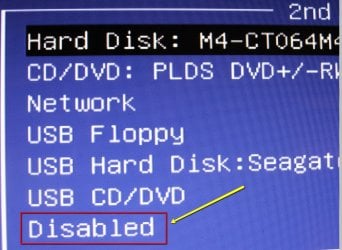
I wonder whether disabling the driver of the OS disk in device manager > properties would accomplish the same thing. Question is whether a) that would work and b) would the driver come back on reboot. Does anybody know??
PS: I could try it out but I like to first weigh the odds. | My System Specs |
| System Manufacturer/Model Number HP, Dell, Gateway, Toshiba - 4 laptops and 2 desktops OS Vista, Windows7, Mint Mate, Zorin, Windows 8 CPU from 1.6GHz Duo to i7 Monitor(s) Displays 2x HP w2207 Keyboard with trackball - no mices Mouse Trackball mice Hard Drives 5x HDD, 7x SSD, 12x Externals Internet Speed DSL 6000 |
05 Jan 2012
|
#2 | | Windows 8 Pro with Media Center x64 Southern California, USA |
could put your computer on top of the desk | My System Specs | | Computer type PC/Desktop System Manufacturer/Model Number Dell Inspiron M5040 OS Windows 8 Pro with Media Center x64 CPU AMD E-450 APU 1.65 GHz Memory 4GB Graphics Card Built-in Radeon HD 6320 Graphics Screen Resolution 1366 x 768 Mouse Microsoft Wireless Mobile Mouse 3500 Cooling fan Hard Drives 500GB Internet Speed 2.86Mbps Download Speed, 2.85Mbps Upload Speed & 26ms Ping Antivirus Defender Browser IE10 |
05 Jan 2012
|
#3 | | |

Quote: Originally Posted by whs Question is whether a) that would work and b) would the driver come back on reboot. Haven't tried it, so it's an edu-guess but I suspect not.
And unless you permanently delete the driver (and from the winsxs folders as well) it's almost a certainty that the driver would be re-installed upon next reboot. | My System Specs | | Computer type PC/Desktop System Manufacturer/Model Number Custom Computers by SmartEyeball OS 8 Pro x64 CPU i7 3770K 4.6GHz Motherboard ASUS P8Z77 WS Memory 16GB G.Skill Trident X 2400mhz Graphics Card 3x Gigabyte GTX 670 OC WindForce *TRI SLI* Sound Card ALC898 / 5.1 receiver/ ATH-AD900 Headphones Monitor(s) Displays x3 Dell U2410 / 58" Samsung / "40 Sony Screen Resolution 5760*1200/ 1920*1200 / 1920*1080 Keyboard Topre Realforce // Ducky Shine MX Black // Filco Ninja TKL Mouse Razer Imperator + Thermaltake Theron PSU Corsair AX1200W Case Thermaltake Level 10 GT Snow Edition Cooling Noctua NH-D14 Hard Drives 2x Intel 520 240GB (RAID 0) * 2x WD Caviar Blacks 2TB (RAID 0) * 2TB WD Caviar Black Antivirus MSE Browser IE, FF Other Info GT Extreme V2 Sim Racing Cockpit + 40" LCD and K/B Mouse stand ▼
Fanatec CSR Elite Wheel + Clubsport Pedals + CSR shifter/7GS ▼
Buttkicker v2 Seat Rumbler with Dedicated 5.1 and Sub Woofer attached to frame ▼
=
Bloody Big Grin |
05 Jan 2012
|
#4 | | Vista, Windows7, Mint Mate, Zorin, Windows 8 Florida in winter, Black Forest/Germany |

Quote: Originally Posted by smarteyeball 
Quote: Originally Posted by whs Question is whether a) that would work and b) would the driver come back on reboot. Haven't tried it, so it's an edu-guess but I suspect not.
And unless you permanently delete the driver (and from the winsxs folders as well) it's almost a certainty that the driver would be re-installed upon next reboot. If it comes back with the next system reboot, that would be OK because for the e.g. Win8 installation I would boot from the CD/DVD reader. Quote: could put your computer on top of the desk That's the setup I have in Germany. But here I have absolutely no room on the desk. | My System Specs | | System Manufacturer/Model Number HP, Dell, Gateway, Toshiba - 4 laptops and 2 desktops OS Vista, Windows7, Mint Mate, Zorin, Windows 8 CPU from 1.6GHz Duo to i7 Monitor(s) Displays 2x HP w2207 Keyboard with trackball - no mices Mouse Trackball mice Hard Drives 5x HDD, 7x SSD, 12x Externals Internet Speed DSL 6000 |
05 Jan 2012
|
#5 | | |
During the W8 setup procedure, the installation is still going to 'see' the current OS drive thanks to the BIOS, so 'hiding' the active OS drive from the OS itself will unfortunately be rendered superfluous. | My System Specs | | Computer type PC/Desktop System Manufacturer/Model Number Custom Computers by SmartEyeball OS 8 Pro x64 CPU i7 3770K 4.6GHz Motherboard ASUS P8Z77 WS Memory 16GB G.Skill Trident X 2400mhz Graphics Card 3x Gigabyte GTX 670 OC WindForce *TRI SLI* Sound Card ALC898 / 5.1 receiver/ ATH-AD900 Headphones Monitor(s) Displays x3 Dell U2410 / 58" Samsung / "40 Sony Screen Resolution 5760*1200/ 1920*1200 / 1920*1080 Keyboard Topre Realforce // Ducky Shine MX Black // Filco Ninja TKL Mouse Razer Imperator + Thermaltake Theron PSU Corsair AX1200W Case Thermaltake Level 10 GT Snow Edition Cooling Noctua NH-D14 Hard Drives 2x Intel 520 240GB (RAID 0) * 2x WD Caviar Blacks 2TB (RAID 0) * 2TB WD Caviar Black Antivirus MSE Browser IE, FF Other Info GT Extreme V2 Sim Racing Cockpit + 40" LCD and K/B Mouse stand ▼
Fanatec CSR Elite Wheel + Clubsport Pedals + CSR shifter/7GS ▼
Buttkicker v2 Seat Rumbler with Dedicated 5.1 and Sub Woofer attached to frame ▼
=
Bloody Big Grin |
05 Jan 2012
|
#6 | | Vista, Windows7, Mint Mate, Zorin, Windows 8 Florida in winter, Black Forest/Germany |

Quote: Originally Posted by smarteyeball During the W8 setup procedure, the installation is still going to 'see' the current OS drive thanks to the BIOS, so 'hiding' the active OS drive from the OS itself will unfortunately be rendered superfluous. Yeah, I am afraid you are right. But I think I can disable the drive in the BIOS too. Have to explore that. I'll do anything to stop the gymnastics. | My System Specs | | System Manufacturer/Model Number HP, Dell, Gateway, Toshiba - 4 laptops and 2 desktops OS Vista, Windows7, Mint Mate, Zorin, Windows 8 CPU from 1.6GHz Duo to i7 Monitor(s) Displays 2x HP w2207 Keyboard with trackball - no mices Mouse Trackball mice Hard Drives 5x HDD, 7x SSD, 12x Externals Internet Speed DSL 6000 |
05 Jan 2012
|
#7 | | W7 x64 3rd Rock from the Sun |
This topic is precisely the reason I like to have external switches for the power supply to each drive... | My System Specs | | System Manufacturer/Model Number Custom built machine OS W7 x64 CPU Intel Q9300 2.5Ghz Quad LGA775 (Would like Q9650) Motherboard Gigabyte GA-EP45T-UD3R (F6 Bios) Memory 4Gb OCZ Gold 1,333Mhz Graphics Card Palit HD4850 O/C Sonic 512Mb DDR3, Dual DViD's Sound Card Azalia to twin Samson 50w Studio Monitors Monitor(s) Displays Twin Dell (E-IPS) U2311H 23.6" Screens Screen Resolution 1920 x 1080 @ 60Hz Keyboard Cherry PS/2 custom model Mouse Lenovo USB laser "Thinkpad" Mouse PSU OCZ 600w Case Lian-Li PC8 acoustifoamed' aluminium tower Cooling Scythe 140mm Zipang Hard Drives Crucial M4 SSD, archives on twin Western Digital Caviar Black WD2002FAEX, 2TB, 7200rpm HDD's, Samsung Ritemaster CD/DVD Burner... Internet Speed ADSL2+ @14Mbps downstream & Cat6 Gigabit Ethernet Antivirus NOD32 Browser Opera Other Info Silicon Dust HD Homerun Dual FTA (Ethernet) TV Tuners, Dray Tek Vigor 2850Vn router and 8x HP Gigabit Switch. Lian-Li CR26 Card Reader, Canon MF4430 iSensys laser printer/scanner. |
05 Jan 2012
|
#8 | | Vista, Windows7, Mint Mate, Zorin, Windows 8 Florida in winter, Black Forest/Germany |
Yeah, tell that to Dell, LOL | My System Specs | | System Manufacturer/Model Number HP, Dell, Gateway, Toshiba - 4 laptops and 2 desktops OS Vista, Windows7, Mint Mate, Zorin, Windows 8 CPU from 1.6GHz Duo to i7 Monitor(s) Displays 2x HP w2207 Keyboard with trackball - no mices Mouse Trackball mice Hard Drives 5x HDD, 7x SSD, 12x Externals Internet Speed DSL 6000 |
05 Jan 2012
|
#9 | | |
Umm there is this really cool feture in the BIOS from the 90's it's called boot order. No need to disable drives. | My System Specs | | System Manufacturer/Model Number Built by Billman OS Windows 7 CPU Core I7 2600 Motherboard Intel DH67GD Memory 4096MB Kingston DDR3 667Mhz Graphics Card Asus nV560Ti Sound Card Realtek High Definition Audio Monitor(s) Displays BenQ E2220HD Screen Resolution 1920x1080 Keyboard Microsoft Wired Mouse Microsoft Wired PSU 1000 Watt Antec Case Coolmaster Elite 353 Cooling Stock Hard Drives 60Gb OCZ Vexer 2 (boot)
500Gb WD Green (Swap)
2x500Gb WD Blacks non RE (Striped) Internet Speed Usless |
05 Jan 2012
|
#10 | | |

Quote: Originally Posted by whs But I think I can disable the drive in the BIOS too. Have to explore that. If that is possible (although I've never seen that feature availble in a BIOS) that would be sufficient - you wouldn't need to remove/disable any drivers on the OS level. Quote: I'll do anything to stop the gymnastics. Entirely understandable. I hope I'm wrong about the BIOS level disabling | My System Specs | | Computer type PC/Desktop System Manufacturer/Model Number Custom Computers by SmartEyeball OS 8 Pro x64 CPU i7 3770K 4.6GHz Motherboard ASUS P8Z77 WS Memory 16GB G.Skill Trident X 2400mhz Graphics Card 3x Gigabyte GTX 670 OC WindForce *TRI SLI* Sound Card ALC898 / 5.1 receiver/ ATH-AD900 Headphones Monitor(s) Displays x3 Dell U2410 / 58" Samsung / "40 Sony Screen Resolution 5760*1200/ 1920*1200 / 1920*1080 Keyboard Topre Realforce // Ducky Shine MX Black // Filco Ninja TKL Mouse Razer Imperator + Thermaltake Theron PSU Corsair AX1200W Case Thermaltake Level 10 GT Snow Edition Cooling Noctua NH-D14 Hard Drives 2x Intel 520 240GB (RAID 0) * 2x WD Caviar Blacks 2TB (RAID 0) * 2TB WD Caviar Black Antivirus MSE Browser IE, FF Other Info GT Extreme V2 Sim Racing Cockpit + 40" LCD and K/B Mouse stand ▼
Fanatec CSR Elite Wheel + Clubsport Pedals + CSR shifter/7GS ▼
Buttkicker v2 Seat Rumbler with Dedicated 5.1 and Sub Woofer attached to frame ▼
=
Bloody Big Grin Too old to crawl under the desk problems? All times are GMT -5. The time now is 01:19 PM. | |