Windows 7 Forums


Windows 7: Cannot boot my windows after using GParted

17 Feb 2012   #1

Windows 7 Professional 32bit
 
 
Cannot boot my windows after using GParted

I converted my dynamic disk to basic. Then i used Disk Management to see my partition sequence. What can i see was my BOOT partition is lost and became unallocated which size of 200MB (the BOOT partition is located at the left side of Windows 7 partition). But i still can boot my Windows 7. So i decided to move the Windows 7 partition to the left so that there are no gap (unallocated) on the left side if Windows 7 partition using GParted. Finally, i CANNOT boot my Windows 7. I'm so desperate!
Is there any way to fix this problem? Help me..

Any suggestions, I appreciate it.
Sorry for the broken English.

My System SpecsSystem Spec

17 Feb 2012   #2

Microsoft Windows 7 Home Premium 64-bits 7601 Multiprocessor Free Service Pack 1
SecretCity


The bootmenu-entry points the the disk and partition where the operating system resides. but it isn't there anymore because you changed the starting sector of that partition! Fixed very easily.

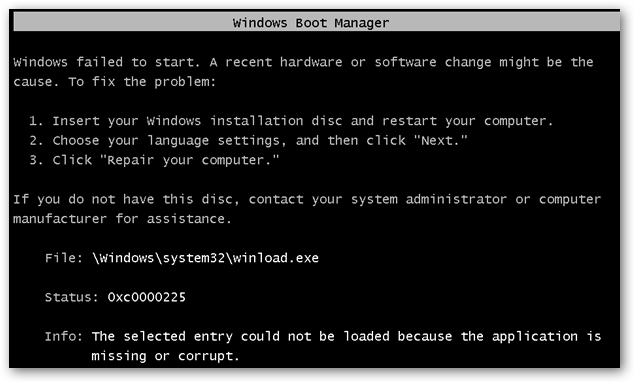
Is this the error? (so does it say \Windows\system32\winload.exe)
recent hardware or software change might be the cause.”
File: \Windows\system32\winload.exe
Status: 0xc0000225
Info: The selected entry could not be loaded because the application is missing or corrupt.
Here’s a screenshot of the error, but don’t worry, we’ll fix it.
My System SpecsSystem Spec
17 Feb 2012   #3

Microsoft Windows 7 Home Premium 64-bits 7601 Multiprocessor Free Service Pack 1
SecretCity


Other question: Do you have a Windows 7 repair disk or Windows 7 install dvd? It's needed to fix the error
My System SpecsSystem Spec
.


17 Feb 2012   #4

Windows 7 Professional 32bit


Quote   Quote: Originally Posted by Kaktussoft View Post
Other question: Do you have a Windows 7 repair disk or Windows 7 install dvd? It's needed to fix the error
yeah.. i have it..
My System SpecsSystem Spec
17 Feb 2012   #5

Microsoft Windows 7 Home Premium 64-bits 7601 Multiprocessor Free Service Pack 1
SecretCity


Is this the error? (so does it say \Windows\system32\winload.exe)
recent hardware or software change might be the cause.”
File: \Windows\system32\winload.exe
Status: 0xc0000225
Info: The selected entry could not be loaded because the application is missing or corrupt.
My System SpecsSystem Spec
17 Feb 2012   #6

Microsoft Windows 7 Home Premium 64-bits 7601 Multiprocessor Free Service Pack 1
SecretCity


boot into System Recovery Options from installation dvd or "Windows 7 rapir disk" select "startup repair".

Is your Windows 7 version listed in step 5? Click next anyway. Tell me the results
My System SpecsSystem Spec
17 Feb 2012   #7

Microsoft Windows 7 Home Premium 64-bits 7601 Multiprocessor Free Service Pack 1
SecretCity


More info here Using GParted to Resize Your Windows 7 or Vista Partition - How-To Geek
Don't cancel the checkdisk on first succesful boot!
My System SpecsSystem Spec
17 Feb 2012   #8

Windows 7 Professional 32bit


I followed the guide from howtogeek, click on 'repair and restart'. then the checkdisk not run. i was greeted by flashed BSOD. i boot the DVD again. repeat the step from howtogeek. it didn't work. the Windows 7 partition lost and managed to recover the partition. i stuck again to boot my Windows 7.
My System SpecsSystem Spec
18 Feb 2012   #9

Microsoft Windows 7 Home Premium 64-bits 7601 Multiprocessor Free Service Pack 1
SecretCity


Quote   Quote: Originally Posted by maafia95 View Post
I followed the guide from howtogeek, click on 'repair and restart'. then the checkdisk not run. i was greeted by flashed BSOD. i boot the DVD again. repeat the step from howtogeek. it didn't work. the Windows 7 partition lost and managed to recover the partition. i stuck again to boot my Windows 7.
I'm not english, so maybe I understand you wrong(?) Still getting exactly the same BSOD-error?

If so, do a "startup repair" and tell me what is wrong!!
You can click on "view details" or "view diagnostics" or something like that. Status 0x0 means no problem.
My System SpecsSystem Spec
18 Feb 2012   #10

Microsoft Windows 7 Home Premium 64-bits 7601 Multiprocessor Free Service Pack 1
SecretCity


Quote   Quote: Originally Posted by Kaktussoft View Post
boot into System Recovery Options from installation dvd or "Windows 7 rapir disk" select "startup repair".

Is your Windows 7 version listed in step 5? Click next anyway. Tell me the results
Is it listed??
My System SpecsSystem Spec
Reply

 Cannot boot my windows after using GParted problems?


Thread Tools


Similar help and support threads for: Cannot boot my windows after using GParted
Thread Forum
Solved I tried to partition HD with gparted now not boot up General Discussion
Solved Can't boot normally after gparted realignment General Discussion
Solved Using Fdisk, Gparted, etc to reformat NTFS for Windows 7 installation Hardware & Devices
Windows 7 will not reboot after using GPARTed move BSOD Help and Support
How to Use GParted? Performance & Maintenance


All times are GMT -5. The time now is 03:58 PM.


Seven Forums Android App Seven Forums IOS App Follow us on Facebook

Windows 7 Forums is an independent web site and has not been authorized,
sponsored, or otherwise approved by Microsoft Corporation.
"Windows 7" and related materials are trademarks of Microsoft Corp.
© Designer Media Ltd
  

1 2 3 4 5 6 7 8 9 10 11 12 13 14 15 16 17 18 19 20 21 22 23 24 25 26 27 28 29 30 31 32