Gigabyte GA-Z77X-UD3H drivers not loading

Blueriver

New member
I am looking for drivers for Ethernet Controller, PCI Simple Communications Controller, SM Bus Controller, and 2 Universal Serial Bus (USB) Controllers. When I use update driver in the Device Manager, they will not load automatically. I do not find them on the Gigabyte or Intel websites.
 

My Computer

Computer Manufacturer/Model Number
I Built It
OS
Windows 7 Ultimate x64
CPU
Intel i7 3770K
Motherboard
Gigabyte GA Z77X UD3H
Memory
Corsair 32 gb
Graphics Card(s)
EVGA GA 550Ti
Sound Card
Soundblaster PCIe Recon 3D
Monitor(s) Displays
Samsung T220HD
Hard Drives
sanDisc SSD 120 gb, WDC 1000 gb (x2), WDC 500 gb, Maxtor 320 gb (external
PSU
Coolermaster 1000W Silent Pro Gold
Case
Coolermaster HAF 932
Cooling
7 fans
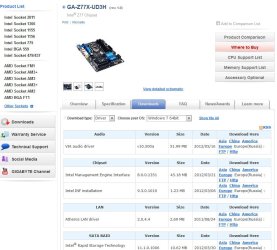
Have you seen this page on the Gigabyte site for your MB drivers?
GIGABYTE - Motherboard - Socket 1155 - GA-Z77X-UD3H (rev. 1.0)

On that page select from the "Choose your OS" dropdown list.
If the drivers you want are available there, have you downloaded them?

Have you tried updating drivers using "Browse my computer for driver Software" rather than "load automatically"?
 

My Computer

Computer type
PC/Desktop
Computer Manufacturer/Model Number
home built
OS
Multi-Boot W7_Pro_x64 W8.1_Pro_x64 W10_Pro_x64 +Linux_VMs +Chromium_VM
CPU
AMD Athlon II x4 620
Motherboard
Gigabyte GA-MA785G-UD3H
Memory
6GB GSkill DDR2 800
Graphics Card(s)
AMD 4670 GPU + AMD 4200 IGP
Sound Card
on board Realtek ALC889A
Monitor(s) Displays
RCA 40" LCD TV, Insignia 32" LCD TV, HP 15" LCD monitor
Screen Resolution
1680 x 1050
Hard Drives
OCZ Vertex 3 120GB,
Samsung F3 1TB (3),
Several others - WD, Seagate, Hitachi, ...
PSU
Corsair 500 W
Case
Rosewill mid tower
Cooling
CM 90mm rifle
Keyboard
Gyration wireless, Logitech wireless, Dell USB wired
Mouse
Gyration wireless, Logitech wireless, V7 USB wired
Internet Speed
Spectrum - 100Mbps D / 10Mbps U
Antivirus
Avast, MBAM3, EMET, WinPatrol
Browser
Pale Moon, Firefox, IE
Other Info
2 multi-boot PC's
Mainly HTPC/Office/Gen purpose (no gaming).
Trendnet USB KVM.
LG DVD burner/Blue Ray Player.
Tray system for removable SATA backup drives.

Not currently OCd, under-volted.
I use Hybrid sleep, rarely re-boot or shutdown.

Hauppauge HD-PVR, Avermedia PCIe TV Tuner, Hauppauge PCI TV Tuner.
Thanks

I have done as you suggested several times. It is a very new motherboard - less than a month old. My BIOS is F5 and it does not show up on Gigabyte's website. Not sure why and they are not answering my request for help. I am somewhat disappointed in their lack of response, but I do like the board. I am not actually having problems with anything except 4 3.0 USB ports that do not work. I don't know if this driver problem is causing that or I need other help. As you might surmise, I put this computer together myself.
Thanks for the quick response. If I find a solution I will post it here as well.
Blueriver
 

My Computer

Computer Manufacturer/Model Number
I Built It
OS
Windows 7 Ultimate x64
CPU
Intel i7 3770K
Motherboard
Gigabyte GA Z77X UD3H
Memory
Corsair 32 gb
Graphics Card(s)
EVGA GA 550Ti
Sound Card
Soundblaster PCIe Recon 3D
Monitor(s) Displays
Samsung T220HD
Hard Drives
sanDisc SSD 120 gb, WDC 1000 gb (x2), WDC 500 gb, Maxtor 320 gb (external
PSU
Coolermaster 1000W Silent Pro Gold
Case
Coolermaster HAF 932
Cooling
7 fans
Hi,

As David explained, you need to select your OS from the dropdown list. These are the latest BIOS updates, so F5 is pretty old.

Capture.JPG

And these are some of the drivers - I would defintealy have a look at those.

Capture2.JPG

There are also some updated USB3 drivers there too:

Capture3.JPG

Regards,
Golden
 

My Computer

Computer type
PC/Desktop
Computer Manufacturer/Model Number
Golden Mk. I.4
OS
Windows 10 Pro x64 ; Xubuntu x64
CPU
Intel i7 860 @ 2.80 GHz O/C'ed to 4.0GHz
Motherboard
Gigabyte P55A-UD3R Rev.1. Award BIOS F13
Memory
16GB Corsair Vengance DDR3 @ 661 MHz Dual Channel (9-9-9-24)
Graphics Card(s)
EVGA NVidia GTX 560 1024MB
Sound Card
Realtek Integrated
Monitor(s) Displays
Dual Samsung SyncMaster 2494HS
Screen Resolution
1920*1080 and 1920*1080
Hard Drives
1*Samsung 840 EVO 120GB SSD;
1*OCZ Vertex 2 60GB SSD;
2*Samsung F3 SpinPoint 1TB in RAID0;
1*Samsung F1 SpinPoint 1TB;
2*Western Digital 1TB External USB 3.0
1*Western Digital 500GB External USB 3.0
1*Seagate 500GB External USB 2.0
PSU
Thermaltake ToughPower QFan 750W
Case
Thermaltake Element S VK60001W2Z
Cooling
Corsair H60 Water Cooling, 2*230mm and 2*80mm case fans
Keyboard
Logitech G110
Mouse
Logitech MX518
Ok, it sounds like you might have a newer "Rev version" than what i found and linked.
The link i gave is for (rev. 1.0)

I've found some manufactures sometimes have different downloads available at different sites...
I.E. The Global download site may have more/newer downloads available than the US download site...

I'm not sure if Gigabyte does that, but if I find anything newer I'll post back with the info.

I just saw Golden's post, and maybe that explanation is clearer than my original post...

I'll still post what i say here in case it is relevant...
I did not see F5 bios listed at all, that's why i think you may have a newer "Rev" MB...
 

My Computer

Computer type
PC/Desktop
Computer Manufacturer/Model Number
home built
OS
Multi-Boot W7_Pro_x64 W8.1_Pro_x64 W10_Pro_x64 +Linux_VMs +Chromium_VM
CPU
AMD Athlon II x4 620
Motherboard
Gigabyte GA-MA785G-UD3H
Memory
6GB GSkill DDR2 800
Graphics Card(s)
AMD 4670 GPU + AMD 4200 IGP
Sound Card
on board Realtek ALC889A
Monitor(s) Displays
RCA 40" LCD TV, Insignia 32" LCD TV, HP 15" LCD monitor
Screen Resolution
1680 x 1050
Hard Drives
OCZ Vertex 3 120GB,
Samsung F3 1TB (3),
Several others - WD, Seagate, Hitachi, ...
PSU
Corsair 500 W
Case
Rosewill mid tower
Cooling
CM 90mm rifle
Keyboard
Gyration wireless, Logitech wireless, Dell USB wired
Mouse
Gyration wireless, Logitech wireless, V7 USB wired
Internet Speed
Spectrum - 100Mbps D / 10Mbps U
Antivirus
Avast, MBAM3, EMET, WinPatrol
Browser
Pale Moon, Firefox, IE
Other Info
2 multi-boot PC's
Mainly HTPC/Office/Gen purpose (no gaming).
Trendnet USB KVM.
LG DVD burner/Blue Ray Player.
Tray system for removable SATA backup drives.

Not currently OCd, under-volted.
I use Hybrid sleep, rarely re-boot or shutdown.

Hauppauge HD-PVR, Avermedia PCIe TV Tuner, Hauppauge PCI TV Tuner.
Hi Golden and David,
Thanks for the advice. I could have missed something, but so far I have done as you indicate.
I downloaded all of the updates available on the site that Golden has shown, well except the VGA update. I don't use it The information on the board and in Properties suggest I have Rev 1.0. I am confused about the BIOS version as well. The board was built in March 2012 according to dates imprinted on it. Gigabyte states in some areas to use the 'Asia' link for downloads. I am going to try that tomorrow, but just save the ZIP files in a folder. I do have the x64 processor as well.
Blueriver
 

My Computer

Computer Manufacturer/Model Number
I Built It
OS
Windows 7 Ultimate x64
CPU
Intel i7 3770K
Motherboard
Gigabyte GA Z77X UD3H
Memory
Corsair 32 gb
Graphics Card(s)
EVGA GA 550Ti
Sound Card
Soundblaster PCIe Recon 3D
Monitor(s) Displays
Samsung T220HD
Hard Drives
sanDisc SSD 120 gb, WDC 1000 gb (x2), WDC 500 gb, Maxtor 320 gb (external
PSU
Coolermaster 1000W Silent Pro Gold
Case
Coolermaster HAF 932
Cooling
7 fans
When you get a newly released motherboard you will need to keep checking their website for new drivers and BIOS versions. These usually will update with new ones fairly often at first. When they get feedback on issues they will fix them with new drivers and new BIOS.

The Gigabyte motherboard site will always list the motherboard versions alternatives at the top center:

GA-Z77X-UD3H (rev. 1.0) - indicates no other versions are available

GA-Z68XP-UD3 (rev. 1.3) - when more than one version link is listed there are new versions available
other version : rev. 1.0 - all other versions of the motherboard will be listed (with links) under the current listing.

All motherboards seem to ship with older BIOS versions, check the change logs or Description to see if a new version may help your issue.
"Improve system compatibility" is a general statement but usually means there are several known issues that have been fixed.
My impression when they don't list previous BIOS versions is that they are faulty and not recommended. Most motherboard BIOS lists are quite long, when older ones are missing it makes me think they are very suspect.
 

My Computer

Computer type
PC/Desktop
Computer Manufacturer/Model Number
76~2.0
OS
Windows 7 Ult x64 - SP1/ Windows 8 Pro x64
CPU
Intel Core i5-3570K 4.6GHz
Motherboard
Gigabyte GA-Z77X UD3H, f18
Memory
8GB (2X4GB) DDR3 1600 Corsair Vengeance CL8 1.5v
Graphics Card(s)
Sapphire HD 7770 Vapor-X OC 1GB DDR5
Sound Card
Onboard VIA VT2021
Monitor(s) Displays
22" LCD Dell
Screen Resolution
1680x1050
Hard Drives
Samsung 840Pro 128GB SSD,
Seagate Barracuda 500GB SATA2 7200rpm 32MB cache, Seagate Barracuda 1TB SATA2 7200rpm 32MB cache,
PSU
Corsair HX650W
Case
Cooler Master Storm Scout
Cooling
Corsair H80 2x12cm Noctua NF P12 , 2x14cm case fans
Keyboard
Logitech Wave
Mouse
CM Sentinel
Internet Speed
Dismal
Antivirus
Avast
Browser
Opera Next
Other Info
Haswell laptop: HP Envy 17t-j, i7-4700MQ, GeForce 740M 2GB DDR3, 17.3" Full HD 1920x1080, 16GB RAM, Samsung 840 Pro 128GB, 1TB Hitachi 7200 HDD,
Desktop: eSATA ports,
External eSATA Seagate 500GB SATA2 7200rpm,
External WD USB 500GB
I Have found the solution finally

After owning this board for about a year I have finally found a solution to the via usb problems. In the bios disable intel usb 2. I don't know why this works nor do I care. Im just happy I can finally use my usb ports. ga-z77x-ud3h doesn't have any usb 2 so disabling it doesn't pertain to me.
 

My Computer

Computer type
PC/Desktop
Computer Manufacturer/Model Number
custome build
OS
windows 8
CPU
3570k
Motherboard
ga-z77x-ud3h
Memory
2x4gb g.skill ripjaws 1600 mhz
Graphics Card(s)
saphire 7950
Hard Drives
segate 3tb
wd black 1tb
Samsung 840 120gb
Back
Top