
How to uninstall a driver completely from the Windows 7 system so that Windows 7 automatically picks up latest driver files from Internet?
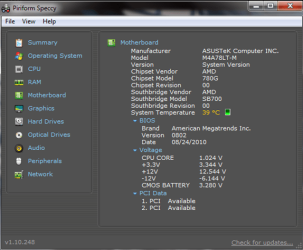
Here is a screenshot of my motherboard details.
Screenshot of my graphic cards details.
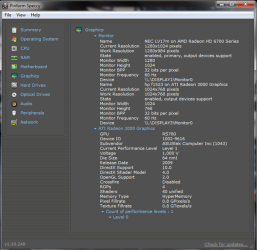
I came across the problem when I attempted to update to AMD catalyst 12.8. I have both integrated (ATi Readon HD 3000) and discrete (AMD Readon HD 6700 Series) graphics installed on my pc. After the installation of Catalyst 12.8 I received some errors.
On my IGP the wrong display driver was installed AMD 760G. The display would not work even when I restarted the computer with just one display attached to it.
On my dicrete graphics I received two error messages:
1. "This device is not working properly because Windows cannot load the drivers required for this device. (Code 31)"
When I restarted my pc I got:
2. "Windows has stopped this device because it has reported problems. (Code 43)"
Only one of my displays was working (the one attached to the discrete graphics) even though it was the one showing the error message. I uninstalled both drivers via Device manager but windows would reinstall them automatically and I still got the same problem.
I figured the problem was with the Catalyst version I installed so I did a system restore. Everything was reverted back and working as usual. I decided to update the display drivers using windows via the device manager and that's how I discovered the problem.
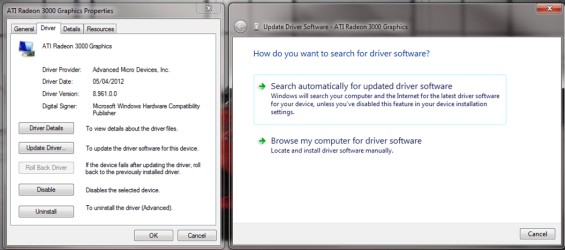
When I select "Search automatically for updated software" Windows was installing an old driver from the hard drive instead of finding a new one on the internet.
I decided to select the option "Browse my computer for driver software". I got the following window:
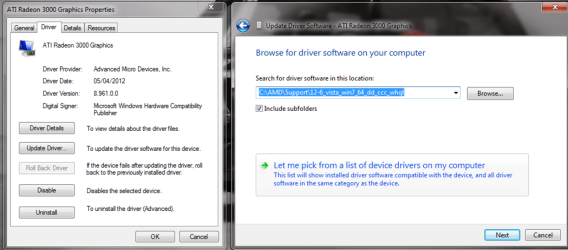
I then selected the option to pick from a list of drivers on my computer.
I got the following window:
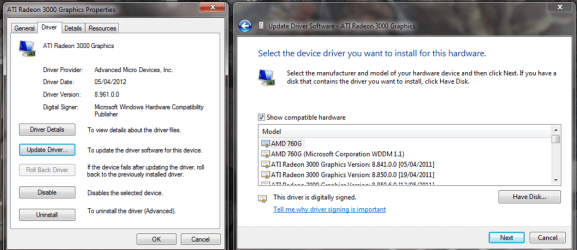
The list had all my previous drivers including the wrong driver which appeared on top. Furthermore my motherboard's chipset model is 780G not 760G.
I tried a common method I found online to remove old drivers but it failed to locate them on the device manager even after I had edited the registry
SET DEVMGR_SHOW_NONPRESENT_DEVICES=1
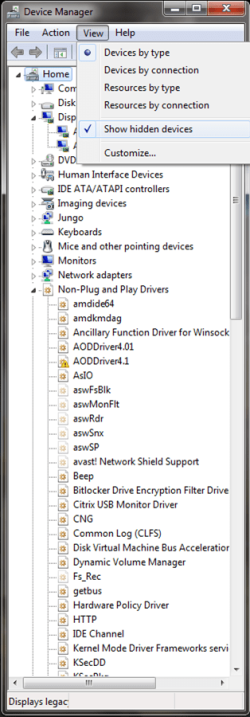
How can I get rid of all the old drivers including this mystery one. When I unchecked the box "Show compatible hardware" I noticed that windows has a list of all the drivers including inactive ones. Where are they located and how can one delete the unnecessary ones?
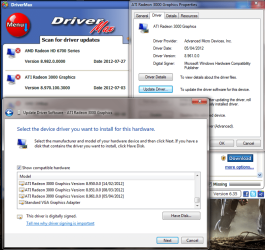
From the above screenshot I know that there is a newer driver on the internet that windows update should be able to locate and install. Why was it not downloading the new update? I have set it to do so? Even when using AMD's catalyst installer it refused to install the new update. My only option was to use Driver Max. How can I force windows to ignore the junk on my computer? Is there away of deleting the junk so that windows will have to look on the internet?
Sorry it took so long to explain myself!! I appreciate any help or input on this!!
Here is a screenshot of my motherboard details.
Screenshot of my graphic cards details.
I came across the problem when I attempted to update to AMD catalyst 12.8. I have both integrated (ATi Readon HD 3000) and discrete (AMD Readon HD 6700 Series) graphics installed on my pc. After the installation of Catalyst 12.8 I received some errors.
On my IGP the wrong display driver was installed AMD 760G. The display would not work even when I restarted the computer with just one display attached to it.
On my dicrete graphics I received two error messages:
1. "This device is not working properly because Windows cannot load the drivers required for this device. (Code 31)"
When I restarted my pc I got:
2. "Windows has stopped this device because it has reported problems. (Code 43)"
Only one of my displays was working (the one attached to the discrete graphics) even though it was the one showing the error message. I uninstalled both drivers via Device manager but windows would reinstall them automatically and I still got the same problem.
I figured the problem was with the Catalyst version I installed so I did a system restore. Everything was reverted back and working as usual. I decided to update the display drivers using windows via the device manager and that's how I discovered the problem.
When I select "Search automatically for updated software" Windows was installing an old driver from the hard drive instead of finding a new one on the internet.
I decided to select the option "Browse my computer for driver software". I got the following window:
I then selected the option to pick from a list of drivers on my computer.
I got the following window:
The list had all my previous drivers including the wrong driver which appeared on top. Furthermore my motherboard's chipset model is 780G not 760G.
I tried a common method I found online to remove old drivers but it failed to locate them on the device manager even after I had edited the registry
SET DEVMGR_SHOW_NONPRESENT_DEVICES=1
How can I get rid of all the old drivers including this mystery one. When I unchecked the box "Show compatible hardware" I noticed that windows has a list of all the drivers including inactive ones. Where are they located and how can one delete the unnecessary ones?
From the above screenshot I know that there is a newer driver on the internet that windows update should be able to locate and install. Why was it not downloading the new update? I have set it to do so? Even when using AMD's catalyst installer it refused to install the new update. My only option was to use Driver Max. How can I force windows to ignore the junk on my computer? Is there away of deleting the junk so that windows will have to look on the internet?
Sorry it took so long to explain myself!! I appreciate any help or input on this!!
My Computer
- Computer Manufacturer/Model Number
- Own built
- OS
- Windows 7 Ultimate x64
- CPU
- AMD Athlon II X4 640
- Motherboard
- ASUSTeK Computer INC. M4A78LT-M (AM3)
- Memory
- 8.0GB Dual-Channel DDR3 @ 669MHz (9-9-9-24)
- Graphics Card(s)
- AMD Radeon HD 6700 Series and ATI Radeon 3000 Graphics
- Sound Card
- AMD High Definition Audio Device & VIA High Definition Audio
- Monitor(s) Displays
- NEC LV17m and hp f1523
