itchellzew
New member
- Local time
- 12:00 PM
- Messages
- 15
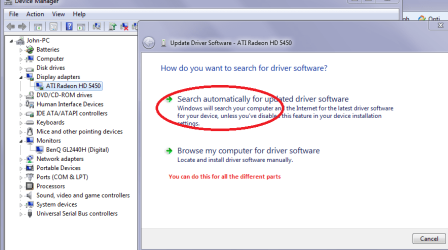
I am running Windows 7 64-Bit on my Toshiba A300, and when I get my monitor in a certain position (same position every time) I hear the noise like I plugged in a flash drive and then the notification pops up and says "USB device not recognized". Sometimes if my computer is in that one bad position when I try to start it up, nothing happens. You can hear the hard drive turn on, but the screen stays black and the hard drive quits spinning. If I turn off & close my computer then move the monitor to a different position it will turn back on. I have left my computer just sitting there for a really long time hoping that some sort of error would come up eventually but nothing ever does. The only thing I can come up with is that my display or monitor driver is not updated. I have tried to find the newest driver and been unsuccessful. I have also tried to let the computer search for the newest driver but it doesn't find anything and I'm pretty sure there are new drivers out there. Any help on this matter would be greatly appreciated. Thanks!
Display Adapter: ATI Mobility Radeon HD 3650
Driver Version: 8.632.1.2000
Driver Date: 8/17/2009
Monitor: Generic PnP Monitor
Driver Version: 6.1.7600.16385
Driver Date: 6/21/2006
Display Adapter: ATI Mobility Radeon HD 3650
Driver Version: 8.632.1.2000
Driver Date: 8/17/2009
Monitor: Generic PnP Monitor
Driver Version: 6.1.7600.16385
Driver Date: 6/21/2006
My Computer
At a glance
Windows 7 Professional 32-Bit
- OS
- Windows 7 Professional 32-Bit