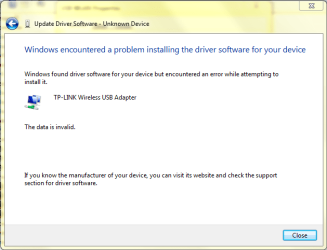
Hey everyone, I bought the TP-LINK TL-WN821N Wireless USB Adapter as the built in WLAN module on my computer malfunctioned. Now when i tried to install the drivers provided in the disk, Windows keeps installing it's own drivers. I managed to uninstall Windows drivers and manually pinpoint the correct drivers for the Wireless USB adapter. Now it keeps saying that the data is invalid halfway through the installation of drivers. Please help!
My Computer
At a glance
Windows 7 Home Premium 64bit SP1Intel Core i5-2400 @ 3.10GHz8GB RAMNVIDIA GeForce GT530 2GB
I would try going to the website and installing the correct drivers ignore the cd try the drivers for your device and OS on the website. let me know thanks.
My Computer
At a glance
Windows 7 Ultimate 64AMD FX - 8350 Oc16GB Corsair VengeanceHD 4870 1GB
Yep, I went to the manufacturer's website and downloaded the drivers and the contents inside were pretty much the same as provided in the CD. Both resulted that the data was invalid or if i allowed windows update to automatically install drivers, it will insist that the best drivers are already installed.
My Computer
At a glance
Windows 7 Home Premium 64bit SP1Intel Core i5-2400 @ 3.10GHz8GB RAMNVIDIA GeForce GT530 2GB
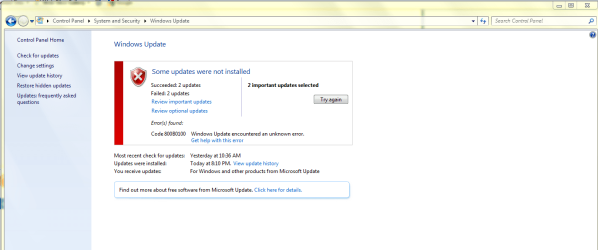
Yep, there were some updates but for some reason, 2 of the updates failed to install. Apparently there was this error 800B0100. Also, I find Windows update annoying too as everytime when I'm shutting down my computer there will be updates installing before it shut down. I had to hide those updates to stop it from trying to install the same updates again everytime i shut down my computer.
My Computer
At a glance
Windows 7 Home Premium 64bit SP1Intel Core i5-2400 @ 3.10GHz8GB RAMNVIDIA GeForce GT530 2GB
As annoying as windows updates are you can turn it off and manually select what updates you would like. But be advised the updates are there for a reason and a reason to help.
Its sounds to me like alot of system files you have are corrupt and some pretty badly that error indicates that. Run microsoft FIX IT tool and it should automatically fix that error and then try install updates and then let me know
Well I bought my computer (Acer Aspire X3990) Around September 2011 which is approximately one year ago. Windows came preinstalled when i bought this unit.
My Computer
At a glance
Windows 7 Home Premium 64bit SP1Intel Core i5-2400 @ 3.10GHz8GB RAMNVIDIA GeForce GT530 2GB
Im just concerned as you said your built in WLAN stopped working your windows update isn't working and pretty much everything else is failing do you have a windows install disc?
My Computer
At a glance
Windows 7 Ultimate 64AMD FX - 8350 Oc16GB Corsair VengeanceHD 4870 1GB
I suspect that my built in WLAN module has hardware issues as my NVIDIA Display driver is also acting very crazy in these few months having a lot of TDR problem. Also I don't have any Windows discs or any Installation/drivers discs. Acer did not give me any disc and I don't have any Windows 7 disc with me.
My Computer
At a glance
Windows 7 Home Premium 64bit SP1Intel Core i5-2400 @ 3.10GHz8GB RAMNVIDIA GeForce GT530 2GB