
Sony Vaio NS11J Drivers and FN Key Win7 64bit

Vanq69

New member
Hi guys, looking for a little assistance.

I have just installed Windows 7 64bit version.

My computer is a Sony Vaio VGN-NS11J from the EU.

Intel Core 2 Duo - T5800 2GHz
4GB Ram
290GB HDD SATA
Mobile Intel 4 Series Express Chipset Graphics Card

-------------------

I have 2 drivers which I cant find drivers for - 1 of which I believe is a Texas Instruments SD Card Controller.

The details I can glean from Device Manager are as follows:

1st:
Base System Device
Location: PCI Bus 5, device 3, function 2
Physical Device Object Name: \Device\NTPNP_PCI0023

2nd:
Unknown Device
Location: on Intel ICH9M LPC Interface controller - 2919
Physical Device Object Name: \Device\0000005b


The other issues I am having is with getting the FN and Mute button's to work, as well as the Power Control for selecting battery options (ie charged less/more to protect the battery) unless how to do this has simply moved in Win7.

I have looked at the EU Sony Driver Support page for my model but it doesnt contain any drivers to solve these problems.

Thanks in advance and I am happy to supply any additional information/screenshots that would be helpful.
 

My Computer

Computer Manufacturer/Model Number
SONY VAIO VGN-NS11J
OS
Windows 7 64bit
CPU
Intel Core 2 Duo T5800 2GHz
Memory
4GB
Graphics Card(s)
Mobile Intel 4 Express Chipset
Hard Drives
300GB HDD SATA

My Computer

OS
XP, Vista, W7 64bit Home Premium
CPU
Intel Core Duo 6850 3.0 ghz @ 3.7 ghz
Motherboard
Asus P5E
Memory
4GB Corsair DDR 2 PC-6400
Graphics Card(s)
Ati 4870 1ghz
Sound Card
Supreme FX 11
Monitor(s) Displays
View Sonic VX1962wm
Screen Resolution
1680 X1050
Hard Drives
3 Seagate Sata Drives 160gb 250gb 500gb
PSU
Thermaltake 600 watt
Case
NZXT Alpha
Cooling
3X120cm Fans
Keyboard
Microsoft Digital Media Pro Keyboard
Mouse
Microsoft Wheel Mouse Optical
Internet Speed
1.5Mb to 8Mb/384k
Below link to similar problem
http://www.sevenforums.com/drivers/23351-help-getting-all-drivers-sony-cr4000.html

Below link to your driver page - VGN-NS11J/S
Vaio : Sony Europe


I gotta go to the dentist - be back later - i think i can find the link to the texas instruments driver - back later

Have looked at the Vaio page as mentioned but this didnt help.

I will take a look at the link for the FN keys - hopefully this will also give the vaio power management tool.

Thanks for taking the time, good luck at the dentist - horrible places!
 

My Computer

Computer Manufacturer/Model Number
SONY VAIO VGN-NS11J
OS
Windows 7 64bit
CPU
Intel Core 2 Duo T5800 2GHz
Memory
4GB
Graphics Card(s)
Mobile Intel 4 Express Chipset
Hard Drives
300GB HDD SATA

My Computer

OS
XP, Vista, W7 64bit Home Premium
CPU
Intel Core Duo 6850 3.0 ghz @ 3.7 ghz
Motherboard
Asus P5E
Memory
4GB Corsair DDR 2 PC-6400
Graphics Card(s)
Ati 4870 1ghz
Sound Card
Supreme FX 11
Monitor(s) Displays
View Sonic VX1962wm
Screen Resolution
1680 X1050
Hard Drives
3 Seagate Sata Drives 160gb 250gb 500gb
PSU
Thermaltake 600 watt
Case
NZXT Alpha
Cooling
3X120cm Fans
Keyboard
Microsoft Digital Media Pro Keyboard
Mouse
Microsoft Wheel Mouse Optical
Internet Speed
1.5Mb to 8Mb/384k
Ok - Update got the drivers all working now thanks very much for the assistance. Have given you rep.

Only thing left is the FN keys and Vaio battery management. Have looked at the CR4000 thread but cant seem to get the final "Setting Utility Series" to unpack correctly - though redownloading this as I type.

How do I install the SFEP as there is no .exe file. Only security catalogue files, setup information file and a SFEP.sys file.

Thanks for the continued assistance.
 

My Computer

Computer Manufacturer/Model Number
SONY VAIO VGN-NS11J
OS
Windows 7 64bit
CPU
Intel Core 2 Duo T5800 2GHz
Memory
4GB
Graphics Card(s)
Mobile Intel 4 Express Chipset
Hard Drives
300GB HDD SATA
The settings utility series program it may link to the sfep - its executable as i downloaded and extracted it - needs extracting- w7 will do it - just right click on the download and select extract, and it extracts to a folder in the current folder you downloaded it to. It says its 32bit/64bit in the version folder.Put the sfep folder in there also not with extracted files but the prior folder- im only guessing.
Use compatibility with vista to install the program if it wont install -
To install a driver OR program in compatibility mode - right click the setup.exe file - click properties - click compatibility - check run in compatibility with vista/xp etc - check run as administrator - leave the rest blank. Start setup.exe and install.

Vaio : Sony Europe
 

My Computer

OS
XP, Vista, W7 64bit Home Premium
CPU
Intel Core Duo 6850 3.0 ghz @ 3.7 ghz
Motherboard
Asus P5E
Memory
4GB Corsair DDR 2 PC-6400
Graphics Card(s)
Ati 4870 1ghz
Sound Card
Supreme FX 11
Monitor(s) Displays
View Sonic VX1962wm
Screen Resolution
1680 X1050
Hard Drives
3 Seagate Sata Drives 160gb 250gb 500gb
PSU
Thermaltake 600 watt
Case
NZXT Alpha
Cooling
3X120cm Fans
Keyboard
Microsoft Digital Media Pro Keyboard
Mouse
Microsoft Wheel Mouse Optical
Internet Speed
1.5Mb to 8Mb/384k
Solution

Ok, all working now, thanks for the help Whest. Here is a detailed list of what I did in order to gain full functionality which hopefully can help others. This is by no means a technical guide just simply stating the steps I have taken and what has worked - follow at your own risk.


1. Firstly installed Windows 7 - used a student upgrade to move from Vista 32bit to Win7 64bit - transferred the files to a dvd. Method of doing so is found here:

How to Create and Make Bootable Windows 7 ISO from EXE Plus Setup1.Box and Setup2.Box Files » My Digital Life

2. I then went to the Sony 64bit driver site (unsupported drivers they have made available) and did a Ctrl + F search for my model number and downloaded each file that contained my model number. Extracted all of these to a folder and went through each item in Device Manager asking it to search that folder to see if a new driver was there. This upgraded a couple of existing and also fixed the 2 devices without drivers. This site is here (click accept for the EULA):

http://www.vaio-link.com/os/vista/64bit/

3. After this to fix the S1 button as well as FN button and Power Management I went to:

Vaio : Sony Europe

From this I downloaded and installed in the following order (all were just the 32bit versions but worked for me):

SFEP Driver (installed through Device Manager)

Sony Shared Library

Setting Utility Service

VAIO Event Service

-- Should now have function and S1 button working

VAIO Power Management

VAIO Control Centre.


Hope this helps anyone who has the same issue. I will re-iterate this worked for me for my model but hopefully this might provide a starting point or solution for others. Many thanks to Whest for his invaluable help.
 

My Computer

Computer Manufacturer/Model Number
SONY VAIO VGN-NS11J
OS
Windows 7 64bit
CPU
Intel Core 2 Duo T5800 2GHz
Memory
4GB
Graphics Card(s)
Mobile Intel 4 Express Chipset
Hard Drives
300GB HDD SATA
:) Well constructed approach, and thought for others.
 

My Computer

OS
XP, Vista, W7 64bit Home Premium
CPU
Intel Core Duo 6850 3.0 ghz @ 3.7 ghz
Motherboard
Asus P5E
Memory
4GB Corsair DDR 2 PC-6400
Graphics Card(s)
Ati 4870 1ghz
Sound Card
Supreme FX 11
Monitor(s) Displays
View Sonic VX1962wm
Screen Resolution
1680 X1050
Hard Drives
3 Seagate Sata Drives 160gb 250gb 500gb
PSU
Thermaltake 600 watt
Case
NZXT Alpha
Cooling
3X120cm Fans
Keyboard
Microsoft Digital Media Pro Keyboard
Mouse
Microsoft Wheel Mouse Optical
Internet Speed
1.5Mb to 8Mb/384k
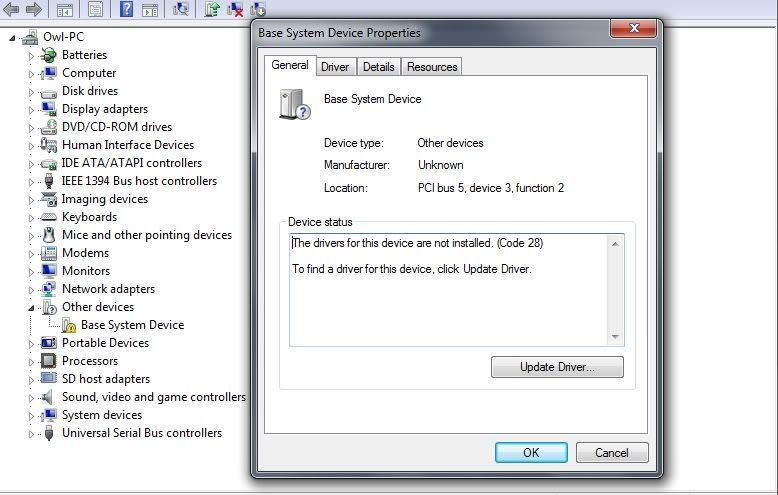
I'm facing the same issue. Where did you find the driver for the memory stick reader? I checked the links you posted, but had no luck. I have attached a pic to outline the issue, thanks in advance:

vaio.jpg
 

My Computer

OS
Windows 7 (64 bit)
I'm facing the same issue. Where did you find the driver for the memory stick reader? I checked the links you posted, but had no luck. I have attached a pic to outline the issue, thanks in advance:

vaio.jpg

The link whest posted above (ZDNET) worked for me..the one on Sony's site wouldn't. A million thanks to him for the link!! :thumbsup:
 

My Computer

Computer Manufacturer/Model Number
Sony VPCZ1390X CTO
OS
7 Pro x64
CPU
Intel Core i7-640M
Motherboard
Sony/Intel
Memory
8GB
Graphics Card(s)
GT330M
Monitor(s) Displays
Built-in 13" + 24" LG Flatron
Screen Resolution
1920x1080, 1920x1080
Hard Drives
Internal-2x128GB SSD (Raid 0), 500GB WD Caviar Green
External- 3TB WD
Keyboard
Logitech Illuminated
Mouse
Logitech Performance MX
Internet Speed
7 MB -- Sprint Overdrive on 4G
Other Info
Sprint EVO 3D (Synergy 2.3.4)
I tired those links, but they didn't work. The ZDNET links have several driver download links within them, is there one in particular I need to use as I only tired a few and they didn't work.
 

My Computer

OS
Windows 7 (64 bit)

My Computer

Computer Manufacturer/Model Number
Sony VPCZ1390X CTO
OS
7 Pro x64
CPU
Intel Core i7-640M
Motherboard
Sony/Intel
Memory
8GB
Graphics Card(s)
GT330M
Monitor(s) Displays
Built-in 13" + 24" LG Flatron
Screen Resolution
1920x1080, 1920x1080
Hard Drives
Internal-2x128GB SSD (Raid 0), 500GB WD Caviar Green
External- 3TB WD
Keyboard
Logitech Illuminated
Mouse
Logitech Performance MX
Internet Speed
7 MB -- Sprint Overdrive on 4G
Other Info
Sprint EVO 3D (Synergy 2.3.4)
I downloaded most of the drivers from sonys FTP, they have all up-to-date drivers on there (which include windows 7 style volume and contrast boxes).
 

My Computer

OS
Windows 7 Home Premuim 64-bit
CPU
Intel Core 2 Duo T5800 2Ghz
Memory
4GB
@ awenthol: Thanks but I'm afraid that didn't work either :(. I should mention though that I have a NS20J, but they are pretty much the same thing, so i doubt the internal components would be different.

@ Matt140: The first thing i did was check Sonys website, and i couldn't find it. This is all they have for Win 7:

Vaio : Sony Europe

I have contacted their support, but all i got was a random answer about not supporting Windows that is self installed, so it doesn't look promising, which is pretty disappointing seeing as their laptops aren't exactly cheap, not to mention I'm not even asking for support, just a flippin driver.
 

My Computer

OS
Windows 7 (64 bit)
Make sure you have the Texas Instruments SD card reader. The link from ZDNet is only for that one, and some of these computers have a Richo brand reader...

I know what you mean...for what I paid for my Vaio, I could have boughten a little more powerful xxxx brand computer. It's a little ridiculous of them to expect us to shell out money for a new computer that functions "properly" with Windows 7 when mine runs magnificently on 7!! Their drivers all seem to be pretty close if not the same between models. It's not like it would be too much work for them to update them all. At LEAST for computers dating back to Vista!
 

My Computer

Computer Manufacturer/Model Number
Sony VPCZ1390X CTO
OS
7 Pro x64
CPU
Intel Core i7-640M
Motherboard
Sony/Intel
Memory
8GB
Graphics Card(s)
GT330M
Monitor(s) Displays
Built-in 13" + 24" LG Flatron
Screen Resolution
1920x1080, 1920x1080
Hard Drives
Internal-2x128GB SSD (Raid 0), 500GB WD Caviar Green
External- 3TB WD
Keyboard
Logitech Illuminated
Mouse
Logitech Performance MX
Internet Speed
7 MB -- Sprint Overdrive on 4G
Other Info
Sprint EVO 3D (Synergy 2.3.4)
Make sure you have the Texas Instruments SD card reader. The link from ZDNet is only for that one, and some of these computers have a Richo brand reader...

I know what you mean...for what I paid for my Vaio, I could have boughten a little more powerful xxxx brand computer. It's a little ridiculous of them to expect us to shell out money for a new computer that functions "properly" with Windows 7 when mine runs magnificently on 7!! Their drivers all seem to be pretty close if not the same between models. It's not like it would be too much work for them to update them all. At LEAST for computers dating back to Vista!

Thanks for your help. Any idea on how i can check if its Texas Instruments? To avoid any confusion, the laptop has 2 card readers, one is a SD card reader, which works fine without issues, and the other is a MS card reader, which is for Sony Memory Sticks:

http://keith340.files.wordpress.com/2009/06/00137_sony-16gb-memory-stick.jpg

This one doesn't work :(.

I know what you mean, it may as well be armed robbery. As far as Sony is concerned, this is the last time I spend money on them :mad:. I'm amazed at their level of service. You sell a product, but don't wanna provide the driver. So what "support" do you provide exactly. This is the response i got from their support:
Dear Mr,
Thank You for contacting Sony Vaio-Link Support
Regarding the issue with Windows 7, unfortunately we can not give you support about a non preinstalled Operating System, so we can not tell you where can you find that driver for Windows 7 64 Bit.
However, all we can recommend you is to check in the device manager the name of the device and look for the driver in internet.
If you have any further queries, please do not hesitate to contact us on
0870 240 2408 (within the warranty period) or 09050310006 (outside the warranty period)
Kind Regards,
Carlos
Sony Vaio-Link Support
They can't be bothered to even provide the name of the device so I can look myself. Pathetic really! Should have gone with Dell.
 

My Computer

OS
Windows 7 (64 bit)
Here's the ftp link. You can find most drivers here, just make sure you download the latest one's (most of them are for both 32 and 64 bit). Also, for the SD/MemoryStick drivers, make sure you download the ones for the Ricoh versions of the component (they're usually named like MEMORY CARD READER WRITER SD etc..)
 

My Computer

OS
Windows 7 Home Premuim 64-bit
CPU
Intel Core 2 Duo T5800 2Ghz
Memory
4GB
My Vaio is from the US CR4000 I can't find the correct files in the 64bit link, any help please?
 

My Computer

Computer Manufacturer/Model Number
Sony Vaio CR4000
OS
Windows 7
Hi guys, looking for a little assistance.

I have just installed Windows 7 64bit version.

My computer is a Sony Vaio VGN-NS11J from the EU.

Intel Core 2 Duo - T5800 2GHz
4GB Ram
290GB HDD SATA
Mobile Intel 4 Series Express Chipset Graphics Card

-------------------

I have 2 drivers which I cant find drivers for - 1 of which I believe is a Texas Instruments SD Card Controller.

The details I can glean from Device Manager are as follows:

1st:
Base System Device
Location: PCI Bus 5, device 3, function 2
Physical Device Object Name: \Device\NTPNP_PCI0023

2nd:
Unknown Device
Location: on Intel ICH9M LPC Interface controller - 2919
Physical Device Object Name: \Device\0000005b


The other issues I am having is with getting the FN and Mute button's to work, as well as the Power Control for selecting battery options (ie charged less/more to protect the battery) unless how to do this has simply moved in Win7.

I have looked at the EU Sony Driver Support page for my model but it doesnt contain any drivers to solve these problems.

Thanks in advance and I am happy to supply any additional information/screenshots that would be helpful.

Hi, I know I am bringing a old thread to life, but when you installed the drivers from sony's website, was there a specific order in which they were meant to be installed?
 

My Computer

Computer Manufacturer/Model Number
Sony NS11J/S
OS
Windows Vista 64bit
CPU
Core2Duo
Memory
4GB
Graphics Card(s)
On Board
Sound Card
On Board
Hard Drives
200GB
Back
Top