
Windows 7 Forums Search
Welcome to Windows 7 Forums. Our forum is dedicated to helping you find solutions with any problems, errors or issues you are experiencing with Windows 7. The Windows 7 forum also covers news and updates and has an extensive Windows 7 tutorial section that covers a wide range of tips and tricks.


Windows 7 - Intel chipset driver caused BSOD - why?


11-07-2009   #1


Windows 7 Professional x64


Intel chipset driver caused BSOD - why?

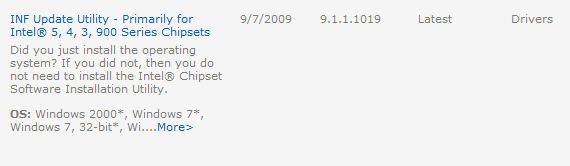
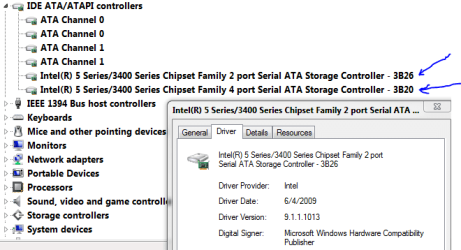
I installed this:

Intel chipset driver caused BSOD - why?-intelinf.png
Intel chipset driver caused BSOD - why?-intelsatadriver.png


I then got a BSOD and my boot disk (an SSD) disappeared from the BIOS. I thought I was in big trouble. I have another controller so I plugged the SSD into the other one and booted to it and rolled back to the MS driver (just for the SATA controller). I then put everything back together.

Back to this:
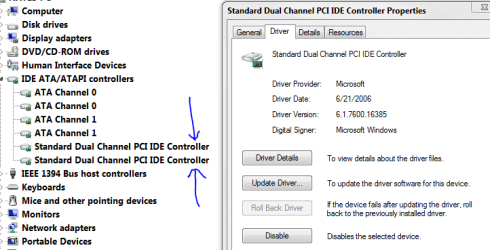
Intel chipset driver caused BSOD - why?-rollbacktomsfromintel.png

Everything seems to work now. Do I need to take any further steps to prevent this from happening again? What happened? Any info would be helpful. Thanks

My System SpecsSystem Spec
11-07-2009   #2


Windows 7 Ultimate x64


I would try again with newest version 1020, yours is outdated. And look for a firmware update for your SSD.
My System SpecsSystem Spec
11-07-2009   #3


Windows 7 Professional x64


The SSD is fully updated and when I search Intel's site, this is the newest one available. v1019 is dated 9-7-09

I am really curious why this would happen more than anything else. Just an incompatibility issue I suppose.
My System SpecsSystem Spec
.


11-07-2009   #4


Windows 7 Ultimate x64


My System SpecsSystem Spec
11-07-2009   #5


Windows 7 Professional x64


Quote   Quote: Originally Posted by SillyMan View Post
It appears to me these are for Intel brand motherboards. That's what it says.

This is what I find on the Intel site when searching for P55 express chipset drivers for Windows 7 64 bit.

http://downloadcenter.intel.com/Sear...lation+Utility
My System SpecsSystem Spec
11-07-2009   #6


Windows 7 SP1 x64


Quote   Quote: Originally Posted by SillyMan View Post
I would try again with newest version 1020, yours is outdated. And look for a firmware update for your SSD.

I repeat myself (about the hundred time this month)

THE 1020 IS FOR DESKTOP BOARD'S ONLY!
My System SpecsSystem Spec
11-07-2009   #7


Windows 7 Professional x64


Quote   Quote: Originally Posted by ratePV View Post
Quote   Quote: Originally Posted by SillyMan View Post
I would try again with newest version 1020, yours is outdated. And look for a firmware update for your SSD.

I repeat myself (about the hundred time this month)

THE 1020 IS FOR DESKTOP BOARD'S ONLY!
RatePV, I don't know as much as I should about these drivers but for the future when I do need to update, what do you think went wrong when I updated to 1019? (in original post) Is it simply an incompatibility with my SSD or othewr hardware?
My System SpecsSystem Spec
11-07-2009   #8


Windows 7 SP1 x64


P55 have some problems with intel chipset drivers (especially with the newer ones) so it's intel's part of the job...
Hmmm you should upload your mini dump and PM H2SO4 to take a peek...

I also see that you have a RAID array so you should update your storage drivers too.

http://downloadcenter.intel.com/Detail_Desc.aspx?agr=Y&DwnldID=17882&ProdId=3151〈=eng
My System SpecsSystem Spec
11-07-2009   #9


Windows 7 Professional x64


Yea, there are some problems. It even lasted about 15 minutes before BSOD.

I am not running RAID right now but I did set it up when I installed Windows 7. This is why I have Intel Matrix Storage Manager. Thanks for the recommendation.
My System SpecsSystem Spec
11-07-2009   #10


Windows 7 SP1 x64


Quote   Quote: Originally Posted by nate42nd View Post
Yea, there are some problems. It even lasted about 15 minutes before BSOD.

I am not running RAID right now but I did set it up when I installed Windows 7. This is why I have Intel Matrix Storage Manager. Thanks for the recommendation.

Maybe, just maybe (this is not recommended) you should try the new 1023 ones.

Intel Chipset 1023
My System SpecsSystem Spec
Reply

 Intel chipset driver caused BSOD - why?


Thread Tools


Similar Threads for: Intel chipset driver caused BSOD - why?
Thread Forum
Installing video driver for Intel 855 Centrino Chipset Drivers
Intel 4 Series Express Chipset family driver help. Drivers
Solved Intel chipset 946 - Win7 driver [.inf] Drivers
Intel Chipset driver error Drivers
Confused with Intel Chipset driver Drivers


All times are GMT -5. The time now is 05:14 AM.


Windows 7 Forums is an independent web site and has not been authorized,
sponsored, or otherwise approved by Microsoft Corporation.
"Windows 7" and related materials are trademarks of Microsoft Corp.
© Designer Media Ltd
  

1 2 3 4 5 6 7 8 9 10 11 12 13 14 15 16 17 18 19 20 21 22 23 24 25 26 27 28 29 30