Windows 7 Forums


Windows 7: No working Media buttons, keyboard

09 Nov 2009   #1

Windows 7 64-bit
 
 
No working Media buttons, keyboard

Hello


Just reinstalled windows 7 this weekend together with new hardware. But i have encountered some problems, both with sound and keyboard. On my keyboard which is a Logitech Ultra X (Ultra X) i have some buttons at the top, like Media, play/pause, www, email and mute. These have been working earlier on both windows xp and vista, but now they are not working.. Very frustrating as i use them very often.

Do any of you guys in here have any idea about how this may be fixed?


Toby91
My System SpecsSystem Spec

09 Nov 2009   #2

W7 RTM Ultimate x64
South Coast NSW


Hey mate, welcome to the forums.

Have you downloaded drivers for your keyboard?
My System SpecsSystem Spec
09 Nov 2009   #3

Windows 7 64-bit


Thank.. Ehm, the problem is that all the time i have used this keyboard i have never installed any driver for it.. It even says on the logitech site that the keyboard uses native USB drivers already existing in the OS. So i guess thats where the problem is, there are no places i can find drivers.
My System SpecsSystem Spec
.


09 Nov 2009   #4

Windows 7 x64 Ultimate
A Finnish immigrant in Leipzig, Germany


Hei Toby og velkommen til de 7 Forums.

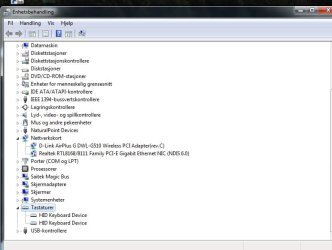
Could you please attach a screenshot showing your Device Manager, keyboard section expanded.

Kari
My System SpecsSystem Spec
09 Nov 2009   #5

Windows 7 64-bit


Here it is.

It just says HID keyboard.
Attached Thumbnails
No working Media buttons, keyboard-enhetsbehandling.jpg  
My System SpecsSystem Spec
09 Nov 2009   #6

Windows 7 x64 Ultimate
A Finnish immigrant in Leipzig, Germany


OK. You could try this:
  • Disconnect the keyboard
  • Right click HID Keyboard device in Device Manager, choose Uninstall. Do this for both instances
  • Shut down your computer
  • Reconnect the keyboard
  • Reboot and let Windows find the keyboard and install the drivers
Might work...

Kari
My System SpecsSystem Spec
09 Nov 2009   #7

Windows 7 64-bit


Ok, i'll try.. Will give you a comment on how it works..
My System SpecsSystem Spec
09 Nov 2009   #8

Windows 7 64-bit


Nope, that didn't work... still some not responding buttons..
My System SpecsSystem Spec
09 Nov 2009   #9

Windows 7 x64 Ultimate
A Finnish immigrant in Leipzig, Germany


Don't know what to suggest next... I'll check something and come back.

Kari
My System SpecsSystem Spec
23 Nov 2009   #10

Windows 7 64-bit


Hi again!


Eventually bought myself a new keyboard, a Logitech G15. But when i installed it, i still had the problem with non working media buttons. So i went again searching for an soulution and found one!


I seems to be an startupentry which you manually have to change from manual to automatic.. If there are anyone having this problem, here is the solution:


- Go to controlpanel --> Performance and maintenance --> Administrative tools

- Choose services and scroll down to find "Human interface devices"

- Right click and choose properties --> and change startup type from manual to automatic --> Reboot and your media buttons should now be working again!


At least it did here, and i'm now happy with my new keyboard!


Toby91
My System SpecsSystem Spec
Reply

 No working Media buttons, keyboard problems?


Thread Tools


Similar help and support threads for: No working Media buttons, keyboard
Thread Forum
Windows 7 RC: Media Keys on HP Keyboard Not Working Hardware & Devices
Skip Forward buttons on keyboard not working with Windows Media Center Media Center
Keyboard media buttons input does not correspond with Itunes Software
Controlling iTunes with Keyboard Media buttons? Music, Pictures & Video
Media Center Buttons not working Media Center


All times are GMT -5. The time now is 07:47 PM.


Windows 7 Forums is an independent web site and has not been authorized,
sponsored, or otherwise approved by Microsoft Corporation.
"Windows 7" and related materials are trademarks of Microsoft Corp.
© Designer Media Ltd