Windows 7 Forums


Windows 7: WFP2208 Webcam and W7 - 64 Bit?

10 Nov 2009  
MLSLK

Windows 7
8 posts
 
 
WFP2208 Webcam and W7 - 64 Bit?

So far, everything Win has been fantastic for me...

Except for my Dell SP2208WFP monitor, with built in mic/webcam.

I'm running 64 bit Windows 7, and I tried using the dell drivers, which include a vista 64 bit driver. Windows 7 doesn't see the driver in the folder, and trying to select to install manually, I get an error stating that it isn't a 64 bit version.

Anyone have any luck getting this going?

My System SpecsSystem Spec

10 Nov 2009  
torrentg

7600.20510 x86
5,842 posts


Install manually like this, exactly.

Right click on it in device manager. Update driver software. Browse. Let me pick. Have disk. Browse. Navigate to where the .inf is and double click on it. Hit ok.
My System SpecsSystem Spec
10 Nov 2009  
MLSLK

Windows 7
8 posts


Did that, this is when I get the error as it being a 32bit driver and not a 64 bit driver, even though it is.
My System SpecsSystem Spec
.


10 Nov 2009  
torrentg

7600.20510 x86
5,842 posts


Can you post a link of the driver so I can look at some of the files?
My System SpecsSystem Spec
10 Nov 2009  
MLSLK

Windows 7
8 posts


Absolutely:

Driver Only - Drivers and Downloads

With all the bs tools: Drivers and Downloads

Thanks
My System SpecsSystem Spec
10 Nov 2009  
pillainp

Windows 7 Ultimate 64-Bit
211 posts


I have the exact same monitor and it installed perfectly, both webcam and microphone working fine on x64.

Try Windows update. There is a Dell/Creative driver on there that works.
My System SpecsSystem Spec
10 Nov 2009  
torrentg

7600.20510 x86
5,842 posts


Alright, could you possibly show me a screenshot of the error?

Because looking at the .inf, it should work for x64. Sometimes I can see why it isn't working based on screenshots much better than an explanation.

Code:
[DELL.NTAMD64]
%SP2208WFP_Analog%=SP2208WFP_Analog.Install, Monitor\DEL4038
%SP2208WFP_Digital%=SP2208WFP_Digital.Install, Monitor\DEL4039
%SP2208WFP_HDMI%=SP2208WFP_HDMI.Install, Monitor\DEL403A
Edit - hey wait a minute...this looks like only for monitors. No webcam?? There's your problem.
My System SpecsSystem Spec
10 Nov 2009  
MLSLK

Windows 7
8 posts


Quote   Quote: Originally Posted by torrentg View Post
Edit - hey wait a minute...this looks like only for monitors. No webcam?? There's your problem.
Sonuva....

Ok, I'll have to try this with the 143mb crap pack, and manually install the driver.... or delete the entries and try windows update again to see if that works (its not working for the webcam/mic currently).

I'll pop back in later (I'm at work) either way
My System SpecsSystem Spec
10 Nov 2009  
pillainp

Windows 7 Ultimate 64-Bit
211 posts


IT should show as an optional update. The webcam drivers are from Creative.
My System SpecsSystem Spec
10 Nov 2009  
MLSLK

Windows 7
8 posts


Ok, got the drivers in, still theres a problem...

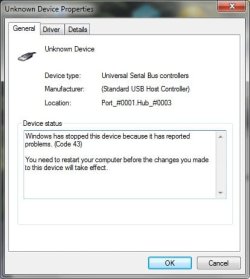
Monitor Webcam is shown under devices, but with the troubleshooting icon - going into that.... unknown device causing the problem, seems to be a usb host controller.

Color me confused about this one. I tried using online update via dev manager, nothing, no driver found. Any ideas?
Attached Thumbnails
WFP2208 Webcam and W7 - 64 Bit?-unknowndevice.jpg  
My System SpecsSystem Spec
Reply

 WFP2208 Webcam and W7 - 64 Bit? problems?


Thread Tools


Similar help and support threads for: WFP2208 Webcam and W7 - 64 Bit?
Thread Forum
webcam Hardware & Devices
Webcam Hardware & Devices
Webcam already in use Drivers
HP webcam Drivers
WebCam Help Hardware & Devices


All times are GMT -5. The time now is 05:32 AM.


Windows 7 Forums is an independent web site and has not been authorized,
sponsored, or otherwise approved by Microsoft Corporation.
"Windows 7" and related materials are trademarks of Microsoft Corp.
© Designer Media Ltd