Welcome to Windows 7 Forums. Our forum is dedicated to helping you find solutions with any problems, errors or issues you are experiencing with Windows 7. The Windows 7 forum also covers news and updates and has an extensive Windows 7 tutorial section that covers a wide range of tips and tricks.
System Manufacturer/Model Number Dell/Inspiron 537S OS Windows 7 x64 Professional CPU Intel Core 2 Quad CPU Q8200 @ 2.33GHz Motherboard Dell/Inspiron 537S Memory 4.00 GB Graphics Card ATI Radeon HD 4350 Sound Card Realtek High Definition Audio Monitor(s) Displays 1) Philips Brilliance 200 P3, 2) Dell S2409W, 3) Dell S2409W
Hard Drives Western Digital WD5000AAKS-75V0A0 (500 GB)
System Manufacturer/Model Number Built by me OS Windows 7 Ultimate x64 SP1 CPU Intel Core i7-950 (3.06GHz) OC to 3.8GHz Motherboard Gigabyte GA-X58A-UD5 rev 1, F6 Bios Memory Corsair Dominator -TR3X6G1600C8D (6GB - 3X2GB) Graphics Card AMD Radeon HD6950 2gig (Sapphire) Sound Card X-Fi Titanium Fatality Pro Monitor(s) Displays HP ZR22w 22" LCD Monitor Screen Resolution 1920 x 1080
Keyboard Logitech Wireless Wave Mouse Logitech Performance MX PSU Antec Signature - SG-850 Case Cooler Master HAF X Cooling Noctua NH-C12P SE14 Hard Drives Primary - OCZ Vertex 2 SSD (120GB). Storage - One 1TB WD Caviar Black, One 750 WD Caviar Black. Internet Speed High Speed Cable Other Info Memory Timings - 1600MHz @ 8-8-8-20-1T @ 1.640 volts
OS Windows 7 Pro 64 bit CPU Intel Core 2 Quad Motherboard Asus P5 Memory 6 GB Graphics Card GTX 275 Monitor(s) Displays IIyama ProLite E2403 Screen Resolution 1920 x 1200
System Manufacturer/Model Number Built by me OS Windows 7 Ultimate x64 SP1 CPU Intel Core i7-950 (3.06GHz) OC to 3.8GHz Motherboard Gigabyte GA-X58A-UD5 rev 1, F6 Bios Memory Corsair Dominator -TR3X6G1600C8D (6GB - 3X2GB) Graphics Card AMD Radeon HD6950 2gig (Sapphire) Sound Card X-Fi Titanium Fatality Pro Monitor(s) Displays HP ZR22w 22" LCD Monitor Screen Resolution 1920 x 1080
Keyboard Logitech Wireless Wave Mouse Logitech Performance MX PSU Antec Signature - SG-850 Case Cooler Master HAF X Cooling Noctua NH-C12P SE14 Hard Drives Primary - OCZ Vertex 2 SSD (120GB). Storage - One 1TB WD Caviar Black, One 750 WD Caviar Black. Internet Speed High Speed Cable Other Info Memory Timings - 1600MHz @ 8-8-8-20-1T @ 1.640 volts
Hello Signus, I read very carrefully all your advices, and I managed to get my ls4000 nikon scanner recognised by my laptop workin with Windows 7 pro 64, updating the driver as you said...
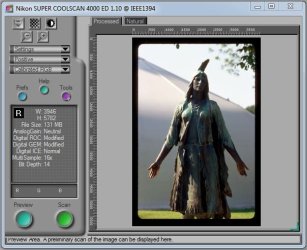
But, then, When I go in nikon scan 4.03, the scanner is recognized , but the buton to scan is not active(green) so I can't launch any scan...
Of course I tried several times to reinstall everything... nothing works... any idea about what to do ??
It should be working; I don't understand why it's not. Sorry. Are you sure the film strip holders are fully inserted into the scanner, or that the film is being read?
System Manufacturer/Model Number Built by me OS Windows 7 Ultimate x64 SP1 CPU Intel Core i7-950 (3.06GHz) OC to 3.8GHz Motherboard Gigabyte GA-X58A-UD5 rev 1, F6 Bios Memory Corsair Dominator -TR3X6G1600C8D (6GB - 3X2GB) Graphics Card AMD Radeon HD6950 2gig (Sapphire) Sound Card X-Fi Titanium Fatality Pro Monitor(s) Displays HP ZR22w 22" LCD Monitor Screen Resolution 1920 x 1080
Keyboard Logitech Wireless Wave Mouse Logitech Performance MX PSU Antec Signature - SG-850 Case Cooler Master HAF X Cooling Noctua NH-C12P SE14 Hard Drives Primary - OCZ Vertex 2 SSD (120GB). Storage - One 1TB WD Caviar Black, One 750 WD Caviar Black. Internet Speed High Speed Cable Other Info Memory Timings - 1600MHz @ 8-8-8-20-1T @ 1.640 volts
I use the automatic feeder 200, which is workin perfect on xp machine...
There the green button is just grey with Windows 7
Should this coming from the cable which is different between the 2 machines because I use a 6pins firewire on the scanner side and mini 4 pins firewire on the laptop side... ?
I'm not sure what you mean, but if you're using a different cable configuration then what was designed for the scanner, than yes it could be the problem.
Other than that I don't know why the software isn't working. My setup works just fine.
System Manufacturer/Model Number Built by me OS Windows 7 Ultimate x64 SP1 CPU Intel Core i7-950 (3.06GHz) OC to 3.8GHz Motherboard Gigabyte GA-X58A-UD5 rev 1, F6 Bios Memory Corsair Dominator -TR3X6G1600C8D (6GB - 3X2GB) Graphics Card AMD Radeon HD6950 2gig (Sapphire) Sound Card X-Fi Titanium Fatality Pro Monitor(s) Displays HP ZR22w 22" LCD Monitor Screen Resolution 1920 x 1080
Keyboard Logitech Wireless Wave Mouse Logitech Performance MX PSU Antec Signature - SG-850 Case Cooler Master HAF X Cooling Noctua NH-C12P SE14 Hard Drives Primary - OCZ Vertex 2 SSD (120GB). Storage - One 1TB WD Caviar Black, One 750 WD Caviar Black. Internet Speed High Speed Cable Other Info Memory Timings - 1600MHz @ 8-8-8-20-1T @ 1.640 volts
Hello signus, finally I found what was going wrong : it was just the automatic feeder sf200 which was not plug enough in the scanner, then, the software was not working ok...
Everything seems to be fine now !
Best regards and thank you very much for your help