Getting your Nikon Coolscan to work on W7 x64

One typo in your directions: C:\Program Files (x86)\Common Files\Nikon\Driver\Scan1394 should be C:\Program Files (x86)\Common Files\Nikon\Driver\ScanUSB.

Actually it can be either as some use Firewire (Coolscan 4000), while some use USB (Coolscan 5000).

If you open the inf file you will see a list of both USB and Firewire scanners listed, so depending on which one you have will determine which folder to look for. However I've added a note to the instructions stating this.

Thanks.
 

My Computer My Computer

At a glance

Windows 10 ProIntel Core i7-4770K (3.5Ghz)32 gig Corsair Dominator Platinum (4x8Gig)Sapphire Tri-X R9 Fury
Computer type
PC/Desktop
Computer Manufacturer/Model Number
Custom built by me.
OS
Windows 10 Pro
CPU
Intel Core i7-4770K (3.5Ghz)
Motherboard
Gigabyte G1 Sniper 5 (F10 Bios)
Memory
32 gig Corsair Dominator Platinum (4x8Gig)
Graphics Card(s)
Sapphire Tri-X R9 Fury
Sound Card
Soundblaster ZXR
Monitor(s) Displays
NEC PA242W 24" LCD Monitor
Screen Resolution
1920 x 1200
Hard Drives
Primary - Samsung 850 Pro (512gig), Samsung 840 Pro (256gig), 2TB WD Caviar Black.
PSU
EVGA Supernova 1000 G2
Case
Cooler Master HAF X
Cooling
Corsair H100i with Corsair Air Series SP120 Quiet Fans
Keyboard
Logitech Wireless Wave
Mouse
Logitech Performance MX
Internet Speed
High Speed Cable
Antivirus
Norton Security
Browser
IE11
Other Info
Memory Timings - 1866MHz @ 9-9-9-27-1T @ 1.5 volts
Yow! It worked!

Thanks for figuring out how to get Nikon Coolscan and Windows 7 x64 to play together, and posting such clear instructions. Everything worked the first time, and now my Super Coolscan 4000 ED is operating just fine on my new Windows 7 64bit build.

Now, if you happen to find a solution for getting a Minolta PagePro 1250W laser printer up and running on Windows 7 x64, you'll have my undying gratitude ;-).
 

My Computer My Computer

At a glance

Windows 7 65 bit
OS
Windows 7 65 bit
Thanks :)

As for this....

Now, if you happen to find a solution for getting a Minolta PagePro 1250W laser printer up and running on Windows 7 x64, you'll have my undying gratitude ;-).

You'll need to create a seperate post in the Drivers" section for the issue. I'm sure someone will try to find a solution for you.

Sorry
 

My Computer My Computer

At a glance

Windows 10 ProIntel Core i7-4770K (3.5Ghz)32 gig Corsair Dominator Platinum (4x8Gig)Sapphire Tri-X R9 Fury
Computer type
PC/Desktop
Computer Manufacturer/Model Number
Custom built by me.
OS
Windows 10 Pro
CPU
Intel Core i7-4770K (3.5Ghz)
Motherboard
Gigabyte G1 Sniper 5 (F10 Bios)
Memory
32 gig Corsair Dominator Platinum (4x8Gig)
Graphics Card(s)
Sapphire Tri-X R9 Fury
Sound Card
Soundblaster ZXR
Monitor(s) Displays
NEC PA242W 24" LCD Monitor
Screen Resolution
1920 x 1200
Hard Drives
Primary - Samsung 850 Pro (512gig), Samsung 840 Pro (256gig), 2TB WD Caviar Black.
PSU
EVGA Supernova 1000 G2
Case
Cooler Master HAF X
Cooling
Corsair H100i with Corsair Air Series SP120 Quiet Fans
Keyboard
Logitech Wireless Wave
Mouse
Logitech Performance MX
Internet Speed
High Speed Cable
Antivirus
Norton Security
Browser
IE11
Other Info
Memory Timings - 1866MHz @ 9-9-9-27-1T @ 1.5 volts
sygn21s and didierlee - Thanks to your efforts I was able to get my V ED up and running on Win 7 x64 today. Many thanks for your efforts!!!

David
 

My Computer My Computer

At a glance

Windows 7 Home Premium x64
OS
Windows 7 Home Premium x64
You are really GREAT!!! My 4000ED now works fine with my Windows 7 64 Bit. Thnak you.
 

My Computer My Computer

At a glance

windows 7
OS
windows 7
Thank you. And Happy scanning.

Enjoy :)
 

My Computer My Computer

At a glance

Windows 10 ProIntel Core i7-4770K (3.5Ghz)32 gig Corsair Dominator Platinum (4x8Gig)Sapphire Tri-X R9 Fury
Computer type
PC/Desktop
Computer Manufacturer/Model Number
Custom built by me.
OS
Windows 10 Pro
CPU
Intel Core i7-4770K (3.5Ghz)
Motherboard
Gigabyte G1 Sniper 5 (F10 Bios)
Memory
32 gig Corsair Dominator Platinum (4x8Gig)
Graphics Card(s)
Sapphire Tri-X R9 Fury
Sound Card
Soundblaster ZXR
Monitor(s) Displays
NEC PA242W 24" LCD Monitor
Screen Resolution
1920 x 1200
Hard Drives
Primary - Samsung 850 Pro (512gig), Samsung 840 Pro (256gig), 2TB WD Caviar Black.
PSU
EVGA Supernova 1000 G2
Case
Cooler Master HAF X
Cooling
Corsair H100i with Corsair Air Series SP120 Quiet Fans
Keyboard
Logitech Wireless Wave
Mouse
Logitech Performance MX
Internet Speed
High Speed Cable
Antivirus
Norton Security
Browser
IE11
Other Info
Memory Timings - 1866MHz @ 9-9-9-27-1T @ 1.5 volts
Brilliant - my 5000 ED worked first time after going through your steps and I'm thrilled to bits! The thought of having to give up on such a great piece of equipment was very disturbing.
 

My Computer My Computer

At a glance

Windows 7Intel X96508GB Kingston DDR3-1333NVidia Quadro FX570
Computer Manufacturer/Model Number
Home grown
OS
Windows 7
CPU
Intel X9650
Motherboard
Asus P5E3
Memory
8GB Kingston DDR3-1333
Graphics Card(s)
NVidia Quadro FX570
Sound Card
Creative X-Fi Elite Pro
Monitor(s) Displays
NEC SpectraView Reference 3090
Hard Drives
Western Digital Sata
PSU
Enermax
Case
Lian-Li
Thank you, I'm happy it worked for you. And yeah, this is a nice piece of equipment, even now.

Enjoy :)
 

My Computer My Computer

At a glance

Windows 10 ProIntel Core i7-4770K (3.5Ghz)32 gig Corsair Dominator Platinum (4x8Gig)Sapphire Tri-X R9 Fury
Computer type
PC/Desktop
Computer Manufacturer/Model Number
Custom built by me.
OS
Windows 10 Pro
CPU
Intel Core i7-4770K (3.5Ghz)
Motherboard
Gigabyte G1 Sniper 5 (F10 Bios)
Memory
32 gig Corsair Dominator Platinum (4x8Gig)
Graphics Card(s)
Sapphire Tri-X R9 Fury
Sound Card
Soundblaster ZXR
Monitor(s) Displays
NEC PA242W 24" LCD Monitor
Screen Resolution
1920 x 1200
Hard Drives
Primary - Samsung 850 Pro (512gig), Samsung 840 Pro (256gig), 2TB WD Caviar Black.
PSU
EVGA Supernova 1000 G2
Case
Cooler Master HAF X
Cooling
Corsair H100i with Corsair Air Series SP120 Quiet Fans
Keyboard
Logitech Wireless Wave
Mouse
Logitech Performance MX
Internet Speed
High Speed Cable
Antivirus
Norton Security
Browser
IE11
Other Info
Memory Timings - 1866MHz @ 9-9-9-27-1T @ 1.5 volts
Nikon Scanner Sets

I upgraded to windows 7 x64 machine from an XP machine, have the coolscan working but want to copy over the scanner sets from the XP machine, anyone know which directory they go in, seems like I thought they went in the Users/appData/nikon/4.0/setings folder but that doesn't seem to show for loading, any suggestions?
 

My Computer My Computer

At a glance

windows 7 x64
OS
windows 7 x64
Nikon Scanner sets

COpied scanner sets from my XP machine and want to install them on my W7 x64 machine, thought they go in users/appdata/nikon/nikonscan/4.0/settings but i cannot load them from there, any suggestions?
 

My Computer My Computer

At a glance

windows 7 x64
OS
windows 7 x64
Have you tried... C:\Users\your name\AppData\Roaming\Nikon\Nikon Scan\4.0\Settings ?

your name being the user name.
 

My Computer My Computer

At a glance

Windows 10 ProIntel Core i7-4770K (3.5Ghz)32 gig Corsair Dominator Platinum (4x8Gig)Sapphire Tri-X R9 Fury
Computer type
PC/Desktop
Computer Manufacturer/Model Number
Custom built by me.
OS
Windows 10 Pro
CPU
Intel Core i7-4770K (3.5Ghz)
Motherboard
Gigabyte G1 Sniper 5 (F10 Bios)
Memory
32 gig Corsair Dominator Platinum (4x8Gig)
Graphics Card(s)
Sapphire Tri-X R9 Fury
Sound Card
Soundblaster ZXR
Monitor(s) Displays
NEC PA242W 24" LCD Monitor
Screen Resolution
1920 x 1200
Hard Drives
Primary - Samsung 850 Pro (512gig), Samsung 840 Pro (256gig), 2TB WD Caviar Black.
PSU
EVGA Supernova 1000 G2
Case
Cooler Master HAF X
Cooling
Corsair H100i with Corsair Air Series SP120 Quiet Fans
Keyboard
Logitech Wireless Wave
Mouse
Logitech Performance MX
Internet Speed
High Speed Cable
Antivirus
Norton Security
Browser
IE11
Other Info
Memory Timings - 1866MHz @ 9-9-9-27-1T @ 1.5 volts
System Error Message

I'm afraid I'm hung up with my 4000ED. I followed the below instructions on my W7 64 bit system, creating and using a Nikon Files folder, and confirming the drivers and software downloaded and installed (software opens thru shortcut).
The Nikon Files folder now contains NKScnUSD.dll and the Scanners.inf files.
In the end I get a message: "Windows found driver software for your device but encountered an error while attempting to install it. [Model of Scanner] The system cannot find the file specified."

Any sugestions?

Many thanks,
dddiver

The Nikon Files folder should now contain these two files... NKScnUSD.dll and the Scanners.inf

View attachment 53226
C:\Program Files (x86)\Nikon\NkScan4\Nikon Files

After that....

6- Go to Device Manager – Control Panel, Device Manager and look for the "Unknown Device" (your scanner) with the yellow triangle.
7- Right click on it and choose "Update Driver Software" and choose "Browse my computer for driver software"
8- Click "Browse" and find the folder/location where you put your created inf file, EX: C:\Program Files (x86)\Nikon\NkScan4\Nikon Files and click "Next" this will install the inf driver for the scanner.
9- That’s it – Your Nikon Scan software should now be fully functional.
 

My Computer My Computer

At a glance

Windows 7
OS
Windows 7
I'm sorry dddiver, but I'm really not sure where you are? Could you clearify?

Thanks.

Also, Did you do this...

Example: I created a folder called Nikon Files. After I install the Nikon Scan software, I'll then place the Nikon Files folder inside the NKScan4 folder located at...
 

My Computer My Computer

At a glance

Windows 10 ProIntel Core i7-4770K (3.5Ghz)32 gig Corsair Dominator Platinum (4x8Gig)Sapphire Tri-X R9 Fury
Computer type
PC/Desktop
Computer Manufacturer/Model Number
Custom built by me.
OS
Windows 10 Pro
CPU
Intel Core i7-4770K (3.5Ghz)
Motherboard
Gigabyte G1 Sniper 5 (F10 Bios)
Memory
32 gig Corsair Dominator Platinum (4x8Gig)
Graphics Card(s)
Sapphire Tri-X R9 Fury
Sound Card
Soundblaster ZXR
Monitor(s) Displays
NEC PA242W 24" LCD Monitor
Screen Resolution
1920 x 1200
Hard Drives
Primary - Samsung 850 Pro (512gig), Samsung 840 Pro (256gig), 2TB WD Caviar Black.
PSU
EVGA Supernova 1000 G2
Case
Cooler Master HAF X
Cooling
Corsair H100i with Corsair Air Series SP120 Quiet Fans
Keyboard
Logitech Wireless Wave
Mouse
Logitech Performance MX
Internet Speed
High Speed Cable
Antivirus
Norton Security
Browser
IE11
Other Info
Memory Timings - 1866MHz @ 9-9-9-27-1T @ 1.5 volts
Sygnus,

I am pretty sure I did, as I was careful to follow the instructions. But since it's not working, perhaps I should try go back go back to square one and start over, then post how it went.


dddiver
 

My Computer My Computer

At a glance

Windows 7
OS
Windows 7
Error Message

Sygnus,

To be more specific about where I am, I:

1) Downloaded 4.0.3 for Vista 32 bit.
2) Downloaded scanners.zip
3)Extracted and saved scanners.inf file in a new folder called Nikon Files at C:\Program Files (x86)\Nikon\NKScan4\Nikon Files
4) I think I then moved Nikon Files folder to inside the NKScan4 folder.
5) Installed the 4.0.3 for Vista 32 bit.
6) Copied NKScnUSD.dII to Nikon Files so it presently contains both NKScnUSD.dII and scanners.inf.
7) Powered up scanner with firewire cord connected to both scanner and computer.
8) Used Device Manager to find scanner identified as unknown device.
9) Used Update Drive Software and browsed my computer to navigate to the Nikon Files folder.
10) Clicked Next and received the message "Windows found driver software for your device but encountered an error while attempting to install it. The system cannot find the file specified."

Do you think I should start over? If so, what to delete before restarting?

Many thanks!
dddiver

I'm sorry dddiver, but I'm really not sure where you are? Could you clearify?


Also, Did you do this...

Example: I created a folder called Nikon Files. After I install the Nikon Scan software, I'll then place the Nikon Files folder inside the NKScan4 folder located at...
 

My Computer My Computer

At a glance

Windows 7
OS
Windows 7
What Version of Windows 7 do you have... 32 or 64-bit
What scanner are you using?

Err... never mind, I see you have Windows 7 x64-bit and a Nikon Coolscan 4000.

I don't know why it's not working. Maybe you should start from scratch.
 

My Computer My Computer

At a glance

Windows 10 ProIntel Core i7-4770K (3.5Ghz)32 gig Corsair Dominator Platinum (4x8Gig)Sapphire Tri-X R9 Fury
Computer type
PC/Desktop
Computer Manufacturer/Model Number
Custom built by me.
OS
Windows 10 Pro
CPU
Intel Core i7-4770K (3.5Ghz)
Motherboard
Gigabyte G1 Sniper 5 (F10 Bios)
Memory
32 gig Corsair Dominator Platinum (4x8Gig)
Graphics Card(s)
Sapphire Tri-X R9 Fury
Sound Card
Soundblaster ZXR
Monitor(s) Displays
NEC PA242W 24" LCD Monitor
Screen Resolution
1920 x 1200
Hard Drives
Primary - Samsung 850 Pro (512gig), Samsung 840 Pro (256gig), 2TB WD Caviar Black.
PSU
EVGA Supernova 1000 G2
Case
Cooler Master HAF X
Cooling
Corsair H100i with Corsair Air Series SP120 Quiet Fans
Keyboard
Logitech Wireless Wave
Mouse
Logitech Performance MX
Internet Speed
High Speed Cable
Antivirus
Norton Security
Browser
IE11
Other Info
Memory Timings - 1866MHz @ 9-9-9-27-1T @ 1.5 volts
I think you need to start over, but.... IF YOU HAVE THE SOFTWARE ALREADY INSTALLED..... don't remove it. JUST DO THIS....

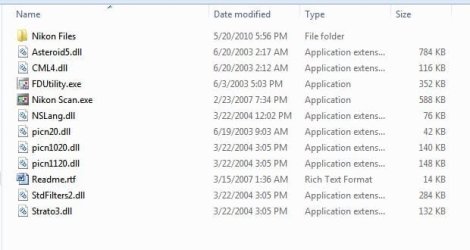
Go to C:\Program Files (x86)\Nikon\NkScan4 and make sure the folder looks like this....

Capture1.JPG

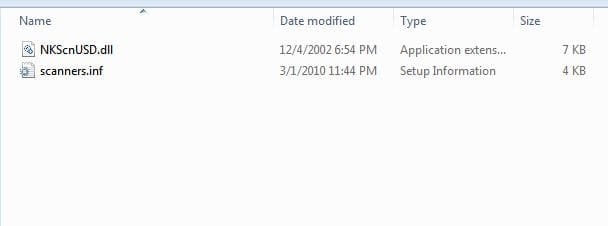
Than click on Nikon Files and make sure these two files are there.... NKScnUSD.dII and scanners.inf.


Capture2.JPG

If so, when doing a search for the driver, make sure you point it the the Nikon Files folder.

Let me know
 

My Computer My Computer

At a glance

Windows 10 ProIntel Core i7-4770K (3.5Ghz)32 gig Corsair Dominator Platinum (4x8Gig)Sapphire Tri-X R9 Fury
Computer type
PC/Desktop
Computer Manufacturer/Model Number
Custom built by me.
OS
Windows 10 Pro
CPU
Intel Core i7-4770K (3.5Ghz)
Motherboard
Gigabyte G1 Sniper 5 (F10 Bios)
Memory
32 gig Corsair Dominator Platinum (4x8Gig)
Graphics Card(s)
Sapphire Tri-X R9 Fury
Sound Card
Soundblaster ZXR
Monitor(s) Displays
NEC PA242W 24" LCD Monitor
Screen Resolution
1920 x 1200
Hard Drives
Primary - Samsung 850 Pro (512gig), Samsung 840 Pro (256gig), 2TB WD Caviar Black.
PSU
EVGA Supernova 1000 G2
Case
Cooler Master HAF X
Cooling
Corsair H100i with Corsair Air Series SP120 Quiet Fans
Keyboard
Logitech Wireless Wave
Mouse
Logitech Performance MX
Internet Speed
High Speed Cable
Antivirus
Norton Security
Browser
IE11
Other Info
Memory Timings - 1866MHz @ 9-9-9-27-1T @ 1.5 volts
Sygnus,

Well that did it. Previously I guess I was pointing to the scanners folder within the Nikon Files folder. This time I pointed to the Nikon Files folder and it worked.

Many, many thanks!
dddiver
www.undersea3d.com


If so, when doing a search for the driver, make sure you point it the the Nikon Files folder.

[/QUOTE]
 

My Computer My Computer

At a glance

Windows 7
OS
Windows 7
Glad I was able to help you sort through it.

Happy scanning :)

Peace :cool:
 

My Computer My Computer

At a glance

Windows 10 ProIntel Core i7-4770K (3.5Ghz)32 gig Corsair Dominator Platinum (4x8Gig)Sapphire Tri-X R9 Fury
Computer type
PC/Desktop
Computer Manufacturer/Model Number
Custom built by me.
OS
Windows 10 Pro
CPU
Intel Core i7-4770K (3.5Ghz)
Motherboard
Gigabyte G1 Sniper 5 (F10 Bios)
Memory
32 gig Corsair Dominator Platinum (4x8Gig)
Graphics Card(s)
Sapphire Tri-X R9 Fury
Sound Card
Soundblaster ZXR
Monitor(s) Displays
NEC PA242W 24" LCD Monitor
Screen Resolution
1920 x 1200
Hard Drives
Primary - Samsung 850 Pro (512gig), Samsung 840 Pro (256gig), 2TB WD Caviar Black.
PSU
EVGA Supernova 1000 G2
Case
Cooler Master HAF X
Cooling
Corsair H100i with Corsair Air Series SP120 Quiet Fans
Keyboard
Logitech Wireless Wave
Mouse
Logitech Performance MX
Internet Speed
High Speed Cable
Antivirus
Norton Security
Browser
IE11
Other Info
Memory Timings - 1866MHz @ 9-9-9-27-1T @ 1.5 volts
Nikon Coolscan 4000 vs. Windows 7

In attempting to get my old Nikon Coolscan 4000 working on my new Windows 7 operating system, I stumbled across your post. I followed your instructions, but can't get the Nikon Scan 4.0.3 application to install. I get an error message saying that "the installed version of the application could not be determined. The Setup will now terminate." I had previously uninstalled Vuescan, as instructed. How do I get past this problem?

Any help greatly appreciated!

Thanks,
Maureen
 

My Computer My Computer

At a glance

Windows 7, 64-bitAMD Phenom II X6 1055T Thban 2.8 Ghz Socket A...G.Skill Ripjaws Series 8Gb (2x4Gb) 240-Pin DD...MSI R5770 Hawk Radeon HD 5770 1 GB 128-bit GD...
Computer Manufacturer/Model Number
Built from separately purchased components
OS
Windows 7, 64-bit
CPU
AMD Phenom II X6 1055T Thban 2.8 Ghz Socket AM3 125W
Motherboard
ASUS M4A89TD Pro/USB3 AMD 890FX SATA 6B\Gb
Memory
G.Skill Ripjaws Series 8Gb (2x4Gb) 240-Pin DDR3 SDRAM
Graphics Card(s)
MSI R5770 Hawk Radeon HD 5770 1 GB 128-bit GDDRS PCI
Sound Card
Built in to motherboard
Monitor(s) Displays
ViewSonic Graphic Series G220 fb (old)
Screen Resolution
1280 x 1024
Hard Drives
Samsung Spinpoint F3 HD 103SJ 1TB 7200 RPM SATA
PSU
Cooler Master Silent Pro 700 RS-700-AMBA-D3 700W
Case
Cooler Master
Cooling
Built in to Cooler Master case
Keyboard
Old
Mouse
Mitsumi (old)
Internet Speed
Whatever Comcast provides for the lowest monthly fee
Back
Top