| Windows 7: Hp photosmart 2575 driver success |
28 Feb 2009
|
| | XP, Win_7 64 7100 24 posts |
Hp photosmart 2575 driver success I had trouble using the xp64 driver and did not want to download and install the full (huge) vista 64 driver package for this all in one printer. I tried to add printer but there was not an Photosmart 2570 series to pick from the windows driver list. So I tried the available 2600 series driver and some what to my surprise the 2600 series driver works | My System Specs |
| System Manufacturer/Model Number Home Built OS XP, Win_7 64 7100 CPU Intel Q6600 Motherboard ASUS P5E3 Deluxe X38 chipset Memory 1033 4x1 GB Graphics Card ATI 4850x2 Sound Card SoundMax Intergrated Monitor(s) Displays SyncMaster 2493HM, SyncMaster 204t Screen Resolution 1920x1200. 1600x120, Keyboard Tarantula Razor Mouse LogitecMx518 PSU PC P&C Silencer 750W Quad Case Cosmos Cooling Zallman 110 mm and more fans Hard Drives VelociRaprtor Raid 0 300 GB array, Raid 1 750 GB array Internet Speed 9.5 down .750 up |
03 Jun 2009
|
| | |
Photosmart 2575 driver succes. Scanning success? Can you scan?
Windows 7 can find the 2575 printer driver if you click on the option to search the internet while installing the printer, but the search takes a very long time, with no indication that anything is happening, so you are tempted to just reboot. Could be as long as five minutes or more with no indication of activity on the screen. Trouble is, it's printer only, no scanning.
I have to use a virtual XP (VMWare Workstation) to scan. | My System Specs | | |
06 Jun 2009
|
| | XP, Win_7 64 7100 24 posts |
No I can not scan... and today I need too. Using the 2600 driver is simply a quick work around to print. When I get full functionality of the device I will post back. | My System Specs | | System Manufacturer/Model Number Home Built OS XP, Win_7 64 7100 CPU Intel Q6600 Motherboard ASUS P5E3 Deluxe X38 chipset Memory 1033 4x1 GB Graphics Card ATI 4850x2 Sound Card SoundMax Intergrated Monitor(s) Displays SyncMaster 2493HM, SyncMaster 204t Screen Resolution 1920x1200. 1600x120, Keyboard Tarantula Razor Mouse LogitecMx518 PSU PC P&C Silencer 750W Quad Case Cosmos Cooling Zallman 110 mm and more fans Hard Drives VelociRaprtor Raid 0 300 GB array, Raid 1 750 GB array Internet Speed 9.5 down .750 up |
12 Jun 2009
|
| | Windows 7 x64 Ultimate 12,755 posts A Finnish immigrant in Leipzig, Germany |
Yes you can! I have Photosmart 2575 installed as a network printer, connectec with a network cabel to my router. I installed the printer from START>Devices and Printers>Add a printer, and choosing from the list Photosmart 2570-series (I found it only after clicking the Windows Update-button because first I only found Photosmart 2600 series)
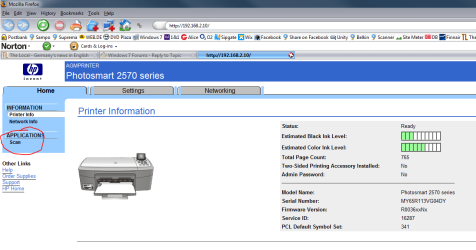
Scanning works perfectly. I just open my browser, and go to http://192.168.2.10, which is the IP-address I gave to my printer in my home network. It opens a network control panel for PS2575, where you just click SCAN-button and the job is done. Scanning works also from every graphics program I use.
If you do not specify a certain IP-address, printer takes the first free address every time it boots, which can cause problems.
Wish you nice scanning.
Kari
Last edited by Kari; 12 Jun 2009 at 05:16 AM..
Reason: Added a screenshot (Photosmart network control panel)
| My System Specs | | Computer type Laptop System Manufacturer/Model Number HP ENVY 17-1150eg OS Windows 7 x64 Ultimate CPU 1.6 GHz Intel Core i7-720QM Processor Memory 6 GB Graphics Card ATI Mobility Radeon HD 5850 Graphics Sound Card Beats sound system with integrated subwoofer Monitor(s) Displays 17" laptop display, 22" LCD and 32" Full HD TV through HDMI Screen Resolution 1600*900, 1680*1050 and 1920*1080 Keyboard Logitech diNovo Media Desktop Laser (bluetooth) Mouse Logitech MX1000 Laser (Bluetooth) Hard Drives Internal: 2 x 500 GB SATA Hard Disk Drive 7200 rpm
External: 2TB for backups, 3TB USB3 network drive for media Internet Speed 50/10 Mbps VDSL Antivirus MSE, Windows Defender Browser Maxthon 3.5.2. Other Info Windows 7 Ultimate Retail Full in English, additional Guest-user accounts in Finnish, German and Swedish (Working languages English & Swedish, Family language German, my own language, mother tongue, Finnish. I really need Ultimate to get to use Language Packs!) |
20 Aug 2009
|
| | |
THANKS! That little tip about going to the network interface in the browser is the single best piece of info I've gotten in a long time. | My System Specs | | |
21 Aug 2009
|
| | Windows 7 x64 Ultimate 12,755 posts A Finnish immigrant in Leipzig, Germany |

Quote: Originally Posted by jimdibb That little tip about going to the network interface in the browser is the single best piece of info I've gotten in a long time.  Thanks mate, nice to know somebody finds it OK.
Kari | My System Specs | | Computer type Laptop System Manufacturer/Model Number HP ENVY 17-1150eg OS Windows 7 x64 Ultimate CPU 1.6 GHz Intel Core i7-720QM Processor Memory 6 GB Graphics Card ATI Mobility Radeon HD 5850 Graphics Sound Card Beats sound system with integrated subwoofer Monitor(s) Displays 17" laptop display, 22" LCD and 32" Full HD TV through HDMI Screen Resolution 1600*900, 1680*1050 and 1920*1080 Keyboard Logitech diNovo Media Desktop Laser (bluetooth) Mouse Logitech MX1000 Laser (Bluetooth) Hard Drives Internal: 2 x 500 GB SATA Hard Disk Drive 7200 rpm
External: 2TB for backups, 3TB USB3 network drive for media Internet Speed 50/10 Mbps VDSL Antivirus MSE, Windows Defender Browser Maxthon 3.5.2. Other Info Windows 7 Ultimate Retail Full in English, additional Guest-user accounts in Finnish, German and Swedish (Working languages English & Swedish, Family language German, my own language, mother tongue, Finnish. I really need Ultimate to get to use Language Packs!) |
01 Oct 2009
|
| | |
Hi, i have Windows 7 x64 and HP2575 too. I have installed on LAN, the printer is OK, but the scan don't. I can scan trought the 192.168.0.2 (my printer IP), but i can't use Photoshop. Can anyone help me to set it? | My System Specs | | OS Win7 CPU Intel E8400 Motherboard Gigabyte Memory 2x2Gb 800 Corsair Graphics Card G45 Monitor(s) Displays Syncmaster 226bw PSU 450 Elan Vital Greenerger Case Cooler Master Elite 334 Hard Drives 2x1Tb Black caviar WDfals1001 |
02 Oct 2009
|
| | |

Quote: Originally Posted by emaborsa Hi, i have Windows 7 x64 and HP2575 too. I have installed on LAN, the printer is OK, but the scan don't. I can scan trought the 192.168.0.2 (my printer IP), but i can't use Photoshop. Can anyone help me to set it? Do you mean that you want to be able to use "file->scan" (or whatever) in Photoshop to trigger the scanning directly? I'm no photoshop expert, but I'd guess you can't do it.
I'm just happy the web interface works at all.
Good luck,
Jim | My System Specs | | |
02 Oct 2009
|
| | |

Quote: Originally Posted by jimdibb 
Quote: Originally Posted by emaborsa Hi, i have Windows 7 x64 and HP2575 too. I have installed on LAN, the printer is OK, but the scan don't. I can scan trought the 192.168.0.2 (my printer IP), but i can't use Photoshop. Can anyone help me to set it? Do you mean that you want to be able to use "file->scan" (or whatever) in Photoshop to trigger the scanning directly? I'm no photoshop expert, but I'd guess you can't do it.
I'm just happy the web interface works at all.
Good luck,
Jim With other O.S. i can.... it's only a driver question. | My System Specs | | OS Win7 CPU Intel E8400 Motherboard Gigabyte Memory 2x2Gb 800 Corsair Graphics Card G45 Monitor(s) Displays Syncmaster 226bw PSU 450 Elan Vital Greenerger Case Cooler Master Elite 334 Hard Drives 2x1Tb Black caviar WDfals1001 |
03 Oct 2009
|
| | |
"With other O.S. i can.... it's only a driver question."
Sorry, I meant you won't be able to do it with the web interface. The rest of the thread implies there is no driver that allows it to work.
Hope you do find something though. | My System Specs | | Hp photosmart 2575 driver success problems? All times are GMT -5. The time now is 12:32 AM. | |