| Windows 7: HP DJ970Cse Network Printer & Windows 7 |
29 Dec 2009
|
#1 | | Windows 7 64-Bit Home Premium Bangor, Maine |
HP DJ970Cse Network Printer & Windows 7 I have a HP Deskjet 970 Cse (parallel) printer attached to a computer that is running XP Sp3 on my network. I want to be able to use the printer across the network with machines running Windows 7 64-bit. When I "Add a Printer" in Windows 7 it "sees" the printer but says that it can't communicate with it. The HP web site talks about a generic driver in Windows 7 that will work but gives no information on the name of the driver or where in Windows to find it.
The printer is parallel only and the Windows 7 computers don't have parallel ports, so I can't hook the printer directly up to the Windows 7 computers. I can't see spending $50 on a parallel/USB cord just for downloading a driver either.
Any help would be greatly appreciated. | My System Specs |
| System Manufacturer/Model Number Dell Studio XPS 435T/9000 OS Windows 7 64-Bit Home Premium CPU Intel(R) Core(TM) i7 CPU 920 @ 2.67GHZ, 2668 Mhz, 4 Core(s) Memory 12 GB DDR3 SDRAM at 1066 Mhz Graphics Card NVIDIA GeForce GTX 260 1.75 GB RAM Sound Card Sound Blaster X-Fi Xtreme Audio Monitor(s) Displays Dell ST2410 24 Inch Flat Panel Display Screen Resolution 1920 x 1080 Keyboard Dell 101 key keyboard Mouse Microsoft Wireless PSU crappy pure Sine wave ONLY PSU. Won't work with most UPS's. Case Tacky looking Tower but functional Cooling Air cooled fans Hard Drives SAMSUNG HD103UJ (1TB Serial ATA 2 Hard Drive 7200 RPM) Internet Speed Cable |
30 Dec 2009
|
#2 | | Windows 7 x64 Ultimate A Finnish immigrant in Leipzig, Germany |
Hello DaLog, welcome to the Seven Forums.
This might work: - Go to Devices and Printers
- Click Add a printer
- Choose Add a local printer
- Choose nul (Local Port) from drop down menu, click Next
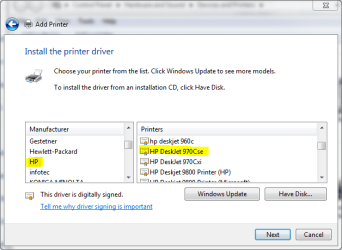
 - Choose your printer from the list, click Next
 - Let Windows install the drivers, change nothing. Click Next when dialogs appear (a couple of times) and finally click Finish
When done, repeat the procedure but this time choose Add a Network Printer.
Kari | My System Specs | | Computer type Laptop System Manufacturer/Model Number HP ENVY 17-1150eg OS Windows 7 x64 Ultimate CPU 1.6 GHz Intel Core i7-720QM Processor Memory 6 GB Graphics Card ATI Mobility Radeon HD 5850 Graphics Sound Card Beats sound system with integrated subwoofer Monitor(s) Displays 17" laptop display, 22" LCD and 32" Full HD TV through HDMI Screen Resolution 1600*900, 1680*1050 and 1920*1080 Keyboard Logitech diNovo Media Desktop Laser (bluetooth) Mouse Logitech MX1000 Laser (Bluetooth) Hard Drives Internal: 2 x 500 GB SATA Hard Disk Drive 7200 rpm
External: 2TB for backups, 3TB USB3 network drive for media Internet Speed 50/10 Mbps VDSL Antivirus MSE, Windows Defender Browser Maxthon 3.5.2. Other Info Windows 7 Ultimate Retail Full in English, additional Guest-user accounts in Finnish, German and Swedish (Working languages English & Swedish, Family language German, my own language, mother tongue, Finnish. I really need Ultimate to get to use Language Packs!) |
30 Dec 2009
|
#3 | | Windows 7 64-Bit Home Premium Bangor, Maine |
Kari,
I did exactly as you said and got the following results. Everything worked fine through step six of your instructions above. When I tried repeating the procedure but this time choosing "Add a Network Printer" I got a screen titled
"Searching for available printers..." with an entry in that windows that says "HP DJ970Cse on DELL8100" Address \\DELL8100\HP DJ970Cse. I highlighted this entry and clicked on "Next".
The next screen that popped up said
"Connecting to HP DJ 970Cse on DELL8100" followed shortly thereafter by another screen saying.
"No driver found" "Windows can't find a driver for hp deskjet 970c series on the network. To locate one manually click OK. When I click on OK another window opens asking me to enter the path to the INF file.
If I only knew what the name of the generic driver file was and WHERE on my machine it is located, I could just "Browse" to the correct file and install the driver. BUT what is the INF file name and where is it located?
BTW I used the "Snipping Tool" to capture pretty pictures of the screens I got, to make it easier on you to follow my ramblings but I couldn't figure out how to get them into this message. My kudos to you for knowing how to do that.
Please Help me figure this out. Thank you very much. | My System Specs | | System Manufacturer/Model Number Dell Studio XPS 435T/9000 OS Windows 7 64-Bit Home Premium CPU Intel(R) Core(TM) i7 CPU 920 @ 2.67GHZ, 2668 Mhz, 4 Core(s) Memory 12 GB DDR3 SDRAM at 1066 Mhz Graphics Card NVIDIA GeForce GTX 260 1.75 GB RAM Sound Card Sound Blaster X-Fi Xtreme Audio Monitor(s) Displays Dell ST2410 24 Inch Flat Panel Display Screen Resolution 1920 x 1080 Keyboard Dell 101 key keyboard Mouse Microsoft Wireless PSU crappy pure Sine wave ONLY PSU. Won't work with most UPS's. Case Tacky looking Tower but functional Cooling Air cooled fans Hard Drives SAMSUNG HD103UJ (1TB Serial ATA 2 Hard Drive 7200 RPM) Internet Speed Cable |
30 Dec 2009
|
#4 | | Windows 7 64-Bit Home Premium Bangor, Maine |
HEY!!! I think I just figured out how to get those pictures into the message. Here are the rest of them in order seen. | My System Specs | | System Manufacturer/Model Number Dell Studio XPS 435T/9000 OS Windows 7 64-Bit Home Premium CPU Intel(R) Core(TM) i7 CPU 920 @ 2.67GHZ, 2668 Mhz, 4 Core(s) Memory 12 GB DDR3 SDRAM at 1066 Mhz Graphics Card NVIDIA GeForce GTX 260 1.75 GB RAM Sound Card Sound Blaster X-Fi Xtreme Audio Monitor(s) Displays Dell ST2410 24 Inch Flat Panel Display Screen Resolution 1920 x 1080 Keyboard Dell 101 key keyboard Mouse Microsoft Wireless PSU crappy pure Sine wave ONLY PSU. Won't work with most UPS's. Case Tacky looking Tower but functional Cooling Air cooled fans Hard Drives SAMSUNG HD103UJ (1TB Serial ATA 2 Hard Drive 7200 RPM) Internet Speed Cable |
30 Dec 2009
|
#5 | | Windows 7 x64 Ultimate A Finnish immigrant in Leipzig, Germany |
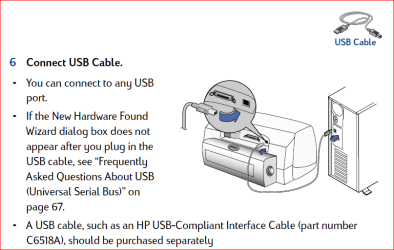
According to User's Manual ( http://h10032.www1.hp.com/ctg/Manual/bpd06955.pdf), actual page 56, PDF-file page 63, your printer can be connected with an USB cable:
Reboot your Windows 7 machine after installing DJ970 as a local printer, connect with USB and try it works. After that, reconnect it to XP machine and try setting it up over the network again.
Other than this, I have no ideas.
Kari | My System Specs | | Computer type Laptop System Manufacturer/Model Number HP ENVY 17-1150eg OS Windows 7 x64 Ultimate CPU 1.6 GHz Intel Core i7-720QM Processor Memory 6 GB Graphics Card ATI Mobility Radeon HD 5850 Graphics Sound Card Beats sound system with integrated subwoofer Monitor(s) Displays 17" laptop display, 22" LCD and 32" Full HD TV through HDMI Screen Resolution 1600*900, 1680*1050 and 1920*1080 Keyboard Logitech diNovo Media Desktop Laser (bluetooth) Mouse Logitech MX1000 Laser (Bluetooth) Hard Drives Internal: 2 x 500 GB SATA Hard Disk Drive 7200 rpm
External: 2TB for backups, 3TB USB3 network drive for media Internet Speed 50/10 Mbps VDSL Antivirus MSE, Windows Defender Browser Maxthon 3.5.2. Other Info Windows 7 Ultimate Retail Full in English, additional Guest-user accounts in Finnish, German and Swedish (Working languages English & Swedish, Family language German, my own language, mother tongue, Finnish. I really need Ultimate to get to use Language Packs!) |
30 Dec 2009
|
#6 | | Windows 7 64-Bit Home Premium Bangor, Maine |
Kari,
I feel like such an IDIOT. The printer has been sitting where it is for so many years with a parallel cable attached that I didn't even remember that it had a USB port in the back. Let me tell you the steps I took to get it WORKING!! 
1) First off, I did what you said and moved the printer into the room with the new Windows 7 machines and hooked it up with a D shaped USB cable that I had on a USB external HD (LUCKY to even have a cable). Imagine my surprise when Windows 7 said that it automatically installed device drivers for the printer. The printer then worked GREAT as a Local Printer hooked directly to the Windows 7 machine.
2) Next, I moved the printer back into the room with the XP SP3 computers and hooked it up with the parallel cable again (I wanted to save my only D shaped USB cable for the external HD).
3) Now I tried to install the printer as a Network Printer but ran into the same exact problem as before. The computer could "see" the printer on the network but said it couldn't find a driver for it. 
4) I did several hours of research on the web and hit upon a solution that WORKED!
5) I selected "Add a Printer" from the Devices and Printers menu.
6) I selected "Add a LOCAL printer"
7) In the next menu I selected "Create a new port" and "Local port"
8) In the next menu where it asks "Enter a port name", I entered \\DELL8100\970Cse. ("DELL8100" is the name of the computer that shares the printer and "970Cse" is the name of the printer share) In my humble opinion the "Enter a port name" should be labeled "Enter a port PATH" instead!!!!!
9) Then I just kept hitting "Enter" until it finished.
Imagine my complete and total surprise when I selected "Print a Test page" and I could hear the old HP Deskjet 970 Cse printer come to life in the next room. I AM ELATED....
Your advice about hooking the printer directly to the new Windows 7 machine first in order to automatically download drivers worked GREAT. To be honest with you, I don't know whether or not the whole setting it up as a local printer through a new Local port would have worked or not if I hadn't followed your advice and gotten the drivers through Windows 7 directly.
In any case IT IS WORKING and I owe you a debt of gratitude. I also added to your reputation (I think) by clicking on the button. THANKS AGAIN VERY MUCH! | My System Specs | | System Manufacturer/Model Number Dell Studio XPS 435T/9000 OS Windows 7 64-Bit Home Premium CPU Intel(R) Core(TM) i7 CPU 920 @ 2.67GHZ, 2668 Mhz, 4 Core(s) Memory 12 GB DDR3 SDRAM at 1066 Mhz Graphics Card NVIDIA GeForce GTX 260 1.75 GB RAM Sound Card Sound Blaster X-Fi Xtreme Audio Monitor(s) Displays Dell ST2410 24 Inch Flat Panel Display Screen Resolution 1920 x 1080 Keyboard Dell 101 key keyboard Mouse Microsoft Wireless PSU crappy pure Sine wave ONLY PSU. Won't work with most UPS's. Case Tacky looking Tower but functional Cooling Air cooled fans Hard Drives SAMSUNG HD103UJ (1TB Serial ATA 2 Hard Drive 7200 RPM) Internet Speed Cable |
30 Dec 2009
|
#7 | | Windows 7 x64 Ultimate A Finnish immigrant in Leipzig, Germany |
I have to thank you! When you tell it now it seems so obvious solution I can not understand I have not tried that trick before, creating a new port!
I have to rep you now. Not because I feel I must return a favor but because this really is a valuable tip.
Thank you!
Kari | My System Specs | | Computer type Laptop System Manufacturer/Model Number HP ENVY 17-1150eg OS Windows 7 x64 Ultimate CPU 1.6 GHz Intel Core i7-720QM Processor Memory 6 GB Graphics Card ATI Mobility Radeon HD 5850 Graphics Sound Card Beats sound system with integrated subwoofer Monitor(s) Displays 17" laptop display, 22" LCD and 32" Full HD TV through HDMI Screen Resolution 1600*900, 1680*1050 and 1920*1080 Keyboard Logitech diNovo Media Desktop Laser (bluetooth) Mouse Logitech MX1000 Laser (Bluetooth) Hard Drives Internal: 2 x 500 GB SATA Hard Disk Drive 7200 rpm
External: 2TB for backups, 3TB USB3 network drive for media Internet Speed 50/10 Mbps VDSL Antivirus MSE, Windows Defender Browser Maxthon 3.5.2. Other Info Windows 7 Ultimate Retail Full in English, additional Guest-user accounts in Finnish, German and Swedish (Working languages English & Swedish, Family language German, my own language, mother tongue, Finnish. I really need Ultimate to get to use Language Packs!) |
30 Dec 2009
|
#8 | | Windows 7 64-Bit Home Premium Bangor, Maine |
Kari,
I put my original post into this forum ( Drivers) as well as the Networks & Sharing forum and the Hardware Devices forum. I did this because the problem really applies to all these subjects. Do you think I should copy the solution that WE came up with in those forums as well so people can find it easier or would that be considered "spamming" the forums or some other bad etiquette? | My System Specs | | System Manufacturer/Model Number Dell Studio XPS 435T/9000 OS Windows 7 64-Bit Home Premium CPU Intel(R) Core(TM) i7 CPU 920 @ 2.67GHZ, 2668 Mhz, 4 Core(s) Memory 12 GB DDR3 SDRAM at 1066 Mhz Graphics Card NVIDIA GeForce GTX 260 1.75 GB RAM Sound Card Sound Blaster X-Fi Xtreme Audio Monitor(s) Displays Dell ST2410 24 Inch Flat Panel Display Screen Resolution 1920 x 1080 Keyboard Dell 101 key keyboard Mouse Microsoft Wireless PSU crappy pure Sine wave ONLY PSU. Won't work with most UPS's. Case Tacky looking Tower but functional Cooling Air cooled fans Hard Drives SAMSUNG HD103UJ (1TB Serial ATA 2 Hard Drive 7200 RPM) Internet Speed Cable |
30 Dec 2009
|
#9 | | Windows 7 x64 Ultimate A Finnish immigrant in Leipzig, Germany |
You'd do us all a favor if you write a summary, first describing the issue and then the solution. This is your solution, honors where they belong. No need to mention me.
Post it under Hardware, give an informative title. Mark the new thread "Solved" so other members can see it already from the thread list that this issue is solved.
I think you are going to be an asset to our Seven Forums. Nice to have you here.
Kari | My System Specs | | Computer type Laptop System Manufacturer/Model Number HP ENVY 17-1150eg OS Windows 7 x64 Ultimate CPU 1.6 GHz Intel Core i7-720QM Processor Memory 6 GB Graphics Card ATI Mobility Radeon HD 5850 Graphics Sound Card Beats sound system with integrated subwoofer Monitor(s) Displays 17" laptop display, 22" LCD and 32" Full HD TV through HDMI Screen Resolution 1600*900, 1680*1050 and 1920*1080 Keyboard Logitech diNovo Media Desktop Laser (bluetooth) Mouse Logitech MX1000 Laser (Bluetooth) Hard Drives Internal: 2 x 500 GB SATA Hard Disk Drive 7200 rpm
External: 2TB for backups, 3TB USB3 network drive for media Internet Speed 50/10 Mbps VDSL Antivirus MSE, Windows Defender Browser Maxthon 3.5.2. Other Info Windows 7 Ultimate Retail Full in English, additional Guest-user accounts in Finnish, German and Swedish (Working languages English & Swedish, Family language German, my own language, mother tongue, Finnish. I really need Ultimate to get to use Language Packs!) HP DJ970Cse Network Printer & Windows 7 problems? All times are GMT -5. The time now is 02:11 PM. | |