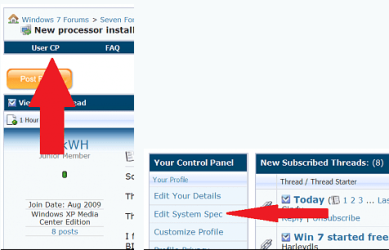
Like thefabe stated, filling in your system specs will help us help you better. Anyway the driver page for your printer is
right here. Select your 32 or 64 bit and install them and get back to us to see if they work because it may be an issue with setting(s) in windows, though having updated drivers is recommended either way.
Thank you very much for your attempted help.
I am having the same problem as the original poster.
I am running Windows 7 - 32 bit
I have been to the link provided. It says:
~~~~~~~~~~~~~~~~~~~~~~~~~~~~~~~~~~~~~~~~~
LaserJet 6L:
Category 3 - Windows 7 print driver available
LaserJet model specific printer drivers are currently available within the Windows 7 operating system. Installation of these drivers can be performed via Devices and Printers , formerly known as the Add Printer Wizard .
NOTE: If the model specific driver that you are looking for does not appear in the list of available printers, clicking the Windows Update button underneath the list of available printers may provide additional drivers to choose from. Requires opt-in to Microsoft Windows Update and internet connection.
~~~~~~~~~~~~~~~~~~~~~~~~~~~~~~~~~~~~~~~~~~~~~~~~~~~~~~~~
THIS IS NOT TRUE FOR ME. There is NO LaserJet 6L driver in the list. And clicking on "check for recent updates" yields nothing useful. Everyone wants to say "Just run the "Add Printer Wizard" and follow the instructions and everything will work fine. Not true in this case.
We're asking for the LaserJet 6L printer driver for Windows 7 - 32 bit because it's NOT in the list under "select your printer"
I'm asking for the 32 bit driver because I'm running Open Office Suite, which I know runs only under 32 bit mode at this time.
There is no LaserJet 6L driver at the link provided and NO LaserJet 6Ldriver in Windows 7
I hope I'm not overdoing this. But sometimes people just don't seem to clearly understand the question.