| Windows 7: Xbox 360 PC wireless gaming Receiver |
14 Aug 2012
|
| | Win 7 Home Premium x64 3 posts |
I've installed drivers manually as in instruction, but controller doesn't sync | My System Specs |
| OS Win 7 Home Premium x64 |
15 Aug 2012
|
| | Windows 7 Ultimate x64 & UE 3.4 x64 136 posts Alberta |

Quote: Originally Posted by ufna I've installed drivers manually as in instruction, but controller doesn't sync  Did you press the button near the battery pack?
Are your batteries new? | My System Specs | | System Manufacturer/Model Number Evga X58 OS Windows 7 Ultimate x64 & UE 3.4 x64 CPU Core i7 950 - 3.06 GHz Motherboard EVGA X58 SLI Memory Corsair XMS3 Dominator CMP12GX3M3A1600C9 12GB Graphics Card eVGA GTX 550 TI-FPB 1GB - eVGA GeForce GT 220 1GB Sound Card High Definition Audio Monitor(s) Displays ASUS VH242H 24 LCD Screen Resolution 1920 X 1080 Keyboard Logitech Mouse Logitech PSU OCZ ZX Series 1250W PSU Case ANTEC NINE HUNDRED TWO Cooling ZALMAN CNPS10X Extreme Hard Drives 2x - Seagate 1000GB Hard Drive SATA 3Gb/s 32MB Cache
Seagate 750GB Barracuda 7200.12 SATA II w/ 32MB Cache
WDC WD2500AAJB-00J3A0 ATA Device Other Info 2 x- HL-DT-ST DVDRAM GH24NS50 ATA Device |
15 Aug 2012
|
| | Win 7 Home Premium x64 3 posts |

Quote: Originally Posted by windrider Did you press the button near the battery pack?
Are your batteries new? Yes, I've installed new batteries (and tested few of them to be sure). When I press the button near the battery pack the lights around "big X" start to "rotate". The same time I press the button on receiver, and the light here starts to blink. But few seconds later the lights on controller starts to blink together, light on receiver permanently turned on, and nothing happend more | My System Specs | | OS Win 7 Home Premium x64 |
15 Aug 2012
|
| | Windows 7 Ultimate x64 & UE 3.4 x64 136 posts Alberta |

Quote: Originally Posted by ufna 
Quote: Originally Posted by windrider Did you press the button near the battery pack?
Are your batteries new? Yes, I've installed new batteries (and tested few of them to be sure). When I press the button near the battery pack the lights around "big X" start to "rotate". The same time I press the button on receiver, and the light here starts to blink. But few seconds later the lights on controller starts to blink together, light on receiver permanently turned on, and nothing happend more  Do you know if your Xbox 360 Wireless is a clone, or an original. I have heard from some that could make a difference.
Do you have another USB to try? | My System Specs | | System Manufacturer/Model Number Evga X58 OS Windows 7 Ultimate x64 & UE 3.4 x64 CPU Core i7 950 - 3.06 GHz Motherboard EVGA X58 SLI Memory Corsair XMS3 Dominator CMP12GX3M3A1600C9 12GB Graphics Card eVGA GTX 550 TI-FPB 1GB - eVGA GeForce GT 220 1GB Sound Card High Definition Audio Monitor(s) Displays ASUS VH242H 24 LCD Screen Resolution 1920 X 1080 Keyboard Logitech Mouse Logitech PSU OCZ ZX Series 1250W PSU Case ANTEC NINE HUNDRED TWO Cooling ZALMAN CNPS10X Extreme Hard Drives 2x - Seagate 1000GB Hard Drive SATA 3Gb/s 32MB Cache
Seagate 750GB Barracuda 7200.12 SATA II w/ 32MB Cache
WDC WD2500AAJB-00J3A0 ATA Device Other Info 2 x- HL-DT-ST DVDRAM GH24NS50 ATA Device |
15 Aug 2012
|
| | Win 7 Home Premium x64 3 posts |

Quote: Originally Posted by windrider Do you know if your Xbox 360 Wireless is a clone, or an original. I have heard from some that could make a difference.
Do you have another USB to try? It looks original - I bought it in one box (controller and receiver) "by Microsoft", but it made in China. But I found strange that it has JR9-00012 serie as 11 is the last on MS website. Maybe it's the fake  Also I've tried different USB ports - I have a powerfull PC and there is no power problem here I think.
Maybe the best solution is to return the device to seller. Maybe I'll make it and try another one. | My System Specs | | OS Win 7 Home Premium x64 |
15 Aug 2012
|
| | Windows 7 Home Premium 64-Bit 4 posts |
Unfortunately none of the solutions in this thread worked for me. I’m using Windows 7 64-Bit with the generic Xbox 360 Wireless Receiver.
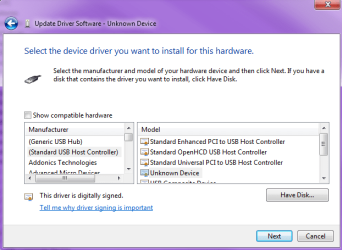
I was able to install the driver manually, and the receiver now appears in Device Manager under 'Microsoft Common Controller for Windows Class’ as ‘Xbox 360 Wireless Receiver for Windows’. I’m also able to connect my wireless controller to the receiver, and the player 1 light on the controller lights up and stays lit.
However, my computer does not get any input from the controller and does not recognize that the controller is connected. Anyone have any ideas for a fix? | My System Specs | | OS Windows 7 Home Premium 64-Bit |
16 Aug 2012
|
| | Windows 7 Ultimate x64 & UE 3.4 x64 136 posts Alberta |

Quote: Originally Posted by capitrium Unfortunately none of the solutions in this thread worked for me. I’m using Windows 7 64-Bit with the generic Xbox 360 Wireless Receiver.
I was able to install the driver manually, and the receiver now appears in Device Manager under 'Microsoft Common Controller for Windows Class’ as ‘Xbox 360 Wireless Receiver for Windows’. I’m also able to connect my wireless controller to the receiver, and the player 1 light on the controller lights up and stays lit.
However, my computer does not get any input from the controller and does not recognize that the controller is connected. Anyone have any ideas for a fix? YOu mean if you go to 'Devices and Printers' you don't see the 'Xbox 360 Wireless Controller'?
It should show up there when connected. | My System Specs | | System Manufacturer/Model Number Evga X58 OS Windows 7 Ultimate x64 & UE 3.4 x64 CPU Core i7 950 - 3.06 GHz Motherboard EVGA X58 SLI Memory Corsair XMS3 Dominator CMP12GX3M3A1600C9 12GB Graphics Card eVGA GTX 550 TI-FPB 1GB - eVGA GeForce GT 220 1GB Sound Card High Definition Audio Monitor(s) Displays ASUS VH242H 24 LCD Screen Resolution 1920 X 1080 Keyboard Logitech Mouse Logitech PSU OCZ ZX Series 1250W PSU Case ANTEC NINE HUNDRED TWO Cooling ZALMAN CNPS10X Extreme Hard Drives 2x - Seagate 1000GB Hard Drive SATA 3Gb/s 32MB Cache
Seagate 750GB Barracuda 7200.12 SATA II w/ 32MB Cache
WDC WD2500AAJB-00J3A0 ATA Device Other Info 2 x- HL-DT-ST DVDRAM GH24NS50 ATA Device |
17 Aug 2012
|
| | Windows 7 Home Premium 64-Bit 4 posts |

Quote: Originally Posted by windrider 
Quote: Originally Posted by capitrium Unfortunately none of the solutions in this thread worked for me. I’m using Windows 7 64-Bit with the generic Xbox 360 Wireless Receiver.
I was able to install the driver manually, and the receiver now appears in Device Manager under 'Microsoft Common Controller for Windows Class’ as ‘Xbox 360 Wireless Receiver for Windows’. I’m also able to connect my wireless controller to the receiver, and the player 1 light on the controller lights up and stays lit.
However, my computer does not get any input from the controller and does not recognize that the controller is connected. Anyone have any ideas for a fix? YOu mean if you go to 'Devices and Printers' you don't see the 'Xbox 360 Wireless Controller'?
It should show up there when connected. Yes, that is what I mean. The controller lights up as if it was connected, but doesn't actually make a connection to the pc. | My System Specs | | OS Windows 7 Home Premium 64-Bit |
18 Aug 2012
|
| | Windows 7 Ultimate x64 & UE 3.4 x64 136 posts Alberta |
Ok I am not sure what is going on there. Maybe try another USB port, or try reinstalling again.
Also for some check out post #65 for more tips, or here [Guide] Xbox 360 Gaming Receiver Windows 7 Connection/Driver Problems | My System Specs | | System Manufacturer/Model Number Evga X58 OS Windows 7 Ultimate x64 & UE 3.4 x64 CPU Core i7 950 - 3.06 GHz Motherboard EVGA X58 SLI Memory Corsair XMS3 Dominator CMP12GX3M3A1600C9 12GB Graphics Card eVGA GTX 550 TI-FPB 1GB - eVGA GeForce GT 220 1GB Sound Card High Definition Audio Monitor(s) Displays ASUS VH242H 24 LCD Screen Resolution 1920 X 1080 Keyboard Logitech Mouse Logitech PSU OCZ ZX Series 1250W PSU Case ANTEC NINE HUNDRED TWO Cooling ZALMAN CNPS10X Extreme Hard Drives 2x - Seagate 1000GB Hard Drive SATA 3Gb/s 32MB Cache
Seagate 750GB Barracuda 7200.12 SATA II w/ 32MB Cache
WDC WD2500AAJB-00J3A0 ATA Device Other Info 2 x- HL-DT-ST DVDRAM GH24NS50 ATA Device |
18 Aug 2012
|
| | Windows 7 Ultimate 64bit 2,193 posts Norfolk, VA |
I own both the white original reciever as well as the new black combo and neither required a driver disc.
Windows saw the hardware and installed the required drivers automatically.
This is the black one I ordered, Amazon.com: Microsoft Xbox 360 Wireless Controller for Windows: Electronics | My System Specs | | System Manufacturer/Model Number HAL-9000 OS Windows 7 Ultimate 64bit CPU Intel i7 3770K Motherboard Asus Sabertooth Z77 Memory 16GB DDR3 1333 Corsair XMS3 Graphics Card XFX HD6950 2GB EyeFinity Sound Card Logitech G35 & Sennheiser PC135 & VIA HD Monitor(s) Displays 23" HP 2310e, 23" Samsung B2230, 21.5" Viewsonic Screen Resolution 5760x1080 Keyboard Logitech G15 and G13 Mouse Logitech G700 Gaming Mouse PSU Antec True Power New 650watt Case Cooler Master HAF-932 Cooling Corsair H60 Hydro Cooler, 3x 230mm Fans, 2x120mm Fan Hard Drives 16TB of Storage
128GB & 256GB Crucial M4 SSD's, 2X 1TB WD Black, 3x 2TB WD, 3x 2TB Samsung F4, 1.5TB Seagate, WD 500GB, Internet Speed 50/10 Mbit Other Info Speakers : Alesis M1 Active Mk2 Studio Monitors , APC RS 1200 UPS, HP 4500DN Color Laser, HP P1006 mono Laser, Kodak 8500 Dye-Sub, Epson 1280 inkjet, Epson Worforce 610 MFC Xbox 360 PC wireless gaming Receiver problems? All times are GMT -5. The time now is 05:51 PM. | |