Windows 7 Forums Search
Welcome to Windows 7 Forums. Our forum is dedicated to helping you find solutions with any problems, errors or issues you are experiencing with Windows 7. The Windows 7 forum also covers news and updates and has an extensive Windows 7 tutorial section that covers a wide range of tips and tricks.


Windows 7 - Belkin F5D9050 Driver Issues


04-27-2009   #1


Windows 7 - Build 7100


Belkin F5D9050 Driver Issues

Hey all,

This is my first time posting on the forums and I'm having issues with my Belkin wireless adapter (Model: F5D9050 Ver: 3000). I've been browsing through the forums and have seen a lot of the threads with people having issues with the Belkin F5D7050 and I've tried fixes outlined throughout those pages with the drivers for my device obviously. I've tried compatibility mode with XP and Vista drivers, I've tried installing and uninstalling so many times it's not even funny but no matter what I've done the device always comes up as unrecognized and the drivers never load properly. I wasn't sure if anyone could offer up any insight on something else I could try or if anyone else has been able to get this particular USB Wireless adapter working? I'm running the 64bit version of Windows 7 Build 7100 as well.

Thanks in advance for any help y'all can offer!

My System SpecsSystem Spec
05-05-2009   #2


Windows 7 Ultmate 32 bit 6.1.7600 Build 7600


Foxx,
Have you tried drivers version 3 or 4 from Belkin website? Maybe try it in XP Comp Mode.

Belkin : Support : F5D9050 Driver

Raj
My System SpecsSystem Spec
08-29-2009   #3


Windows 7, Ubuntu


Same problem

I also have been having this problem. Any luck getting it to work with Windows 7?

I have the same F5D9050 Network Adapter ... Oddly enough, running Ubuntu, the Network Adapter receives internet signals perfectly. When running Windows 7, the adapter will work for a short period of time and eventually disconnects, and seems unable to detect my wireless router (the name disappears from the connection options) for whatever reason.

Despite Windows 7's compatibility mode, will the 32-bit architecture software work when I am running Windows 7 in 64-bit mode?
My System SpecsSystem Spec
.


09-08-2009   #4


Vista64 and Windows 7RC


Hi,

I just finished installing Windows 7 and, after encountering the same issue with this Belkin adapter as I did with Vista 64 - which required a driver from Ralink - returned to their site and downloaded their most current driver. Ralink makes the chip for the F5D9050 and while the older driver I'd been using for Vista 64 didn't work for Windows 7, the new one did, although not identified as supporting Windows 7. So, if you've not already found this driver, just click here to download it from Ralink.
My System SpecsSystem Spec
09-08-2009   #5


Windows 7 Ultimate x64 + x86 + Windows 8 x64


Please note that there are actually five different chipsets used in these adapters - you need to check on the Belkin site as to which is present in any particular adaptor
My System SpecsSystem Spec
10-23-2009   #6


windows 7


Belkin F5D9050 Ver 3014
Wireless G Plus MIMO USB Network Adapter
Working in windows 7 professional 64bit

I have found a solution to this problem, you actually don't even need to download any drivers for it either.(Unless I actually selected on that I already picked. Link provided at end of post)

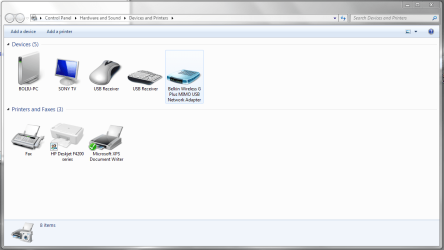
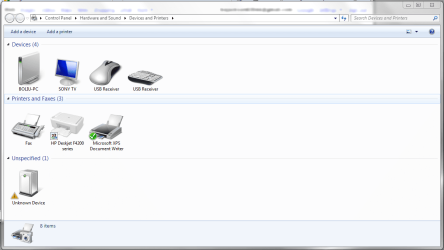
Solution, First go to start, devices and printers, with the belkin F5D9050 plugged in you should see a device that is unidentified(you know which one it should be something for wireless, I can't remember exactly), right click and go to properties, hardware tab, and properties of the device again(not sure the exact order for it due to mine already installed), then go to update drive button. This will bring up a windows menu with 2 options 1 go look online or something of the sort and the other is to search your computer for the driver yourself. Pick the one to search on your computer, in this window go to then pick let me search my computer for driver. On the new window it will list categories of devices, I picked the one for all drivers(will take a little time to load the list). Go down the list and find Ralink(I had two that were named very similar, I went into the first one listed), it should bring up a list of types of drivers it has for the company, pick the one that says USB g stick or something very similar to that. After picking it your wireless should work(mine has been working without a hitch, it detected a network very shortly after) There you have it, wireless on with the belkin F5D9050 on windows 7.

*** NOTE IF YOU DO NOT HAVE RALINK DRIVERS FOR THE USB STICK ***
I believe it might of been on of the drivers I attempted to get my wireless working with. This is the manufacturer of the chipset for the F5D9050, so the driver I installed from them might be what I ended up selecting in the list.

The driver I selected is USB (RT257x /RT2671 /RT520x)
(note, from what I have read online, there are a few different chipsets for our belkin F5D9050. If what I installed on the windows driver list worked, this is most likely the same for you. Might not be a solution for other versions of the device though)

http://www.ralinktech.com/download.p...djbVZsQw%3D%3D

If link doesn't work, here is the page.
Ralink corp.

If you need help or I wasn't clear about any of the instructions post on here or give me an email at [email removed ]
My System SpecsSystem Spec
11-09-2009   #7


Windows 7


Not fixed, but getting closer.

I know this is an old post, but since this is the first one to come up on a Google search, I thought I would update people on what I have encountered,

I have done a clean install to Windows 7 Pro 64bit, and my adapter does not work. Here is what happened:

- The default install of Windows 7 did not recognise the adapter.
- I tried to install the drivers from the supplied cd, but they did not work.
- I tried downloading the newest Belkin drivers, but they are only 32bit and did not work.
- I tried forcing Windows 7 to use the old drivers but they did not work (I tried all the drivers listed under the manufacturer Ralink including the USB Stick drivers as the post above suggests)
- I downloaded the latest drivers from Ralink for the RT7x chipset. These did not work.

NOW THE INTERESTING PART:

I wanted to get Windows Update to download a suitable driver. So I tethered my mobile phone to my computer to get it to use my mobile internet. I then told the Update Driver to search for drivers online. This installed a Belkin driver from Windows Update. However, when I tried to look for Wireless Networks, Windows 7 said there was no connection avaliable.

I went the 'view network connections' and noticed that my Wireless Adapter was disabled. I tried enabling it but it would not enable. I then right-clicked on the adapter and selected Diagnose. This gave me the error message "Windows couldn't automatically bind the IP protocol stack to the network adapter".

I telephoned Belkin to ask them what to do and they basically said to wait for them to make new drivers. I am sure this is a driver issue, but I have just found the following page on Google and will be trying out the suggestions later today:

Windows couldn't automatically bind the IP protocol stack to the network adapter.
My System SpecsSystem Spec
11-14-2009   #8


Windows 7


Alright, I gave up. I found another adapter that works with Windows 7 64bit. The Netgear WG111 - is cheap and works. Just make sure you install the drivers under Vista compatibility mode.
My System SpecsSystem Spec
11-16-2009   #9


Windows 7


Quote   Quote: Originally Posted by Stephenishere View Post
Belkin F5D9050 Ver 3014
Wireless G Plus MIMO USB Network Adapter
Working in windows 7 professional 64bit

I have found a solution to this problem, you actually don't even need to download any drivers for it either.(Unless I actually selected on that I already picked. Link provided at end of post)

Solution, First go to start, devices and printers, with the belkin F5D9050 plugged in you should see a device that is unidentified(you know which one it should be something for wireless, I can't remember exactly), right click and go to properties, hardware tab, and properties of the device again(not sure the exact order for it due to mine already installed), then go to update drive button. This will bring up a windows menu with 2 options 1 go look online or something of the sort and the other is to search your computer for the driver yourself. Pick the one to search on your computer, in this window go to then pick let me search my computer for driver. On the new window it will list categories of devices, I picked the one for all drivers(will take a little time to load the list). Go down the list and find Ralink(I had two that were named very similar, I went into the first one listed), it should bring up a list of types of drivers it has for the company, pick the one that says USB g stick or something very similar to that. After picking it your wireless should work(mine has been working without a hitch, it detected a network very shortly after) There you have it, wireless on with the belkin F5D9050 on windows 7.

*** NOTE IF YOU DO NOT HAVE RALINK DRIVERS FOR THE USB STICK ***
I believe it might of been on of the drivers I attempted to get my wireless working with. This is the manufacturer of the chipset for the F5D9050, so the driver I installed from them might be what I ended up selecting in the list.

The driver I selected is USB (RT257x /RT2671 /RT520x)
(note, from what I have read online, there are a few different chipsets for our belkin F5D9050. If what I installed on the windows driver list worked, this is most likely the same for you. Might not be a solution for other versions of the device though)

http://www.ralinktech.com/download.p...djbVZsQw%3D%3D

If link doesn't work, here is the page.
Ralink corp.

If you need help or I wasn't clear about any of the instructions post on here or give me an email at [email removed ]
I signed up just to say "thank you." I followed your directions and the wireless now works flawlessly.

Thanks!

Edit: Looks like I spoke too soon. The adapter would randomly be identified as "unknown" by windows. I have no idea what's going on. Unplugging the adapter and reconnect sometimes works, but it happens often enough to make wireless networking unusable! I even went through and got the drivers through "windows update." Still, the adapter would randomly switch from working fine to "unknown USB device."

Last edited by bojackson63044; 11-16-2009 at 11:57 PM..
My System SpecsSystem Spec
11-17-2009   #10


windows 7


do you know what version your device is? This whole situation is kind of irritating, I didn't know belkin had such terrible drive support ; /


If i were you i would try to do a full windows update, and try a possibly differnt Ralink driver. Mine has worked without a hitch for over a month now, I get emails from when people post here. So i'll respond pretty quickly if you have any more questions.
The main thing is what version your device is, if possible can you list out what the sticker says on your device, i might be able to help you some more from there.
My System SpecsSystem Spec
Reply

 Belkin F5D9050 Driver Issues


Thread Tools


Similar Threads for: Belkin F5D9050 Driver Issues
Thread Forum
Belkin Usb wireless driver Drivers
Belkin F5U273 - 64 bit driver Drivers
Issues with Belkin USB network hub Network & Sharing
Internet connection issues. Comcast and a Belkin N Router. Network & Sharing
Belkin F5D7050eaE wireless Driver Drivers


All times are GMT -5. The time now is 07:53 PM.


Windows 7 Forums is an independent web site and has not been authorized,
sponsored, or otherwise approved by Microsoft Corporation.
"Windows 7" and related materials are trademarks of Microsoft Corp.
© Designer Media Ltd
  

1 2 3 4 5 6 7 8 9 10 11 12 13 14 15 16 17 18 19 20 21 22 23 24 25 26 27 28 29 30