

Capt.Jack Sparrow
Crash Dump Analyst
Most of the crashes happens because of a bad drivers. Unfortunately most of the time these bad drivers are coming from Windows Update. Because it won't pick the best driver. So when we troubleshoot BSOD it's best to disable automatic driver installation so we can make sure we are downloading the best driver from manufacturer's website.
Here is how we will disable Automatic Driver Installation
http://www.sevenforums.com/tutorials/2803-device-installation-settings.html
1, Start Menu search box : type change device installation settings

Once you click on that to start it up you will get the following dialog that gives you two choices:

2, The top option: Yes, do this automatically is the recommended setting.
When the second option is selected the options expand:
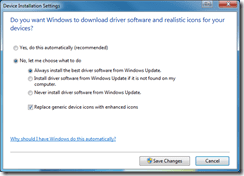
3, When it is expanded you see a default choice and this is basically the same as the automatic option above. The other two choices are the big difference here.
Hope this helps,
Captain
Here is how we will disable Automatic Driver Installation
http://www.sevenforums.com/tutorials/2803-device-installation-settings.html
1, Start Menu search box : type change device installation settings
When the second option is selected the options expand:
- Install driver software from Windows Update if it is not found on my computer. This will search your computer first instead of Windows Update. If it is not found locally then it will go to Windows Update and look there for a driver.
- Never install driver software from Windows Update. The system will always ask you to provide the device driver.
- We want to enable "Never install driver software from Windows Update"
- Then click on Save Changes
Hope this helps,
Captain
My Computer
- Computer Manufacturer/Model Number
- Samsung NP550P5C-S02IN
- OS
- Windows 7 Ultimate - 64-bit | Windows 8 Pro - 64-bit
- CPU
- Intel® Core™ i7 Processor 3,610QM (2.30Hz, 6MB L3 Cach
- Memory
- 8 GB
- Graphics Card(s)
- NVIDIA® GeForce® GT 650M 2GB Graphics, Optimus™ techno
- Sound Card
- SoundAlive™ JBL 3 Speakers (With sub-Woofer)
- Monitor(s) Displays
- 39.62cm (15.6) SuperBright 300nit HD+ LED Display
- Screen Resolution
- 1,600 x 900, Anti-Reflective
- Hard Drives
- 1TB S-ATA II Hard Drive (5,400RPM)


