Windows 7 Forums Search
Welcome to Windows 7 Forums. Our forum is dedicated to helping you find solutions with any problems, errors or issues you are experiencing with Windows 7. The Windows 7 forum also covers news and updates and has an extensive Windows 7 tutorial section that covers a wide range of tips and tricks.


Windows 7 - Dell Studio XPS 16 Driver Help :)

 
05-08-2010   #11


win 7 ultimate


Quote   Quote: Originally Posted by solarmystic View Post
I have a Dell Studio XPS 16 Myself as you can see from my system specs, and i found that i only had to install 3 drivers manually as the rest were covered by Windows 7 excellent set of base drivers when i did a clean install to upgrade my OS from Vista x64 to Windows 7 x64. Even the AHCI mode was supported out of the box for my HDD without having to insert any special drivers into my installation and all relevant chipset drivers (e.g. ICH9 drivers) came preinstalled.

They were:-

1. The ATI Display Drivers, i prefer the newer Cat 10.3s from ATI than the basic WDDMs that Windows installed automagically when i 1st installed 7. Obtained it from their official website.

2. The Ricoh SD Card Reader Host controller. The previous Drivers that Dell provided on their driver CD sufficed.

3. The Ricoh 1394 Host Controller driver.

Windows 7 has the best out of the box driver repository yet, kudos to MS i say. This is how it should be done on all successive Windows editions. I can't imagine the amount of driver searching i would have to do if i wanted to install some legacy OS on this system for kicks (e.g. Windows XP and below)
+1 on that , ive upgraded 3 Dell laptops [I5100, I9400 and XPS m1710] and out of the box everything worked apart from the radion graphics on the I5100 but its a very old lappy so was to be expected

My System SpecsSystem Spec
05-08-2010   #12


Windows 7 Ulimate (64-Bit)


Quote   Quote: Originally Posted by fireberd View Post
If you "just got a new Dell laptop" why did you reinstall or feel the need to install? If there is some Dell download that fixes or adds something that applies to your specific installation then do the update, otherwise the old adage "if it ain't broke, don't fix it". I do a lot of support on the Dell forum and see a lot of problems caused by users udating when it wasn't really needed (especially the BIOS as a failed BIOS update and a corrupted BIOS and the only option on a Dell is to replace the motherboard).

You also have to be careful with non-Dell drivers, due to Dell's custom implementation of a lot of hardware. For example I've seen a lot of posts of people trying different sound drivers trying to get the System Mixer function that is not on some models and in most cases the non-Dell drivers will either not install or the sound, including the audio input and output ports, will not work correctly.

If you need to reinstall, the Dell recovery partition on the hard drive, accessed by F8 (for Vista and Win 7 systems) at power on will allow you to restore the PC to the original factory condition.
dont like all the bloatware and w.e else factory laptops come with behind the scenes when shipped...reformat = mandatory for me when getting a new laptop...

question towards solarmystic, how did you get windows (properties on my computer) to read 4GB of memory rather than 4GB of memory with only 2.96 useable??

also i just remembered, how do you turn bluetooth off??? cant seem to find anywhere that i can and its just running for no reason (i dont use BT)

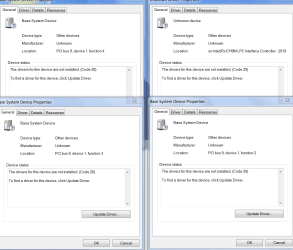
and the intel drivers didnt give me an install error but the driver is still an unknown device under device manager
My System SpecsSystem Spec
05-10-2010   #13


Windows 7 x64 Professional


@A F I G 3

Bluetooth can be turned off in the BIOS if I am not mistaken through an option.

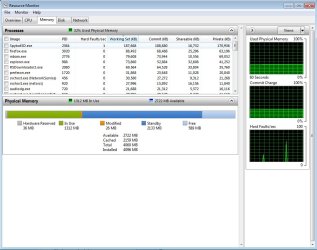
What do you mean by 2.96GB usable.. you mean the amount of hardware reserved Physical Memory is a lot that you only have 2.96 usable? This is the picture i get from my Resource Monitor RAM screen shot
Attached Thumbnails
Dell Studio XPS 16 Driver Help :)-resmon.jpg  
My System SpecsSystem Spec
.


05-10-2010   #14


Windows 7 ultimate 64 bit / XP Home sp3


You can also just disable the device in device manager, if it's bothers you that much. I don't think their is any advantage gained by removing, disabling it or turning it off. That's only because I subscribe to "If it ain't broke don't fix it" ideals. Fabe
My System SpecsSystem Spec
05-10-2010   #15


Windows 7 Ulimate (64-Bit)


Quote   Quote: Originally Posted by solarmystic View Post
@A F I G 3

Bluetooth can be turned off in the BIOS if I am not mistaken through an option.

What do you mean by 2.96GB usable.. you mean the amount of hardware reserved Physical Memory is a lot that you only have 2.96 usable? This is the picture i get from my Resource Monitor RAM screen shot

Nvm on the 2.96GB usable statement I figured that part out...was a setting I messed with in msconfig..btw guys if anyone ever runs into bluetooth problems for this model laptop send them here...the problem was the driver wasn't installed with Windows 7 and Dell doesn't have the driver directly on their page for this model laptop...the link is here:

Drivers and Downloads
My System SpecsSystem Spec
Reply

 Dell Studio XPS 16 Driver Help :) problems?


Thread Tools


Similar Threads for: Dell Studio XPS 16 Driver Help :)
Thread Forum
Solved Dell Studio 1735 Drivers
Dell Studio 1535 keyboard driver Drivers
BSOD - DELL studio XPS 1645 - ATI Driver Fault when watching videos Crashes and Debugging
Help needed for camera driver of dell studio 1555!! Drivers
Dell studio 1535 Drivers


All times are GMT -5. The time now is 05:49 PM.


Windows 7 Forums is an independent web site and has not been authorized,
sponsored, or otherwise approved by Microsoft Corporation.
"Windows 7" and related materials are trademarks of Microsoft Corp.
© Designer Media Ltd
  

1 2 3 4 5 6 7 8 9 10 11 12 13 14 15 16 17 18 19 20 21 22 23 24 25 26 27 28 29 30