Windows 7 Forums Search
Welcome to Windows 7 Forums. Our forum is dedicated to helping you find solutions with any problems, errors or issues you are experiencing with Windows 7. The Windows 7 forum also covers news and updates and has an extensive Windows 7 tutorial section that covers a wide range of tips and tricks.


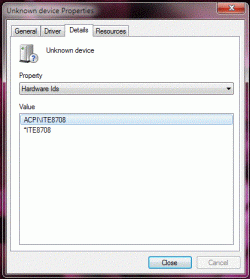
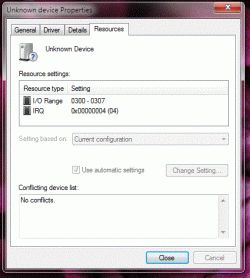
Windows 7 - need help fixing this "unknown device" pictures added


05-07-2009   #1


Windows 7


need help fixing this "unknown device" pictures added

Hello everyone. Please assist me in fixing this issue.

I have already installed and ran DriverMax. That did not help.

Would appreciate any input, thanks.
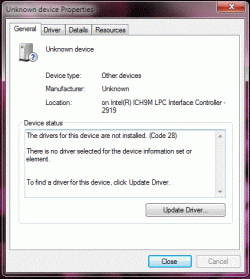
need help fixing this "unknown device" pictures added-1.gif

need help fixing this "unknown device" pictures added-2.gif

need help fixing this "unknown device" pictures added-3.gif

My System SpecsSystem Spec
05-07-2009   #2


Hi IvoryPearl, welcome the the forums.

Have you tried right-clicking the device in 'Device Manager' and selecting Update Driver Software?
My System SpecsSystem Spec
05-07-2009   #3


Windows 7


Quote   Quote: Originally Posted by Orbital Shark View Post
Hi IvoryPearl, welcome the the forums.

Have you tried right-clicking the device in 'Device Manager' and selecting Update Driver Software?

Yes Sir, I have. "Windows was unable to install your unknown device"
My System SpecsSystem Spec
.


05-07-2009   #4


What chipset is your motherboard? Also, if you click the Uset CP you can update your system specs, this will help us determine exactly what hardware you have & we can offer more advise.

My System SpecsSystem Spec
05-07-2009   #5


Windows 7


Quote   Quote: Originally Posted by Orbital Shark View Post
What chipset is your motherboard? Also, if you click the Uset CP you can update your system specs, this will help us determine exactly what hardware you have & we can offer more advise.


Sir, hmm.. how do i find out what chip set is my mother board?? My laptop is ASUS L50Vn-B1
My System SpecsSystem Spec
05-07-2009   #6


Quote   Quote: Originally Posted by IvoryPearl View Post
Sir, hmm.. how do i find out what chip set is my mother board?? My laptop is ASUS L50Vn-B1
That may be enough, give me a few mins & i'll do a background check
My System SpecsSystem Spec
05-07-2009   #7


Windows 7


Quote   Quote: Originally Posted by Orbital Shark View Post
That may be enough, give me a few mins & i'll do a background check

Asus L50Vn-B1 Specifications - Intel Core 2 Duo Notebook, Notebook
My System SpecsSystem Spec
05-07-2009   #8


You could try Drivers - Download NVIDIA Drivers and see if the Autodetect option for both the graphics & motherboard find anything.
My System SpecsSystem Spec
05-07-2009   #9


Windows 7


Okay Sir, working on it. Will keep posted.
My System SpecsSystem Spec
05-07-2009   #10


Windows 7


no good news yet
My System SpecsSystem Spec
Reply

 need help fixing this "unknown device" pictures added


Thread Tools


Similar Threads for: need help fixing this "unknown device" pictures added
Thread Forum
Graphics Card Showing up as "Unknown Device" Drivers
Saitek X45 "Unknown device" when plugging in. Windows 7x64 Hardware & Devices
Remaking "My Music", "My Pictures", "My Videos" folders Customization
internal USB port ìs "unknown device" Hardware & Devices
Turn off "Unknown Device" Error Hardware & Devices


All times are GMT -5. The time now is 03:08 AM.


Windows 7 Forums is an independent web site and has not been authorized,
sponsored, or otherwise approved by Microsoft Corporation.
"Windows 7" and related materials are trademarks of Microsoft Corp.
© Designer Media Ltd
  

1 2 3 4 5 6 7 8 9 10 11 12 13 14 15 16 17 18 19 20 21 22 23 24 25 26 27 28 29 30