| Windows 7: Acer Aspire Crystal Eye Webcam Driver |
05 Jul 2010
|
#1 | | Windows 7 Professional 32-bit Indiana |
Acer Aspire Crystal Eye Webcam Driver Ok, so I upgraded my OS with a student discount from Windows 7 starter to Windows 7 Pro. I have an Acer Aspire One A0532h netbook I bought right around a month ago and upgraded about two weeks ago. Before the upgrade, my webcam worked just fine. Now I am unable to even locate the files for the webcam anywhere! Even when I do a search on the whole computer, nothing comes up. It is an integrated webcam. I tried going to the acer support website where I specified my exact computer, model, and such and downloaded all three setups for the webcam but they all had the same error; something along the lines of "no camera detected" or "no camera is plugged in". I dont understand. If anyone could help me, it would greatly be appreciated. Thanks. | My System Specs |
| System Manufacturer/Model Number Acer Aspire One A0532h OS Windows 7 Professional 32-bit CPU Intel Atom N450 Motherboard Intel Atom 450 Mobile Intel NM10 Express Chipset Memory Single Channel DDR2 667 MHz SDRAM memory interface design Graphics Card Integrated Intel® Graphics Media Accelerator 3150 Monitor(s) Displays Acer CrystalBrite LED-backlit TFT LCD Screen Resolution 10.1" HD 1280 x 720 (WXGA) pixel resolution Keyboard 84-/85-/88-key keyboard, 93 % standard size Mouse Multi-gesture touchpad pointing device PSU 63 W 5600 mAh 6-cell Li-ion battery pack Hard Drives 2.5" 9.5 mm 160GB
Multi-in-1 card reader Internet Speed LAN: 10/100 Mbps Fast Ethernet |
05 Jul 2010
|
#2 | | |
Acer Aspire Crystal Eye Webcam Driver Just proceed to the Acer website to download the app
Link provided Service & Support | My System Specs | | System Manufacturer/Model Number Acer Aspire 4935 OS Windows 7 CPU Intel Core2Duo T6400 Memory 2G Graphics Card Intel 4100 Monitor(s) Displays 14.1" TFT 1280 x 800 ( WXGA ), 24-bit (16.7 million colors) Hard Drives 320 GB |
05 Jul 2010
|
#3 | | Windows 7 Professional 32-bit Indiana |
I've tried that. I looked at various other posts about this same issue on here as well, tying everything that was suggested. On Acer's Service & Support I found three different applications for a webcam. None of them worked  .
I should also note that nothing about imaging software or a webcam even shows up in the device manager anymore. So now it's like I have an integrated webcam that is useless  . | My System Specs | | System Manufacturer/Model Number Acer Aspire One A0532h OS Windows 7 Professional 32-bit CPU Intel Atom N450 Motherboard Intel Atom 450 Mobile Intel NM10 Express Chipset Memory Single Channel DDR2 667 MHz SDRAM memory interface design Graphics Card Integrated Intel® Graphics Media Accelerator 3150 Monitor(s) Displays Acer CrystalBrite LED-backlit TFT LCD Screen Resolution 10.1" HD 1280 x 720 (WXGA) pixel resolution Keyboard 84-/85-/88-key keyboard, 93 % standard size Mouse Multi-gesture touchpad pointing device PSU 63 W 5600 mAh 6-cell Li-ion battery pack Hard Drives 2.5" 9.5 mm 160GB
Multi-in-1 card reader Internet Speed LAN: 10/100 Mbps Fast Ethernet |
05 Jul 2010
|
#4 | | Windows 7 Professional SP1 - x64 Lost In Space, Vol 8-New Kind Of Kick |

Quote: Originally Posted by RoomNine I've tried that. I looked at various other posts about this same issue on here as well, tying everything that was suggested. On Acer's Service & Support I found three different applications for a webcam. None of them worked  .
I should also note that nothing about imaging software or a webcam even shows up in the device manager anymore. So now it's like I have an integrated webcam that is useless  . You should try to know which brand is your built-in Camera..."Chicony", "Liteon", or "Suyin" before.
It is very bad to update with wrong drivers. Right click to the .exe and try to locate the Brand in Details Tab.
The probs now you have tried 3 differents brands drivers, it might shows the wrong camera! | My System Specs | | Computer type PC/Desktop System Manufacturer/Model Number [May-Dec-2012] - New Mid-tower - (is done!) OS Windows 7 Professional SP1 - x64 CPU Ivy Bridge Core i5 K Motherboard Asus H77 Chipset (ATX) Memory G.Skill DDR3 PC3-12800 (16Gb) Graphics Card Sapphire HD 7770 Vapor-X Oc Sound Card SBXi-Fi Xtreme Audio (w/5.1 sound system) Monitor(s) Displays Asus Led 21,5" Screen Resolution 16/9 Keyboard Razer + Razer gamepad Mouse Razer PSU 700w 80+ Gold (ErP 6 ready) Case Cooler Master Silencio 550-v2 (modded) Cooling Gelid Solutions (PWM Push/pull Fans) Hard Drives Internal:
500Go Sata 6Gb/s (x2)
500Go Sata 3Gb/s (x2)
SSD 60Go Sata 6Gb/s Antivirus MSE 4.2 Browser IE10 Rtm |
05 Jul 2010
|
#5 | | Windows 7 Professional 32-bit Indiana |
I couldn't remember which brand it was so I tried downloading them all hoping one would work. I just dont understand how none of them would recognize my camera when its integrated to begin with. My usb ports quit working as well. Idk what to do. | My System Specs | | System Manufacturer/Model Number Acer Aspire One A0532h OS Windows 7 Professional 32-bit CPU Intel Atom N450 Motherboard Intel Atom 450 Mobile Intel NM10 Express Chipset Memory Single Channel DDR2 667 MHz SDRAM memory interface design Graphics Card Integrated Intel® Graphics Media Accelerator 3150 Monitor(s) Displays Acer CrystalBrite LED-backlit TFT LCD Screen Resolution 10.1" HD 1280 x 720 (WXGA) pixel resolution Keyboard 84-/85-/88-key keyboard, 93 % standard size Mouse Multi-gesture touchpad pointing device PSU 63 W 5600 mAh 6-cell Li-ion battery pack Hard Drives 2.5" 9.5 mm 160GB
Multi-in-1 card reader Internet Speed LAN: 10/100 Mbps Fast Ethernet |
05 Jul 2010
|
#6 | | Windows 7 Professional SP1 - x64 Lost In Space, Vol 8-New Kind Of Kick |

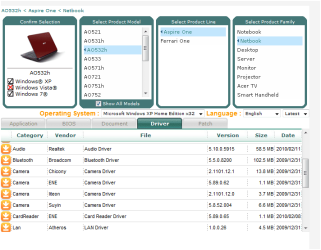
Quote: Originally Posted by RoomNine I couldn't remember which brand it was so I tried downloading them all hoping one would work. I just dont understand how none of them would recognize my camera when its integrated to begin with. My usb ports quit working as well. Idk what to do. You should be able to uninstall in the "Control Panel"=>"Program & Features" the Acer Crystal Eye Software. Do so, reboot then let windows 7 install his proper drivers. And let me think about it soon.
As you can see on screenshot, it is only some Windows 7 drivers....in the "Devices Manager". No Acer one, that why it is difficult to locate the brand! | My System Specs | | Computer type PC/Desktop System Manufacturer/Model Number [May-Dec-2012] - New Mid-tower - (is done!) OS Windows 7 Professional SP1 - x64 CPU Ivy Bridge Core i5 K Motherboard Asus H77 Chipset (ATX) Memory G.Skill DDR3 PC3-12800 (16Gb) Graphics Card Sapphire HD 7770 Vapor-X Oc Sound Card SBXi-Fi Xtreme Audio (w/5.1 sound system) Monitor(s) Displays Asus Led 21,5" Screen Resolution 16/9 Keyboard Razer + Razer gamepad Mouse Razer PSU 700w 80+ Gold (ErP 6 ready) Case Cooler Master Silencio 550-v2 (modded) Cooling Gelid Solutions (PWM Push/pull Fans) Hard Drives Internal:
500Go Sata 6Gb/s (x2)
500Go Sata 3Gb/s (x2)
SSD 60Go Sata 6Gb/s Antivirus MSE 4.2 Browser IE10 Rtm |
05 Jul 2010
|
#8 | | Windows 7 Professional SP1 - x64 Lost In Space, Vol 8-New Kind Of Kick |
The Windows 7 box is checked theog!!! So, if you scroll the list it shows 7 drivers!!!
@RoomNine...try to download their Manual Instructions from their site....in the "Documents" Tab. | My System Specs | | Computer type PC/Desktop System Manufacturer/Model Number [May-Dec-2012] - New Mid-tower - (is done!) OS Windows 7 Professional SP1 - x64 CPU Ivy Bridge Core i5 K Motherboard Asus H77 Chipset (ATX) Memory G.Skill DDR3 PC3-12800 (16Gb) Graphics Card Sapphire HD 7770 Vapor-X Oc Sound Card SBXi-Fi Xtreme Audio (w/5.1 sound system) Monitor(s) Displays Asus Led 21,5" Screen Resolution 16/9 Keyboard Razer + Razer gamepad Mouse Razer PSU 700w 80+ Gold (ErP 6 ready) Case Cooler Master Silencio 550-v2 (modded) Cooling Gelid Solutions (PWM Push/pull Fans) Hard Drives Internal:
500Go Sata 6Gb/s (x2)
500Go Sata 3Gb/s (x2)
SSD 60Go Sata 6Gb/s Antivirus MSE 4.2 Browser IE10 Rtm |
05 Jul 2010
|
#9 | | Windows 7 Professional 32-bit Indiana |
Hey NoN. Thanks for the reply. That's the thing though, it is nowhere to be found anywhere on my computer. It wasnt under device manager, installed programs, or even when I searched the computer for it.
Theog - When I select the OS and set it to Windows 7 Pro x32 it gives me three 'Camera' options under 'Applications'. All say 'Webcam Applications' and have vendors of 'Liteon', 'Suyin', and 'Chicony'. | My System Specs | | System Manufacturer/Model Number Acer Aspire One A0532h OS Windows 7 Professional 32-bit CPU Intel Atom N450 Motherboard Intel Atom 450 Mobile Intel NM10 Express Chipset Memory Single Channel DDR2 667 MHz SDRAM memory interface design Graphics Card Integrated Intel® Graphics Media Accelerator 3150 Monitor(s) Displays Acer CrystalBrite LED-backlit TFT LCD Screen Resolution 10.1" HD 1280 x 720 (WXGA) pixel resolution Keyboard 84-/85-/88-key keyboard, 93 % standard size Mouse Multi-gesture touchpad pointing device PSU 63 W 5600 mAh 6-cell Li-ion battery pack Hard Drives 2.5" 9.5 mm 160GB
Multi-in-1 card reader Internet Speed LAN: 10/100 Mbps Fast Ethernet |
05 Jul 2010
|
#10 | | Windows 7 Professional SP1 - x64 Lost In Space, Vol 8-New Kind Of Kick |
If you own an "Acer eRecovery" software, you should be able when choosing restore "Apps & Drivers" to see which brand it is. | My System Specs | | Computer type PC/Desktop System Manufacturer/Model Number [May-Dec-2012] - New Mid-tower - (is done!) OS Windows 7 Professional SP1 - x64 CPU Ivy Bridge Core i5 K Motherboard Asus H77 Chipset (ATX) Memory G.Skill DDR3 PC3-12800 (16Gb) Graphics Card Sapphire HD 7770 Vapor-X Oc Sound Card SBXi-Fi Xtreme Audio (w/5.1 sound system) Monitor(s) Displays Asus Led 21,5" Screen Resolution 16/9 Keyboard Razer + Razer gamepad Mouse Razer PSU 700w 80+ Gold (ErP 6 ready) Case Cooler Master Silencio 550-v2 (modded) Cooling Gelid Solutions (PWM Push/pull Fans) Hard Drives Internal:
500Go Sata 6Gb/s (x2)
500Go Sata 3Gb/s (x2)
SSD 60Go Sata 6Gb/s Antivirus MSE 4.2 Browser IE10 Rtm Acer Aspire Crystal Eye Webcam Driver problems? All times are GMT -5. The time now is 08:45 AM. | |