
Is there a way to make it so that hitting "maximize" on a window will not cover-up the gadgets? I know that you can have Gadgets always display on-top; however, I want to be able to have a dedicated area on the desktop where the gadgets will be located even if a window is maximized.
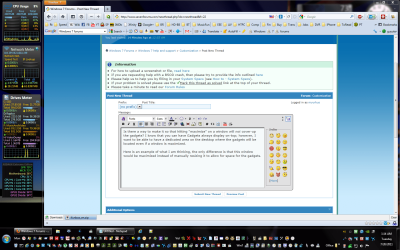
Here is an example of what I am thinking, the only difference is that this window would be maximized instead of manually resizing it to allow for space for the gadgets.
I understand that with the nature of Gadgets in Windows 7 there is no dedicated "sidebar" space like there was in Vista; however, I am fine with dedicating a specific space for this "zone" while ignoring other Gadgets that may be all over the place.
I am a software engineer and am proficient in .net etc, so if the only solution is programatic; that is fine, I am willing to work on it. However, I want to know if this is the only way and if anyone has any suggestions on how to go about doing this (even from a high-level.)
Thank you very much in advance for your help! I am excited if there is a way to make this work!.
MikeY
Here is an example of what I am thinking, the only difference is that this window would be maximized instead of manually resizing it to allow for space for the gadgets.
I understand that with the nature of Gadgets in Windows 7 there is no dedicated "sidebar" space like there was in Vista; however, I am fine with dedicating a specific space for this "zone" while ignoring other Gadgets that may be all over the place.
I am a software engineer and am proficient in .net etc, so if the only solution is programatic; that is fine, I am willing to work on it. However, I want to know if this is the only way and if anyone has any suggestions on how to go about doing this (even from a high-level.)
Thank you very much in advance for your help! I am excited if there is a way to make this work!.
MikeY
My Computer
At a glance
Windows 7 Ultimate x64
- OS
- Windows 7 Ultimate x64
