

arsalanronin
New member
I have this strange problem since a reboot and I have already tried Gadgets not Displaying Correctly in Windows 7 - Fix but it didn't do any good. I also tried restoring the system but again with no luck.
this problem occurs only with the gadgets that I have installed myself and not the default ones.
for example the WeatherBug gadget acts this way when I hover the mouse over it and gets corrected with a second hovering.
any help would be appreciated.
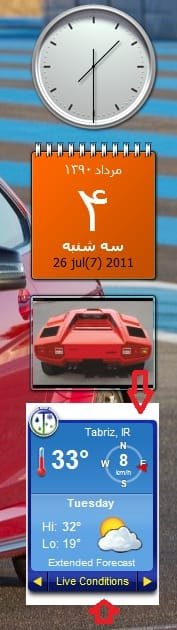
this problem occurs only with the gadgets that I have installed myself and not the default ones.
for example the WeatherBug gadget acts this way when I hover the mouse over it and gets corrected with a second hovering.
any help would be appreciated.
My Computer
At a glance
Windows 7 Ultimate Service Pack 1 32bitIntel Celeron 2.53GHz512 MBNVIDIA GeForce FX 5200LE
- OS
- Windows 7 Ultimate Service Pack 1 32bit
- CPU
- Intel Celeron 2.53GHz
- Motherboard
- Solonex
- Memory
- 512 MB
- Graphics Card(s)
- NVIDIA GeForce FX 5200LE
- Sound Card
- Realtek AC'97
- Monitor(s) Displays
- LG F700B
- Screen Resolution
- 1024*768
- Hard Drives
- Maxtor 2F040L0 ATA
- Case
- Generous
- Keyboard
- Turbo-Media
- Mouse
- SONY
- Internet Speed
- 128 Kbps


