
sbstratos79
New member
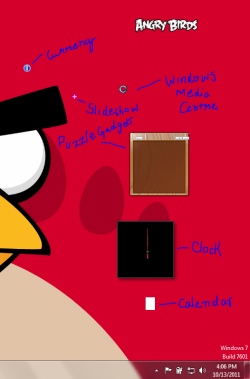
I had installed Kaspersky Internet Security 2012 in my pc. After installation a Kaspersky gadget appeared on my desktop. But when I uninstalled Kaspersky Internet Security 2012, its gadget still remained on my desktop. So I closed it down and uninstalled the gadget. But when I opened the clock, and other default gadgets, they were looking quite funny. As shown in the screenshot
I reinstalled the Windows gadget platform, tried Enable registry.reg, but nothing worked can anyone help me?
I reinstalled the Windows gadget platform, tried Enable registry.reg, but nothing worked can anyone help me?
Attachments
My Computer
At a glance
Windows 7 Ultimate 32bitAMD Athlon 64 X2nVIDIA GeForce 9100M G
- Computer Manufacturer/Model Number
- Acer/Aspire 4530
- OS
- Windows 7 Ultimate 32bit
- CPU
- AMD Athlon 64 X2
- Graphics Card(s)
- nVIDIA GeForce 9100M G
- Screen Resolution
- 1280*800
- Mouse
- Synaptics pointing device
- Internet Speed
- 4 Mbps


