Windows 7 Forums Search
Welcome to Windows 7 Forums. Our forum is dedicated to helping you find solutions with any problems, errors or issues you are experiencing with Windows 7. The Windows 7 forum also covers news and updates and has an extensive Windows 7 tutorial section that covers a wide range of tips and tricks.


Windows 7 - Windows 7 gadgets not working properly

 
10-13-2011   #1


Windows 7 Ultimate 32bit


Windows 7 gadgets not working properly

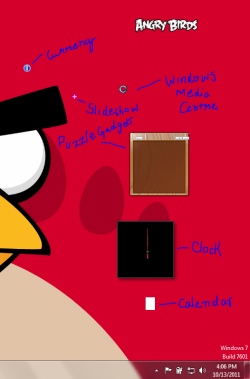
I had installed Kaspersky Internet Security 2012 in my pc. After installation a Kaspersky gadget appeared on my desktop. But when I uninstalled Kaspersky Internet Security 2012, its gadget still remained on my desktop. So I closed it down and uninstalled the gadget. But when I opened the clock, and other default gadgets, they were looking quite funny. As shown in the screenshot
I reinstalled the Windows gadget platform, tried Enable registry.reg, but nothing worked can anyone help me?

Attached Thumbnails
Windows 7 gadgets not working properly-trouble-gadget.png  
My System SpecsSystem Spec
10-13-2011   #2


Looks like Kapersky gadget uninstall may have taken or damaged some Systems files. Try running SFC -SCANNOW Command

Next try System Restore to before you did these things, or even better before you installed or uninstalled KIS. Then try closing the gadget with it's X, or search gadgets to see List of Installed Gadgets and uninstall it that way.
My System SpecsSystem Spec
10-14-2011   #3


Windows 7 Ultimate 32bit


The SFC-SCANNOW command did'nt work, and I have not created any system restore points yet, so is there any other way to fix this problem?
My System SpecsSystem Spec
.


10-14-2011   #4


What do you mean SFC command didn't work? Did it run, find any damaged System File, any irreparable?

Why are there no Restore points available? There should be at least some.

Next I would try a Repair Install
My System SpecsSystem Spec
10-14-2011   #5


Windows 7 Ultimate x64 SP1


Hello sbStratos,

Before doing a repair install, you might see if this may be able to fix them for you.

Gadgets not Displaying Correctly in Windows 7 - Fix

Hope this helps,
Shawn
My System SpecsSystem Spec
10-15-2011   #6


Windows 7 Ultimate 32bit


Hello gregrocker, I had done a system scan with SFC-SCANNOW command and it found some errors and fixed them, but when i restarted my pc gadgets were still malfunctioning. So I againg did the same thing but this time it didn't find any errors. I don't have any system restore points because I had a serious problems related to icons. I had tried many troubleshooting methods listed on some websites but none of them worked for me so I had to restore from the pc image file, that solved my problem but I had created this image file after the gadget problem and at that time I didn't have any system restore points.
My System SpecsSystem Spec
10-15-2011   #7


Try Brink's fix which look's promising.

How are all other aspects of performance?
My System SpecsSystem Spec
10-16-2011   #8


Windows 7 Home Premium x64 SP1


I had seen issues with Kaspersky removal and gadgets before. I found this post on Kaspersky forum which appears to be a simple work around.

Windows 7 sidebar / desktop gadgets - Kaspersky Lab Forum

You must register at the forum to gain access to the download. A Guy
My System SpecsSystem Spec
11-28-2011   #9


Windows 7 Ultimate 32bit


Sorry for replying too late, but I have now formatted my pc and reinstalled windows 7 64 bit. Sorry for the inconvenience.
My System SpecsSystem Spec
11-28-2011   #10


Windows 7 Ultimate x64 SP1


No problem. Thank you for posting back with your results.
My System SpecsSystem Spec
Reply

 Windows 7 gadgets not working properly problems?


Thread Tools


Similar Threads for: Windows 7 gadgets not working properly
Thread Forum
Solved Gadgets not working properly Gadgets
Solved Gadgets will not show up properly. Customization
Solved Desktop Gadgets Not working properly Gadgets
windows not working properly Crashes and Debugging
Disable UAC in Windows 7 With Sidebar and Gadgets Working Properly General Discussion


All times are GMT -5. The time now is 07:09 PM.


Windows 7 Forums is an independent web site and has not been authorized,
sponsored, or otherwise approved by Microsoft Corporation.
"Windows 7" and related materials are trademarks of Microsoft Corp.
© Designer Media Ltd
  

1 2 3 4 5 6 7 8 9 10 11 12 13 14 15 16 17 18 19 20 21 22 23 24 25 26 27 28 29 30