Windows 7 Forums


Windows 7: Sidebar.exe will not run at all

26 Apr 2012   #1

windows 7 ultimate
 
 
Sidebar.exe will not run at all

1st day since I got windows 7 ultimate installed, my gadgets DONT RUN. Everytime i run sidebar.exe, nothing happens. I have tried to run it as administrator,changed permissions, renamed setting.ini file after backing it up, done the registry changes as per other tutorials, to no effect. Is there any solution???PLEASE HELP!!!

My System SpecsSystem Spec

26 Apr 2012   #2

Windows 7 Ultimate SP1 64-Bit
Peterborough, England


Welcome to Windows Seven Forums.

Have you tried to run the System File Checker?

If not, this tutorial shows you how: SFC /SCANNOW Command - System File Checker
My System SpecsSystem Spec
29 Apr 2012   #3

Windows 7 Home Premium x64 SP1
Bay Area Peninsula


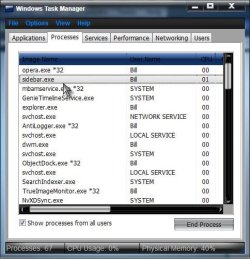
Welcome to Seven Forums troubled88. When you say nothing happens. Does the sidebar.exe show as running in taskmanager?

Sidebar.exe will not run at all-sidebar.jpg

A Guy
My System SpecsSystem Spec
.


29 Apr 2012   #4

windows 7 ultimate


Thanks a lot for correspondng. I did run SFC a couple of times, getting the
message : " Windows Resource Protection found corrupt files but was unable to fix some of them".
Plus the taskmanager doesnot show sidebar.exe in the running processes.
My System SpecsSystem Spec
29 Apr 2012   #5

Windows 7 Home Premium x64 SP1
Bay Area Peninsula


Suggest you post the CBS.log per Option Three of the tutorial How to See and Read Only the "SFC" Scan Results from the CBS.LOG.

Also, as a simple test, you can turn off the Windows Gadget Platform, and restart it for a possible simple fix (assuming it is already turned on!).

Windows Features - Turn On or Off

Scroll down to Windows Gadget Platform, and make sure it's checked. If so, uncheck it, reboot, then go back and recheck it, reboot again and see if that helps. A Guy
My System SpecsSystem Spec
06 May 2012   #6

windows 7 ultimate


I tried unchecking Windows Gadget Platform many times but this is the message i get everytime:
"An error has occured. Not all of the features were successfully changed."
and the checkmark is still there when i re open it.
My System SpecsSystem Spec
06 May 2012   #7

Windows 7 Home Premium x64 SP1
Bay Area Peninsula


Thanks for the additional information. I'd suggest running the System File Checker, and see if it finds and corrects any errors.

SFC /SCANNOW Command - System File Checker

A Guy
My System SpecsSystem Spec
06 May 2012   #8

windows 7 ultimate


The sfcdetails.txt file was around 15MB so i compressed it.sfcdetails.rar its a big file i'm not sure how to assess it.
My System SpecsSystem Spec
06 May 2012   #9

Windows 7 Home Premium x64 SP1
Bay Area Peninsula


Wow, your install has many problems. You could try a repair install, but a clean install may be a better option if this is a new install.

Repair Install

Clean Install Windows 7

A Guy
My System SpecsSystem Spec
Reply

 Sidebar.exe will not run at all problems?


Thread Tools


Similar help and support threads for: Sidebar.exe will not run at all
Thread Forum
Sidebar Gone? Customization
Sidebar for 7? Gadgets
fix for windows 7 sidebar - the sidebar is a gadget Gadgets
Sidebar Gadgets
Where has my sidebar gone? General Discussion


All times are GMT -5. The time now is 05:12 PM.


Seven Forums Android App Seven Forums IOS App Follow us on Facebook

Windows 7 Forums is an independent web site and has not been authorized,
sponsored, or otherwise approved by Microsoft Corporation.
"Windows 7" and related materials are trademarks of Microsoft Corp.
© Designer Media Ltd
  

1 2 3 4 5 6 7 8 9 10 11 12 13 14 15 16 17 18 19 20 21 22 23 24 25 26 27 28 29 30 31 32