Windows 7 Forums


Windows 7: Mirror's Edge black screen on WIndows 7 64 bit

07 Jan 2011   #1

Windows 7
 
 
Mirror's Edge black screen on WIndows 7 64 bit

Hi guys. I'm having a problem running Mirror's Edge on my computer. I got it through steam and when I run it, I can hear all the sound, but there's no video.


I've seen similar cases where the game would crash, but it seems to be working fine aside from no video output.

I'm running on Windows 7 64 bit with an NVIDIA GTX 260 graphics card. I just updated the drivers this morning.

I checked around and people were saying to change the tdEngine.ini's resolution. There is no tdEngine.ini. There's only a defaultEngine.ini like in most Unreal made ames. Changing anything in that causes the game not to work period.

i CAN'T FIGURE OUT WHY IT WONT' WORK.

i HAVE A LAPTOP RUNNING AN ati GRAPHICS CARD (4550 MAYBE?) aND IT'S RUNNING WINDOWS 7 32 BIT AND WORKS FINE. iT HAS THE SAME RESLOLUTION (1360X768)

i CAN'T FIGURE OUT WHY THE GAME WON'T SHOW ANY VIDEO.

aNY SUGGESTIONS? tHANKS.
My System SpecsSystem Spec

07 Jan 2011   #2

Windows 7 Ultimate x64 SP1
Hampton VA


Make sure your video card drivers and your DirectX files are up to date. I have Mirror's Edge through steam on my machine and it's running great. No ini tweaks neccessary.

See my post here for other tips as well -Tips on Troubleshooting Game Issues
My System SpecsSystem Spec
08 Jan 2011   #3

Windows 7 Ultimate
Mumbai, India


make sure u r not using 3GB ram on a 64BIT system
My System SpecsSystem Spec
.


08 Jan 2011   #4

Windows 7 Ultimate x64 SP1
Hampton VA


Quote   Quote: Originally Posted by SteeLx View Post
make sure u r not using 3GB ram on a 64BIT system
That's not really an issue. Sure it's better to have at least 4gig on a 64-bit, but you can conceivably run it on 2, so 3 isn't a show stopper.

Anyway....

Quote   Quote: Originally Posted by Dreamcube017 View Post
i HAVE A LAPTOP RUNNING AN ati GRAPHICS CARD (4550 MAYBE?) aND IT'S RUNNING WINDOWS 7 32 BIT AND WORKS FINE. iT HAS THE SAME RESLOLUTION (1360X768)
My System SpecsSystem Spec
08 Jan 2011   #5

Windows 7


Firstly, sorry for writing in all caps. I didn't realize I had capslock on.

Like I said, I updated my gfx drivers the morning of that post. I'll run the DX redist again, but I'm pretty sure I updated that as other games work just fine. (games such as portal and what not)

I have 4 gigs of RAM, not 3.

I'll try some more tests when I get back home. Thanks.
My System SpecsSystem Spec
08 Jan 2011   #6

Windows 7 Home Premium 64bit
Southern Ohio


[QUOTE=Dreamcube017;1169737]I checked around and people were saying to change the tdEngine.ini's resolution. There is no tdEngine.ini. There's only a defaultEngine.ini like in most Unreal made ames.


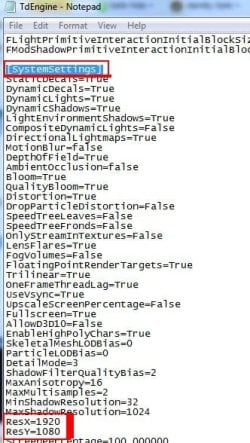
tdengine.ini is located in the Documents Folder.

By Default:
My Documents / EA Games / Mirrors Edge / Tdgame / Config / tdengine.ini


I have no clue if it even works but ...

Open the ini with Notepad.
Press CTRL+F and do a Search for System
It should jump you down to System Settings ... then in that section look for the resolution part and change it to whatever your native resolution is.

Heres a snip of mine so you can see.
Attached Thumbnails
Mirror's Edge black screen on WIndows 7 64 bit-capture.jpg  
My System SpecsSystem Spec
Reply

 Mirror's Edge black screen on WIndows 7 64 bit problems?


Thread Tools


Similar help and support threads for: Mirror's Edge black screen on WIndows 7 64 bit
Thread Forum
Taskbar autohide and doesn't appear when touching the screen edge General Discussion
Solved Mouse problem cursor moves way beyond right edge of screen Hardware & Devices
Mirror's Edge Gaming
Monitor's native resolution goes off the edge of the screen? Graphic Cards


All times are GMT -5. The time now is 09:06 AM.


Seven Forums Android App Seven Forums IOS App Follow us on Facebook

Windows 7 Forums is an independent web site and has not been authorized,
sponsored, or otherwise approved by Microsoft Corporation.
"Windows 7" and related materials are trademarks of Microsoft Corp.
© Designer Media Ltd
  

1 2 3 4 5 6 7 8 9 10 11 12 13 14 15 16 17 18 19 20 21 22 23 24 25 26 27 28 29 30 31 32