| Windows 7: Props to Game Booster... |
25 Jan 2011
|
#1 | | Vista x64 + Windows 7 x64 (Ultimate) Miami, Florida |
Props to Game Booster... For those of you playing older games (like me :P) on Windows 7 64 bit (at least for me) and you are having problems with erratic mouse movements in-game or error while loading, etc, etc... give this little gadget a try.
Be careful though, as everything out there, it will want you to update to their Pro Version and it will also want to install a bunch of other apps that you may not need or want so, make sure you install only the basic Game Booster software.
I was having such a horrendous time playing Medal of Honor Allied Assault and nothing I tried help. my aiming was just super slow and I kept dying all over the place. I tried new drivers all around, going back to old drivers, I even tried an old usb mouse I had (I am using a G9 logitech).
As soon as I installed the Game Booster, I tried the game and Presto... killing spree and rampage free!
Anyways... give it a try as a last resort if you are desperate just like I was!
2 Thumbs Up! | My System Specs |
| Computer type PC/Desktop System Manufacturer/Model Number Custom Built OS Vista x64 + Windows 7 x64 (Ultimate) CPU Intel Q9650 Motherboard EVGA 780i FTW Memory 8GBs Corsair Dominator 1066Mhz Graphics Card Asus GTX660 (2GBs) + MSI 9600GT (PhysX) Sound Card Onboard Realtek HD Monitor(s) Displays Acer AL2216W Screen Resolution 1680 x 1050 Keyboard Logitech G15 Mouse Logitech G9 PSU PC Cooling 750w Silencer Case Thermaltake Spedo Advance Cooling CM 8V Hard Drives WD VelociRaptor 300GB
Samsung 750GB 32MB cache
1.5 TB Internet Speed Comcast 20Mbit Antivirus Avast Browser Firefox |
26 Jan 2011
|
#2 | | Vista x64 + Windows 7 x64 (Ultimate) Miami, Florida |
Well, I guess I was a bit premature on my props to Game Booster as today, my issue with the game are back and no matter what I do, it does not want to work.
Oh well. | My System Specs | | Computer type PC/Desktop System Manufacturer/Model Number Custom Built OS Vista x64 + Windows 7 x64 (Ultimate) CPU Intel Q9650 Motherboard EVGA 780i FTW Memory 8GBs Corsair Dominator 1066Mhz Graphics Card Asus GTX660 (2GBs) + MSI 9600GT (PhysX) Sound Card Onboard Realtek HD Monitor(s) Displays Acer AL2216W Screen Resolution 1680 x 1050 Keyboard Logitech G15 Mouse Logitech G9 PSU PC Cooling 750w Silencer Case Thermaltake Spedo Advance Cooling CM 8V Hard Drives WD VelociRaptor 300GB
Samsung 750GB 32MB cache
1.5 TB Internet Speed Comcast 20Mbit Antivirus Avast Browser Firefox |
26 Jan 2011
|
#3 | | |
hehe, as far as i know, all gamebooster does is temporarily disable a few services, and defrags game folders. (?)
maybe useful if you're trying to run new games on a low-end system close to minimum specs, but not vice versa? | My System Specs | | System Manufacturer/Model Number mickey megabyte 1234 OS ultimate 64 sp1 CPU i5 2500K 3.3@4.2GHz Motherboard MSI P67A-GD53 Memory 8 gigs GSkill Ripjaws 1600 Graphics Card amd hd6950 Sound Card creative x-fi gamer Monitor(s) Displays samsung 24" Screen Resolution 1920x1080 Keyboard saitek eclipse ii Mouse logitech g3 PSU antec 550 Case antec three hundred Cooling i'm a cooling fan Hard Drives ocz vertex 2e 60 gig, samsung f3 1tb, buffalo 2tb ext Internet Speed about 4 Mbps Other Info i love win7 |
27 Jan 2011
|
#4 | | Vista x64 + Windows 7 x64 (Ultimate) Miami, Florida |

Quote: Originally Posted by mickey megabyte hehe, as far as i know, all gamebooster does is temporarily disable a few services, and defrags game folders. (?)
maybe useful if you're trying to run new games on a low-end system close to minimum specs, but not vice versa? That is exactly what I thought but I was impressed (wrongfully it seems  ) when I installed it and Mohaa played like a champ.
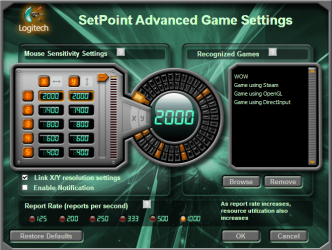
Last night I started to change things around and I think I got it down to the nitty gritty... an option inside my logitech setpoint where you must tick or un-tick something about the OS handling acceleration. As soon as I unchecked this my mouse just felt faster and crispier so I immediately when to the game and I was able to play fine again.
I was extremely tired so I only played for a bit but I will know more tonight when I get home. | My System Specs | | Computer type PC/Desktop System Manufacturer/Model Number Custom Built OS Vista x64 + Windows 7 x64 (Ultimate) CPU Intel Q9650 Motherboard EVGA 780i FTW Memory 8GBs Corsair Dominator 1066Mhz Graphics Card Asus GTX660 (2GBs) + MSI 9600GT (PhysX) Sound Card Onboard Realtek HD Monitor(s) Displays Acer AL2216W Screen Resolution 1680 x 1050 Keyboard Logitech G15 Mouse Logitech G9 PSU PC Cooling 750w Silencer Case Thermaltake Spedo Advance Cooling CM 8V Hard Drives WD VelociRaptor 300GB
Samsung 750GB 32MB cache
1.5 TB Internet Speed Comcast 20Mbit Antivirus Avast Browser Firefox |
28 Jan 2011
|
#5 | | W7 Ulti/64, XP Pro/32 NYC |
Game Booster, I tried it, do not bother with it. I was not able to discern any gaming help from it.
Vista Services Optimizer is another such piece of software, its free, theres no discernable difference, when I game, with game mode enabled or not. Just an FYI.
Games are about cpu, ram and vid card. OC'ing these components will give you a truly discernable change, but you risk your hardware???????. | My System Specs | | System Manufacturer/Model Number DIY #3, #2 OS W7 Ulti/64, XP Pro/32 CPU INTEL i7 920 DO, Core2 Duo 6400 Motherboard GIGABYTE EX58 UD3R-SLI, EP45-UD3R Memory KINGSTON DDR3 1333MHz, CORSAIR DDR2 800MHz Graphics Card EVGA GTX 260 x2, 8800 GTX Sound Card REALTEK HD onboard, ditto Monitor(s) Displays SONY 40" BRAVIA LCD Screen Resolution 1360 X 768 Keyboard MS Mouse MS PSU COOLERMASTER 900W, ENERMAX 850W Case COOLERMASTER HAF 932 x2 Cooling stock Hard Drives OCZ VERTEX/RAID0 -3, Vertex 30GB Internet Speed ADSL 3MB/768KBs Other Info amateur enthusiast |
28 Jan 2011
|
#6 | | |

Quote: Originally Posted by spyknee Game Booster, I tried it, do not bother with it. I was not able to discern any gaming help from it. On which system? The i7 or the Core2?
Either way, this app and the Vista Optimizer app are designed for PC's that are really struggling for resources.
Even then the benefits are dubious at best.
97% of users wouldn't notice a difference. Particularly on systems with plenty of resources to begin with. Quote: Games are about cpu, ram and vid card. OC'ing these components will give you a truly discernible change, but you risk your hardware???????. You only risk your hardware if you push a component too hard for too long.
(Usually outside the maximum 'safe parameters' ie too much voltage and too much heat)
Done properly, there is very little risk. | My System Specs | | Computer type PC/Desktop System Manufacturer/Model Number SmartEyeball Inc OS 8 Pro x64 CPU i7 3770K 4.6GHz Motherboard ASUS P8Z77 WS Memory 16GB G.Skill Trident X 2400mhz Graphics Card 3x Gigabyte GTX 670 OC WindForce *TRI SLI* Sound Card ALC898 / 5.1 receiver/ ATH-AD900 Headphones Monitor(s) Displays x3 Dell U2410 / 58" Samsung / "40 Sony Screen Resolution 5760*1200/ 1920*1200 / 1920*1080 Keyboard Topre Realforce // Ducky Shine MX Black // Filco Ninja TKL Mouse Razer Imperator + Thermaltake Theron PSU Corsair AX1200W Case Thermaltake Level 10 GT Snow Edition Cooling Noctua NH-D14 Hard Drives 2x Intel 520 240GB (RAID 0) * 2x WD Caviar Blacks 2TB (RAID 0) * 2TB WD Caviar Black Antivirus MSE Browser IE, FF Other Info GT Extreme V2 Sim Racing Cockpit + 40" LCD and K/B Mouse stand ▼
Fanatec CSR Elite Wheel + Clubsport Pedals + CSR shifter/7GS ▼
Buttkicker v2 Seat Rumbler with Dedicated 5.1 and Sub Woofer attached to frame ▼
=
Bloody Big Grin |
28 Jan 2011
|
#7 | | Vista x64 + Windows 7 x64 (Ultimate) Miami, Florida |
Believe me when I tell you that I know I have enough PC to play MoHAA but when this thing got it going (or so I thought) I jumped extremely high on their hype.
AS stated on my MoHAA thead, the problem with the mouse was not solved by Gamebooster but by an Option on my own logitech setpoint (something about OS acceleration) that I had to uncheck so the logitech software would run it... I still don't know how it was checked though | My System Specs | | Computer type PC/Desktop System Manufacturer/Model Number Custom Built OS Vista x64 + Windows 7 x64 (Ultimate) CPU Intel Q9650 Motherboard EVGA 780i FTW Memory 8GBs Corsair Dominator 1066Mhz Graphics Card Asus GTX660 (2GBs) + MSI 9600GT (PhysX) Sound Card Onboard Realtek HD Monitor(s) Displays Acer AL2216W Screen Resolution 1680 x 1050 Keyboard Logitech G15 Mouse Logitech G9 PSU PC Cooling 750w Silencer Case Thermaltake Spedo Advance Cooling CM 8V Hard Drives WD VelociRaptor 300GB
Samsung 750GB 32MB cache
1.5 TB Internet Speed Comcast 20Mbit Antivirus Avast Browser Firefox |
28 Jan 2011
|
#8 | | Win 7 Ultimate x64 Etobicoke, Ontario |
No idea Asta but that is one I have to change any time I install or update Setpoint as it sets it to "OS implementation" by default. | My System Specs | | System Manufacturer/Model Number Me OS Win 7 Ultimate x64 CPU Phenom II x4 955 @ 4 GHz. Motherboard Asus M5A97 EVO Memory 2x2 GB Kingston HyperX DDR3 1600 Graphics Card Sapphire HD 6850 Sound Card Xonar DGX w/ Logitech X-530 Monitor(s) Displays Acer S232HL Abid Screen Resolution 1920x1080 Keyboard Logitech Wave Mouse Logitech G5 v2 PSU Antec Earthwatts 650W Green Case Antec Three Hundred Cooling Cooler Master 212 EVO Hard Drives 120 GB OCZ Vertex 3
500 GB Seagate 7200.12 Internet Speed 24000/1000 |
28 Jan 2011
|
#9 | | Vista x64 + Windows 7 x64 (Ultimate) Miami, Florida |

Quote: Originally Posted by stormy13 No idea Asta but that is one I have to change any time I install or update Setpoint as it sets it to "OS implementation" by default. Then, therein lies the answer and the problem to my Mohaa issue.
The funny thing is that, no other game had given me any problems except this one... strange! | My System Specs | | Computer type PC/Desktop System Manufacturer/Model Number Custom Built OS Vista x64 + Windows 7 x64 (Ultimate) CPU Intel Q9650 Motherboard EVGA 780i FTW Memory 8GBs Corsair Dominator 1066Mhz Graphics Card Asus GTX660 (2GBs) + MSI 9600GT (PhysX) Sound Card Onboard Realtek HD Monitor(s) Displays Acer AL2216W Screen Resolution 1680 x 1050 Keyboard Logitech G15 Mouse Logitech G9 PSU PC Cooling 750w Silencer Case Thermaltake Spedo Advance Cooling CM 8V Hard Drives WD VelociRaptor 300GB
Samsung 750GB 32MB cache
1.5 TB Internet Speed Comcast 20Mbit Antivirus Avast Browser Firefox |
28 Jan 2011
|
#10 | | |
i've got a logitech (g3) mouse, and i never bother with the setpoint drivers.
am i missing anything? | My System Specs | | System Manufacturer/Model Number mickey megabyte 1234 OS ultimate 64 sp1 CPU i5 2500K 3.3@4.2GHz Motherboard MSI P67A-GD53 Memory 8 gigs GSkill Ripjaws 1600 Graphics Card amd hd6950 Sound Card creative x-fi gamer Monitor(s) Displays samsung 24" Screen Resolution 1920x1080 Keyboard saitek eclipse ii Mouse logitech g3 PSU antec 550 Case antec three hundred Cooling i'm a cooling fan Hard Drives ocz vertex 2e 60 gig, samsung f3 1tb, buffalo 2tb ext Internet Speed about 4 Mbps Other Info i love win7 Props to Game Booster... problems? All times are GMT -5. The time now is 12:12 PM. | |