
Hi,
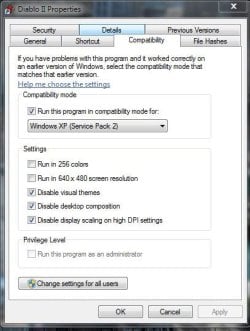
I was wondering if anybody could help me with a problem I'm having. When I start Diablo 2 the colours are all messed up they seem to be in a rainbow sort of style I don't really know how to explain but I've googled around about this and can't seem to find a fix?. I'm running windows 7 home premium and I have changed the video options for the game to directdraw along with setting the compatibility to windows xp service pack 2. If anyone could help me find a permanent fix for this I would be most grateful.
Thanks
I was wondering if anybody could help me with a problem I'm having. When I start Diablo 2 the colours are all messed up they seem to be in a rainbow sort of style I don't really know how to explain but I've googled around about this and can't seem to find a fix?. I'm running windows 7 home premium and I have changed the video options for the game to directdraw along with setting the compatibility to windows xp service pack 2. If anyone could help me find a permanent fix for this I would be most grateful.
Thanks
My Computer
At a glance
Windows 7Chipset
- Computer type
- PC/Desktop
- Computer Manufacturer/Model Number
- HP Pavillion S5306UK
- OS
- Windows 7
- Graphics Card(s)
- Chipset
- Browser
- Firefox



 That's how it worked for me. If you want to start your explorer.exe again: Task Manager-> Processes-> File -> New Task (Run...) -> type "exlorer.exe" and hit enter
  thanks for the help DG.

