Cache memory fills up RAM so I can't play performance heavy games

Manitis

New member
Local time
5:33 AM
Messages
5
Hello,

I have a really powerful gaming rig with Intel Core i7 2.8 GHz, Crucial C300 64GB SSD and 8 gigs of RAM which most would think is more than enough to run even the most performance demanding of games. I was playing COD: Blackops the other day and Windows told me it had to close some programs because it was low on system memory. I then saw that 5 GIGS were bound in cached memory and Windows 7 seemingly refused to give them up so I could play the game.

I don't want to hear from people saying that this it's actually a good thing that Windows is using my memory to cache programs and stuff and that it's a process I don't notice at all since it gives it up if you need it. The thing is it DOES annoy me because Windows doesn't give it up and it means I have to restart if I want to play a game that demands only roughly 1 gig of the 8 gigs I have. Also since I have a SSD all my programs load superfast anyways so I really want to find a way to completely shut this really irritating and stupid function off since it annoys me a lot.

Does anyone know of any way around this or a way to maybe make Windows realize that I sometimes need some of the gigabytes of RAM I paid for.
 

My Computer My Computer

At a glance

Windows 7 Ultimate x64
OS
Windows 7 Ultimate x64
I was playing COD: Blackops the other day and Windows told me it had to close some programs because it was low on system memory. I then saw that 5 GIGS were bound in cached memory and Windows 7 seemingly refused to give them up so I could play the game.

I don't want to hear from people saying that this it's actually a good thing that Windows is using my memory to cache programs and stuff and that it's a process I don't notice at all since it gives it up if you need it. The thing is it DOES annoy me because Windows doesn't give it up and it means I have to restart if I want to play a game that demands only roughly 1 gig of the 8 gigs I have.

Asking for help and then telling people you don't want to hear reality prolly isn't the best way to actually get the help you're looking for. :rolleyes: When you let people know right off the bat you're not receptive to truth... well... who wants a part of that, right?

What you have is a memory leak; caused by some application you installed and run in-between reboots.

You can start helping us help you by filling out your system specs, in detail, and list all the applications/programs you have up and running, or that you run when you notice high memory usage.
 

My Computer My Computer

At a glance

7 Ultimate x64i5-2500k8GB G.Skill Ripjaws X F3-12800CL7D-8GBXH 1866...EVGA GTX 570 SC
OS
7 Ultimate x64
CPU
i5-2500k
Motherboard
Asus P8P67 Pro
Memory
8GB G.Skill Ripjaws X F3-12800CL7D-8GBXH 1866MHz 8-9-8-24
Graphics Card(s)
EVGA GTX 570 SC
Sound Card
X-Fi Titanium Fatality
Monitor(s) Displays
Samsung S27A550H 27" LED
Screen Resolution
1920x1080
Hard Drives
OCZ Vertex 3 120GB.
1TB Samsung F3.
2TB Samsung F4.
PSU
PC Power & Cooling Silencer 760
Case
Lian Li Lancool K62
Cooling
Thermalright Venomous X Black/Scythe S-Flex/Shin-Etsu X23
Keyboard
MS Natural Elite 4000 Ergonomic
Mouse
Logitech G500
Internet Speed
6MB/768
Other Info
Logitech Z-5500 505 watts.
D-Link DGL-4500.
Tripp-Lite Smart Pro 1500.
Do you have a page file?
 

My Computer My Computer

At a glance

Windows 10 Pro (x64)Intel Core i7-3930K (3.2GHz - 4.5GHz)4x Samsung 4GB PC3-12800 DDR3 (16GB 1600MHz)Nvidia Geforce GTX 690
Computer type
PC/Desktop
Computer Manufacturer/Model Number
Alienware Aurora ALX R4
OS
Windows 10 Pro (x64)
CPU
Intel Core i7-3930K (3.2GHz - 4.5GHz)
Motherboard
Alienware Aurora-R4 x79
Memory
4x Samsung 4GB PC3-12800 DDR3 (16GB 1600MHz)
Graphics Card(s)
Nvidia Geforce GTX 690
Sound Card
SteelSeries Siberia Elite
Monitor(s) Displays
Dell UltraSharp U3011
Screen Resolution
2560x1600
Hard Drives
Samsung 850 Pro 256 GB, Seagate 1TB Desktop Hybrid HDD, 2x Western Digital 4TB Green HDD
PSU
875W Some Dell PSU <.<
Case
Alienware Aurora ALX
Cooling
Custom Liquid Cooling (EK CPU & GPU blocks) dual EK 480RAD
Keyboard
Logitech G710+ Mechanical
Mouse
Logitech G700s
Internet Speed
Verizon Fios (50 mbps average)
Other Info
Server: Intel NUC D54250WYK: i5-4250U, 16GB, 256 GB mSATA, Windows Server 2012 R2
I'm sorry about the irritated response to start with, I was just a bit fed up that every site I visited seemed to say that nothing was wrong and I was getting frustrated at not being able to fix a problem that seemed to be a byproduct of failed memory handling on Windows behalf. So I apologize for that, my temper just flared up a bit.

My system specs are:
CPU: Intel Core i7 2.8GHz
Motherboard: Asus P6T SE
GPU: 1GB Sapphire ATI RADEON HD 5770
Ram: 4x2GB DDR3 1600 MHz Corsair XMS3
SSD: 64GB Crucial RealSSD C300
HDD: 2x1.5TB Seagate Barracuda 7200.11 SATA-300 7200rpm 32MB
PSU: SilverStone ST75F 750 Watt

At the time when I got the message I was playing COD: Blackops and I would guess that the two main possible culprits would be Chrome or Skype. I was actually video chatting on Skype at the time and that means that Skype takes up about 250MB of RAM and I almost always have some Chrome windows open and due to the fact that I have quite a few extensions it actually runs quite high in RAM, for example right now as I'm writing this Chrome as a whole is actually taking up 1GB of Private memory and 1GB in private virtual memory with 500 MB in mapped virtual memory (don't know which number was needed). Other than those two I didn't have other notably RAM heavy programs running.

@logicearth: I do have a pagefile which is the size that Windows recommends 12274MB and it resides on one of the 1.5TB drives and is set such that Initial Size and Maximum Size or both set to 12274MB.

I hope this helps and I appreciate any support (even though I started sounding like I didn't :p )
 

My Computer My Computer

At a glance

Windows 7 Ultimate x64
OS
Windows 7 Ultimate x64
No blood no foul Manitis, we've all been there. :)

Since you've got your page file on another drive, did you make sure to go to your power options and set your hard drives to turn off "never"? If Windows needs to page, and that drive has spun down, this may be creating a problem?

Black Ops doesn't have a leak... I can't speak for Skype or Chrome, but the fact that Chrome seems to want 2.5GB's of RAM tells me there's a problem, a big one. Try using another browser for a few days and see if the problem still occurs.

Is your OS fully patched?
 

My Computer My Computer

At a glance

7 Ultimate x64i5-2500k8GB G.Skill Ripjaws X F3-12800CL7D-8GBXH 1866...EVGA GTX 570 SC
OS
7 Ultimate x64
CPU
i5-2500k
Motherboard
Asus P8P67 Pro
Memory
8GB G.Skill Ripjaws X F3-12800CL7D-8GBXH 1866MHz 8-9-8-24
Graphics Card(s)
EVGA GTX 570 SC
Sound Card
X-Fi Titanium Fatality
Monitor(s) Displays
Samsung S27A550H 27" LED
Screen Resolution
1920x1080
Hard Drives
OCZ Vertex 3 120GB.
1TB Samsung F3.
2TB Samsung F4.
PSU
PC Power & Cooling Silencer 760
Case
Lian Li Lancool K62
Cooling
Thermalright Venomous X Black/Scythe S-Flex/Shin-Etsu X23
Keyboard
MS Natural Elite 4000 Ergonomic
Mouse
Logitech G500
Internet Speed
6MB/768
Other Info
Logitech Z-5500 505 watts.
D-Link DGL-4500.
Tripp-Lite Smart Pro 1500.
Often memory errors like this are due to the Pagefile. many times because its disabled.

Having it on another drive should be fine. But, as pointed out make sure that Drive is not going into sleep mode.


Something else you may want to try, if you do not want the PF on the OS.

A 500MB PF on your main OS drive.

Then the Main PF on secondary drive..
With 8GB of RAM, I would just use something like a set (Min/Max) 4GB one as the main PF. Or you can set it to let Windows Manage.

Its a good thing to have a least a small PF with the OS IMHO.


Keep in mind most Games are 32bit apps, and therefore will only use up to 2GB of RAM.
Of course thats 2GB per 32bit app. There really shouldn't be a issue running multiple things in memory .. especially no more than you are.

I agree, the fact Chrome is using so much itslef though is a bit troubling.
 

My Computer My Computer

At a glance

Windows 7 Home Premium 64bitIntel Core i7 2700k8GB Mushkin Redline Ridgebacks @1866EVGA GTX570 SC
Computer Manufacturer/Model Number
Custom (Self Build)
OS
Windows 7 Home Premium 64bit
CPU
Intel Core i7 2700k
Motherboard
eVGA P67 SLI
Memory
8GB Mushkin Redline Ridgebacks @1866
Graphics Card(s)
EVGA GTX570 SC
Sound Card
XiFi Titanium HD
Monitor(s) Displays
LG W2453V
Screen Resolution
1920x1080
Hard Drives
Intel 320 80GB -- Intel X25-V 40GB --WD Black 1TB x2 -- WD Blue 640GB
PSU
Seasonic x750
Case
Corsair 600T SE White
Cooling
eVGA Superclocked CPU Cooler
Keyboard
Saitek Cyborg
Antivirus
Kaspersky
Browser
IE
Other Info
LG BD/DVD
Yeah I'm actually myself amazed at how high Chrome was. In a process explorer the processes combine most of the time to a little over 1 GB. I don't know if in the example before it was actually taking up 2.5Gigs since I don't know what the virtual memory is in fact (from what I've read it's not directly the pagefile but more a mixture of the CPU,RAM and the HDD as this guy writes: Answers.com - Difference between virtual memory and main memory )

I found the hard drive turn off idea very interesting and thought that could've caused it but unfortunately it was already set to never. I will however make a small 500mb PF on the main drive just to test that out. It's also a good point made by Wishmaster that because most games are 32 bit they only access 2GB and therefore although they appear to be way under my maximum RAM usage they could be maxing out the 2GB accessible to them.

I was wondering whether there was any program at all that could help me identify which program could be causing the memory leak, like say a process explorer that can list what's in the cached memory? Because the problem is I don't have a certain way of causing the problem so it's a little bit tricky to know when it's solved and when it's not, so much harder to solve those kind of problems. I'm going to try to find a way to reproduce the problem and find out whether the problem lies with Chrome or Skype, since those are the two main suspects.
 

My Computer My Computer

At a glance

Windows 7 Ultimate x64
OS
Windows 7 Ultimate x64
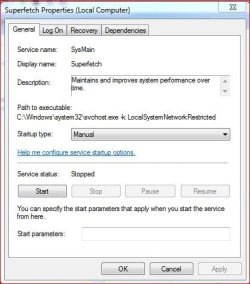
Amother suggestion - turn Superfetch off (in Services). That should stop the caching. It is not something I recommend on a permanent basis, but as a test it may give us some clues.
 

My Computer My Computer

At a glance

Vista, Windows7, Mint Mate, Zorin, Windows 8from 1.6GHz Duo to i7
Computer Manufacturer/Model Number
HP, Dell, Gateway, Toshiba - 4 laptops and 2 desktops
OS
Vista, Windows7, Mint Mate, Zorin, Windows 8
CPU
from 1.6GHz Duo to i7
Monitor(s) Displays
2x HP w2207
Hard Drives
5x HDD, 7x SSD, 12x Externals
Keyboard
with trackball - no mices
Mouse
Trackball mice
Internet Speed
DSL 6000
It is actually disabled, it happens automatically in Windows 7 because I have a SSD. Windows then disables disk defragmentation, Superfetch, ReadyBoost, as well as boot and application launch prefetching.
 

My Computer My Computer

At a glance

Windows 7 Ultimate x64
OS
Windows 7 Ultimate x64
It is actually disabled, it happens automatically in Windows 7 because I have a SSD. Windows then disables disk defragmentation, Superfetch, ReadyBoost, as well as boot and application launch prefetching.
Superfetch is not automatically disabled because of the SSD - at least not on my 5 systems with SSDs. Did you actually check that in Services?
 

My Computer My Computer

At a glance

Vista, Windows7, Mint Mate, Zorin, Windows 8from 1.6GHz Duo to i7
Computer Manufacturer/Model Number
HP, Dell, Gateway, Toshiba - 4 laptops and 2 desktops
OS
Vista, Windows7, Mint Mate, Zorin, Windows 8
CPU
from 1.6GHz Duo to i7
Monitor(s) Displays
2x HP w2207
Hard Drives
5x HDD, 7x SSD, 12x Externals
Keyboard
with trackball - no mices
Mouse
Trackball mice
Internet Speed
DSL 6000
Oh okay, I read that somewhere but it could be wrong. But I checked and it is disabled on my computer.
 

My Computer My Computer

At a glance

Windows 7 Ultimate x64
OS
Windows 7 Ultimate x64
I actually have less RAM than you (see system specs) and am an avid gamer and have never run into memory problems. I would suggest you check to see if it isn't actually a game related issue as opposed to a Windows memory usage issue. Wishmaster is also an avid gamer and I'm quite sure she hasn't run into your problem either (I think).

BTW I do have a pagefile, I don’t have Superfetch disabled. In fact I don’t have any Windows "tweaks" at all. I’ve also got all my games on a mechanical hard drive as opposed to my SSD drive.

Again, with this configuration, and only 6gig of RAM, no memory issues. I say again, check to see if this isn’t in fact a game issue. Some game are in fact known to have memory issues, so.....

My two cents.
 

My Computer My Computer

At a glance

Windows 10 ProIntel Core i7-4770K (3.5Ghz)32 gig Corsair Dominator Platinum (4x8Gig)Sapphire Tri-X R9 Fury
Computer type
PC/Desktop
Computer Manufacturer/Model Number
Custom built by me.
OS
Windows 10 Pro
CPU
Intel Core i7-4770K (3.5Ghz)
Motherboard
Gigabyte G1 Sniper 5 (F10 Bios)
Memory
32 gig Corsair Dominator Platinum (4x8Gig)
Graphics Card(s)
Sapphire Tri-X R9 Fury
Sound Card
Soundblaster ZXR
Monitor(s) Displays
NEC PA242W 24" LCD Monitor
Screen Resolution
1920 x 1200
Hard Drives
Primary - Samsung 850 Pro (512gig), Samsung 840 Pro (256gig), 2TB WD Caviar Black.
PSU
EVGA Supernova 1000 G2
Case
Cooler Master HAF X
Cooling
Corsair H100i with Corsair Air Series SP120 Quiet Fans
Keyboard
Logitech Wireless Wave
Mouse
Logitech Performance MX
Internet Speed
High Speed Cable
Antivirus
Norton Security
Browser
IE11
Other Info
Memory Timings - 1866MHz @ 9-9-9-27-1T @ 1.5 volts
Just a thought ...

The next time this happens look in your services, and show processes from all Users.


See how much memory the audioDG is using.
I remember a while back playing EQ2, that my RAM use would climb up to about 6-7GB of memory use. Which was just a bit overboard.
Eventually I would get a message that memory was low.


After some investigation, I found the audiodg.exe was very high use.
Turned out for me, Ventrillo was the culprit.

It had since been fixed but ...


Perhaps something similar is happening here with Skype?
May not be the issue, but was just a thought.

I have never used Skype, nor know anything about it, but its something to at least look into.


And as Sygnus has suggested, some games have leaks. I've seen it myself.
If, for example,they attempt to write to memory outside of thier 2GB allocated space, it will cause a memory error. This usually causes a crash though.
 

My Computer My Computer

At a glance

Windows 7 Home Premium 64bitIntel Core i7 2700k8GB Mushkin Redline Ridgebacks @1866EVGA GTX570 SC
Computer Manufacturer/Model Number
Custom (Self Build)
OS
Windows 7 Home Premium 64bit
CPU
Intel Core i7 2700k
Motherboard
eVGA P67 SLI
Memory
8GB Mushkin Redline Ridgebacks @1866
Graphics Card(s)
EVGA GTX570 SC
Sound Card
XiFi Titanium HD
Monitor(s) Displays
LG W2453V
Screen Resolution
1920x1080
Hard Drives
Intel 320 80GB -- Intel X25-V 40GB --WD Black 1TB x2 -- WD Blue 640GB
PSU
Seasonic x750
Case
Corsair 600T SE White
Cooling
eVGA Superclocked CPU Cooler
Keyboard
Saitek Cyborg
Antivirus
Kaspersky
Browser
IE
Other Info
LG BD/DVD
Amother suggestion - turn Superfetch off (in Services). That should stop the caching. It is not something I recommend on a permanent basis, but as a test it may give us some clues.

It is actually disabled, it happens automatically in Windows 7 because I have a SSD. Windows then disables disk defragmentation, Superfetch, ReadyBoost, as well as boot and application launch prefetching.

It is actually disabled, it happens automatically in Windows 7 because I have a SSD. Windows then disables disk defragmentation, Superfetch, ReadyBoost, as well as boot and application launch prefetching.
Superfetch is not automatically disabled because of the SSD - at least not on my 5 systems with SSDs. Did you actually check that in Services?


It's not disabled right off with a new install on newer SSD's, until you run the WEI for the first time. Then it automatically disables it. If you don't ever run the WEI, it won't ever automatically turn it off.

I believe on old first gen SSD's they didn't auto disable it at all.
 

My Computer My Computer

At a glance

Windows 7 Ultimate x64 SP1Core i7 920 (D0) @ 4Ghz, *26c idle *65c full ...12GB DDR3 Corsair Dominator -CMD12GX3M6A1600C...Zotac Geforce GTX 770
Computer type
PC/Desktop
Computer Manufacturer/Model Number
Airbot 2.0
OS
Windows 7 Ultimate x64 SP1
CPU
Core i7 920 (D0) @ 4Ghz, *26c idle *65c full load on air
Motherboard
Asus P6X58D Premium - Sata 6Gb/s - USB 3.0
Memory
12GB DDR3 Corsair Dominator -CMD12GX3M6A1600C8 at 1600MHz
Graphics Card(s)
Zotac Geforce GTX 770
Sound Card
ASUS Xonar D2X
Monitor(s) Displays
1 LG 24" Flatron W2453V-PF 1 Samsung 24" P2450H both 2ms RT
Screen Resolution
1920x1080@60hz
Hard Drives
1 Samsung 250GB 840 Evo SSD
1 OCZ Vertex2 180GB SSD
1 TB Samsung Spinpoint F1 7200RPM 32MB cache
2 500GB WD Caviar Blacks 7200RPM 32MB cache (WD5001AALS)

Pioneer DVD Burner DVR-S18M
PSU
Corsair HX1000W
Case
Cooler Master HAF 932
Cooling
Case Fans *3 230mm, *1 140mm/CPU - *Tuniq Tower 120 Extreme
Keyboard
Logitech Wireless MK700
Mouse
Logitech Wireless MK700
Internet Speed
DL 15 Mbps UL 0.98 Mbps
Antivirus
None
Browser
Firefox Nightly
Other Info
Processor-7.7 *RAM- 7.9 *Graphics-7.9 *Gaming Graphics- 7.9 *SSD- 7.8 W.E.I final score= 7.7
*Phone- LG Nexus 5
It's not disabled right off with a new install on newer SSD's, until you run the WEI for the first time. Then it automatically disables it. If you don't ever run the WEI, it won't ever automatically turn it off.

I believe on old first gen SSD's they didn't auto disable it at all.

Hmmm.... never knew that. Is there a place to find this info?

Thanks.

Never mind I found it.....

Windows 7 Optimizations and Default Behavior Summary

Windows 7 will disable disk defragmentation on SSD system drives. Because SSDs perform extremely well on random read operations, defragmenting files isn’t helpful enough to warrant the added disk writing defragmentation produces. The FAQ section below has some additional details.

Be default, Windows 7 will disable Superfetch, ReadyBoost, as well as boot and application launch prefetching on SSDs with good random read, random write and flush performance. These technologies were all designed to improve performance on traditional HDDs, where random read performance could easily be a major bottleneck.

Support and Q&A for Solid-State Drives - Engineering Windows 7 - Site Home - MSDN Blogs
 

My Computer My Computer

At a glance

Windows 10 ProIntel Core i7-4770K (3.5Ghz)32 gig Corsair Dominator Platinum (4x8Gig)Sapphire Tri-X R9 Fury
Computer type
PC/Desktop
Computer Manufacturer/Model Number
Custom built by me.
OS
Windows 10 Pro
CPU
Intel Core i7-4770K (3.5Ghz)
Motherboard
Gigabyte G1 Sniper 5 (F10 Bios)
Memory
32 gig Corsair Dominator Platinum (4x8Gig)
Graphics Card(s)
Sapphire Tri-X R9 Fury
Sound Card
Soundblaster ZXR
Monitor(s) Displays
NEC PA242W 24" LCD Monitor
Screen Resolution
1920 x 1200
Hard Drives
Primary - Samsung 850 Pro (512gig), Samsung 840 Pro (256gig), 2TB WD Caviar Black.
PSU
EVGA Supernova 1000 G2
Case
Cooler Master HAF X
Cooling
Corsair H100i with Corsair Air Series SP120 Quiet Fans
Keyboard
Logitech Wireless Wave
Mouse
Logitech Performance MX
Internet Speed
High Speed Cable
Antivirus
Norton Security
Browser
IE11
Other Info
Memory Timings - 1866MHz @ 9-9-9-27-1T @ 1.5 volts
Disabling Superfetch is a BIG mistake. RAM is a lot faster than the fastest SSD.
 

My Computer My Computer

At a glance

Vista, Windows7, Mint Mate, Zorin, Windows 8from 1.6GHz Duo to i7
Computer Manufacturer/Model Number
HP, Dell, Gateway, Toshiba - 4 laptops and 2 desktops
OS
Vista, Windows7, Mint Mate, Zorin, Windows 8
CPU
from 1.6GHz Duo to i7
Monitor(s) Displays
2x HP w2207
Hard Drives
5x HDD, 7x SSD, 12x Externals
Keyboard
with trackball - no mices
Mouse
Trackball mice
Internet Speed
DSL 6000
Microsoft apparently doesn't think so. However in regards to early gen SSD's....

Will Superfetch be disabled on SSDs?

Yes, for most systems with SSDs.

If the system disk is an SSD, and the SSD performs adequately on random reads and doesn’t have glaring performance issues with random writes or flushes, then Superfetch, boot prefetching, application launch prefetching, ReadyBoost and ReadDrive will all be disabled.

Initially, we had configured all of these features to be off on all SSDs, but we encountered sizable performance regressions on some systems. In root causing those regressions, we found that some first generation SSDs had severe enough random write and flush problems that ultimately lead to disk reads being blocked for long periods of time. With Superfetch and other prefetching re-enabled, performance on key scenarios was markedly improved.
 

My Computer My Computer

At a glance

Windows 10 ProIntel Core i7-4770K (3.5Ghz)32 gig Corsair Dominator Platinum (4x8Gig)Sapphire Tri-X R9 Fury
Computer type
PC/Desktop
Computer Manufacturer/Model Number
Custom built by me.
OS
Windows 10 Pro
CPU
Intel Core i7-4770K (3.5Ghz)
Motherboard
Gigabyte G1 Sniper 5 (F10 Bios)
Memory
32 gig Corsair Dominator Platinum (4x8Gig)
Graphics Card(s)
Sapphire Tri-X R9 Fury
Sound Card
Soundblaster ZXR
Monitor(s) Displays
NEC PA242W 24" LCD Monitor
Screen Resolution
1920 x 1200
Hard Drives
Primary - Samsung 850 Pro (512gig), Samsung 840 Pro (256gig), 2TB WD Caviar Black.
PSU
EVGA Supernova 1000 G2
Case
Cooler Master HAF X
Cooling
Corsair H100i with Corsair Air Series SP120 Quiet Fans
Keyboard
Logitech Wireless Wave
Mouse
Logitech Performance MX
Internet Speed
High Speed Cable
Antivirus
Norton Security
Browser
IE11
Other Info
Memory Timings - 1866MHz @ 9-9-9-27-1T @ 1.5 volts
Disabling Superfetch is a BIG mistake. RAM is a lot faster than the fastest SSD.

I agree.
While the benefit is not immediatey apparent, after a few days there is a bit of a difference.

I turn mine back on.
 

My Computer My Computer

At a glance

Windows 7 Home Premium 64bitIntel Core i7 2700k8GB Mushkin Redline Ridgebacks @1866EVGA GTX570 SC
Computer Manufacturer/Model Number
Custom (Self Build)
OS
Windows 7 Home Premium 64bit
CPU
Intel Core i7 2700k
Motherboard
eVGA P67 SLI
Memory
8GB Mushkin Redline Ridgebacks @1866
Graphics Card(s)
EVGA GTX570 SC
Sound Card
XiFi Titanium HD
Monitor(s) Displays
LG W2453V
Screen Resolution
1920x1080
Hard Drives
Intel 320 80GB -- Intel X25-V 40GB --WD Black 1TB x2 -- WD Blue 640GB
PSU
Seasonic x750
Case
Corsair 600T SE White
Cooling
eVGA Superclocked CPU Cooler
Keyboard
Saitek Cyborg
Antivirus
Kaspersky
Browser
IE
Other Info
LG BD/DVD
Honestly I never even knew mines was off, had no performance issues or drive degredation so I'll leave mine as is.

Superfetch.JPG
 

My Computer My Computer

At a glance

Windows 10 ProIntel Core i7-4770K (3.5Ghz)32 gig Corsair Dominator Platinum (4x8Gig)Sapphire Tri-X R9 Fury
Computer type
PC/Desktop
Computer Manufacturer/Model Number
Custom built by me.
OS
Windows 10 Pro
CPU
Intel Core i7-4770K (3.5Ghz)
Motherboard
Gigabyte G1 Sniper 5 (F10 Bios)
Memory
32 gig Corsair Dominator Platinum (4x8Gig)
Graphics Card(s)
Sapphire Tri-X R9 Fury
Sound Card
Soundblaster ZXR
Monitor(s) Displays
NEC PA242W 24" LCD Monitor
Screen Resolution
1920 x 1200
Hard Drives
Primary - Samsung 850 Pro (512gig), Samsung 840 Pro (256gig), 2TB WD Caviar Black.
PSU
EVGA Supernova 1000 G2
Case
Cooler Master HAF X
Cooling
Corsair H100i with Corsair Air Series SP120 Quiet Fans
Keyboard
Logitech Wireless Wave
Mouse
Logitech Performance MX
Internet Speed
High Speed Cable
Antivirus
Norton Security
Browser
IE11
Other Info
Memory Timings - 1866MHz @ 9-9-9-27-1T @ 1.5 volts
I leave SuperFetch enabled on my box with my SSD.

To the OP, Windows 7 should use RAM and it should free up that RAM as needed. That is normal and what you want. However, in your case, it's not cached RAM that is filling up your memory, but rather a memory leak that is causing RAM to be fully used and thus running out. So, those are two different things.
 

My Computer My Computer

At a glance

Windows 7 Ultimate x64Intel Q9550 2.83Ghz OC'd to 3.40Ghz8GB G.Skill PI DDR2-800, 4-4-4-12 timingsEVGA 1280MB Nvidia GeForce GTX570
Computer Manufacturer/Model Number
Self-Built in July 2009
OS
Windows 7 Ultimate x64
CPU
Intel Q9550 2.83Ghz OC'd to 3.40Ghz
Motherboard
Gigabyte GA-EP45-UD3R rev. 1.1, F12 BIOS
Memory
8GB G.Skill PI DDR2-800, 4-4-4-12 timings
Graphics Card(s)
EVGA 1280MB Nvidia GeForce GTX570
Sound Card
Realtek ALC899A 8 channel onboard audio
Monitor(s) Displays
23" Acer x233H
Screen Resolution
1920x1080
Hard Drives
Intel X25-M 80GB Gen 2 SSD
Western Digital 1TB Caviar Black, 32MB cache. WD1001FALS
PSU
Corsair 620HX modular
Case
Antec P182
Cooling
stock
Keyboard
ABS M1 Mechanical
Mouse
Logitech G9 Laser Mouse
Internet Speed
15/2 cable modem
Other Info
Windows and Linux enthusiast. Logitech G35 Headset.
Back
Top