| Windows 7: Cache memory fills up RAM so I can't play performance heavy games |
14 May 2011
|
#1 | | |
Cache memory fills up RAM so I can't play performance heavy games Hello,
I have a really powerful gaming rig with Intel Core i7 2.8 GHz, Crucial C300 64GB SSD and 8 gigs of RAM which most would think is more than enough to run even the most performance demanding of games. I was playing COD: Blackops the other day and Windows told me it had to close some programs because it was low on system memory. I then saw that 5 GIGS were bound in cached memory and Windows 7 seemingly refused to give them up so I could play the game.
I don't want to hear from people saying that this it's actually a good thing that Windows is using my memory to cache programs and stuff and that it's a process I don't notice at all since it gives it up if you need it. The thing is it DOES annoy me because Windows doesn't give it up and it means I have to restart if I want to play a game that demands only roughly 1 gig of the 8 gigs I have. Also since I have a SSD all my programs load superfast anyways so I really want to find a way to completely shut this really irritating and stupid function off since it annoys me a lot.
Does anyone know of any way around this or a way to maybe make Windows realize that I sometimes need some of the gigabytes of RAM I paid for. | My System Specs |
| OS Windows 7 Ultimate x64 |
14 May 2011
|
#2 | | 7 Ultimate x64 California |

Quote: Originally Posted by Manitis I was playing COD: Blackops the other day and Windows told me it had to close some programs because it was low on system memory. I then saw that 5 GIGS were bound in cached memory and Windows 7 seemingly refused to give them up so I could play the game. I don't want to hear from people saying that this it's actually a good thing that Windows is using my memory to cache programs and stuff and that it's a process I don't notice at all since it gives it up if you need it. The thing is it DOES annoy me because Windows doesn't give it up and it means I have to restart if I want to play a game that demands only roughly 1 gig of the 8 gigs I have. Asking for help and then telling people you don't want to hear reality prolly isn't the best way to actually get the help you're looking for.  When you let people know right off the bat you're not receptive to truth... well... who wants a part of that, right?
What you have is a memory leak; caused by some application you installed and run in-between reboots.
You can start helping us help you by filling out your system specs, in detail, and list all the applications/programs you have up and running, or that you run when you notice high memory usage. | My System Specs | | OS 7 Ultimate x64 CPU i5-2500k Motherboard Asus P8P67 Pro Memory 8GB G.Skill Ripjaws X F3-12800CL7D-8GBXH 1866MHz 8-9-8-24 Graphics Card EVGA GTX 570 SC Sound Card X-Fi Titanium Fatality Monitor(s) Displays Samsung S27A550H 27" LED Screen Resolution 1920x1080 Keyboard MS Natural Elite 4000 Ergonomic Mouse Logitech G500 PSU PC Power & Cooling Silencer 760 Case Lian Li Lancool K62 Cooling Thermalright Venomous X Black/Scythe S-Flex/Shin-Etsu X23 Hard Drives OCZ Vertex 3 120GB.
1TB Samsung F3.
2TB Samsung F4. Internet Speed 6MB/768 Other Info Logitech Z-5500 505 watts.
D-Link DGL-4500.
Tripp-Lite Smart Pro 1500. Computer type PC/Desktop System Manufacturer/Model Number Alienware Aurora ALX R4 OS Windows 7 x64 (SP1) CPU Intel Core i7-3930K (3.2GHz, Turbo 4GHz) Motherboard Alienware Aurora-R4 x79 Memory 4x Samsung 4GB PC3-12800 DDR3 (16GB 1600MHz) Graphics Card Nvidia Geforce GTX 690 (Stock) Sound Card RealTek Integrated Audio Monitor(s) Displays Dell UltraSharp U3011 Screen Resolution 2560x1600 PSU 875W Some Dell PSU <.< Hard Drives Samsung P830 256 GB, WD Raptor 150GB, 2x 1TB HDDs Other Info Dell Inspiron Mini 10v (Intel Atom N270 1.6 GHz; 1GB; Windows 7 Ultimate) |
15 May 2011
|
#4 | | |
I'm sorry about the irritated response to start with, I was just a bit fed up that every site I visited seemed to say that nothing was wrong and I was getting frustrated at not being able to fix a problem that seemed to be a byproduct of failed memory handling on Windows behalf. So I apologize for that, my temper just flared up a bit.
My system specs are:
CPU: Intel Core i7 2.8GHz
Motherboard: Asus P6T SE
GPU: 1GB Sapphire ATI RADEON HD 5770
Ram: 4x2GB DDR3 1600 MHz Corsair XMS3
SSD: 64GB Crucial RealSSD C300
HDD: 2x1.5TB Seagate Barracuda 7200.11 SATA-300 7200rpm 32MB
PSU: SilverStone ST75F 750 Watt
At the time when I got the message I was playing COD: Blackops and I would guess that the two main possible culprits would be Chrome or Skype. I was actually video chatting on Skype at the time and that means that Skype takes up about 250MB of RAM and I almost always have some Chrome windows open and due to the fact that I have quite a few extensions it actually runs quite high in RAM, for example right now as I'm writing this Chrome as a whole is actually taking up 1GB of Private memory and 1GB in private virtual memory with 500 MB in mapped virtual memory (don't know which number was needed). Other than those two I didn't have other notably RAM heavy programs running.
@logicearth: I do have a pagefile which is the size that Windows recommends 12274MB and it resides on one of the 1.5TB drives and is set such that Initial Size and Maximum Size or both set to 12274MB.
I hope this helps and I appreciate any support (even though I started sounding like I didn't  ) | My System Specs | | OS Windows 7 Ultimate x64 |
15 May 2011
|
#5 | | 7 Ultimate x64 California |
No blood no foul Manitis, we've all been there.
Since you've got your page file on another drive, did you make sure to go to your power options and set your hard drives to turn off "never"? If Windows needs to page, and that drive has spun down, this may be creating a problem?
Black Ops doesn't have a leak... I can't speak for Skype or Chrome, but the fact that Chrome seems to want 2.5GB's of RAM tells me there's a problem, a big one. Try using another browser for a few days and see if the problem still occurs.
Is your OS fully patched? | My System Specs | | OS 7 Ultimate x64 CPU i5-2500k Motherboard Asus P8P67 Pro Memory 8GB G.Skill Ripjaws X F3-12800CL7D-8GBXH 1866MHz 8-9-8-24 Graphics Card EVGA GTX 570 SC Sound Card X-Fi Titanium Fatality Monitor(s) Displays Samsung S27A550H 27" LED Screen Resolution 1920x1080 Keyboard MS Natural Elite 4000 Ergonomic Mouse Logitech G500 PSU PC Power & Cooling Silencer 760 Case Lian Li Lancool K62 Cooling Thermalright Venomous X Black/Scythe S-Flex/Shin-Etsu X23 Hard Drives OCZ Vertex 3 120GB.
1TB Samsung F3.
2TB Samsung F4. Internet Speed 6MB/768 Other Info Logitech Z-5500 505 watts.
D-Link DGL-4500.
Tripp-Lite Smart Pro 1500. |
15 May 2011
|
#6 | | Windows 7 Home Premium 64bit Southern Ohio |
Often memory errors like this are due to the Pagefile. many times because its disabled.
Having it on another drive should be fine. But, as pointed out make sure that Drive is not going into sleep mode.
Something else you may want to try, if you do not want the PF on the OS.
A 500MB PF on your main OS drive.
Then the Main PF on secondary drive..
With 8GB of RAM, I would just use something like a set (Min/Max) 4GB one as the main PF. Or you can set it to let Windows Manage.
Its a good thing to have a least a small PF with the OS IMHO.
Keep in mind most Games are 32bit apps, and therefore will only use up to 2GB of RAM.
Of course thats 2GB per 32bit app. There really shouldn't be a issue running multiple things in memory .. especially no more than you are.
I agree, the fact Chrome is using so much itslef though is a bit troubling. | My System Specs | | System Manufacturer/Model Number Custom (Self Build) OS Windows 7 Home Premium 64bit CPU Intel Core i7 2700k Motherboard eVGA P67 SLI Memory 8GB Mushkin Redline Ridgebacks @1866 Graphics Card EVGA GTX570 SC Sound Card XiFi Titanium HD Monitor(s) Displays LG W2453V Screen Resolution 1920x1080 Keyboard Saitek Cyborg PSU Seasonic x750 Case Corsair 600T SE White Cooling eVGA Superclocked CPU Cooler Hard Drives Intel 320 80GB -- Intel X25-V 40GB --WD Black 1TB x2 -- WD Blue 640GB Antivirus Kaspersky Browser IE Other Info LG BD/DVD |
15 May 2011
|
#7 | | |
Yeah I'm actually myself amazed at how high Chrome was. In a process explorer the processes combine most of the time to a little over 1 GB. I don't know if in the example before it was actually taking up 2.5Gigs since I don't know what the virtual memory is in fact (from what I've read it's not directly the pagefile but more a mixture of the CPU,RAM and the HDD as this guy writes: Answers.com - Difference between virtual memory and main memory )
I found the hard drive turn off idea very interesting and thought that could've caused it but unfortunately it was already set to never. I will however make a small 500mb PF on the main drive just to test that out. It's also a good point made by Wishmaster that because most games are 32 bit they only access 2GB and therefore although they appear to be way under my maximum RAM usage they could be maxing out the 2GB accessible to them.
I was wondering whether there was any program at all that could help me identify which program could be causing the memory leak, like say a process explorer that can list what's in the cached memory? Because the problem is I don't have a certain way of causing the problem so it's a little bit tricky to know when it's solved and when it's not, so much harder to solve those kind of problems. I'm going to try to find a way to reproduce the problem and find out whether the problem lies with Chrome or Skype, since those are the two main suspects. | My System Specs | | OS Windows 7 Ultimate x64 |
15 May 2011
|
#8 | | Vista, Windows7, Mint Mate, Zorin, Windows 8 Florida in winter, Black Forest/Germany |
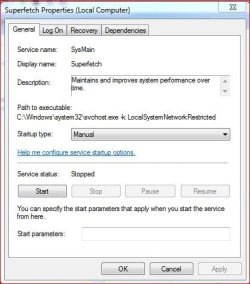
Amother suggestion - turn Superfetch off (in Services). That should stop the caching. It is not something I recommend on a permanent basis, but as a test it may give us some clues. | My System Specs | | System Manufacturer/Model Number HP, Dell, Gateway, Toshiba - 4 laptops and 2 desktops OS Vista, Windows7, Mint Mate, Zorin, Windows 8 CPU from 1.6GHz Duo to i7 Monitor(s) Displays 2x HP w2207 Keyboard with trackball - no mices Mouse Trackball mice Hard Drives 5x HDD, 7x SSD, 12x Externals Internet Speed DSL 6000 |
15 May 2011
|
#9 | | |
It is actually disabled, it happens automatically in Windows 7 because I have a SSD. Windows then disables disk defragmentation, Superfetch, ReadyBoost, as well as boot and application launch prefetching. | My System Specs | | OS Windows 7 Ultimate x64 |
15 May 2011
|
#10 | | Vista, Windows7, Mint Mate, Zorin, Windows 8 Florida in winter, Black Forest/Germany |

Quote: Originally Posted by Manitis It is actually disabled, it happens automatically in Windows 7 because I have a SSD. Windows then disables disk defragmentation, Superfetch, ReadyBoost, as well as boot and application launch prefetching. Superfetch is not automatically disabled because of the SSD - at least not on my 5 systems with SSDs. Did you actually check that in Services? | My System Specs | | System Manufacturer/Model Number HP, Dell, Gateway, Toshiba - 4 laptops and 2 desktops OS Vista, Windows7, Mint Mate, Zorin, Windows 8 CPU from 1.6GHz Duo to i7 Monitor(s) Displays 2x HP w2207 Keyboard with trackball - no mices Mouse Trackball mice Hard Drives 5x HDD, 7x SSD, 12x Externals Internet Speed DSL 6000 Cache memory fills up RAM so I can't play performance heavy games problems? All times are GMT -5. The time now is 11:45 AM. | |