Windows 7 Forums Search
Welcome to Windows 7 Forums. Our forum is dedicated to helping you find solutions with any problems, errors or issues you are experiencing with Windows 7. The Windows 7 forum also covers news and updates and has an extensive Windows 7 tutorial section that covers a wide range of tips and tricks.


Windows 7 - Intel Graphics Control Panel Scaling Issue

 
11-29-2011   #1


Windows 7 Ultimate x32


Intel Graphics Control Panel Scaling Issue

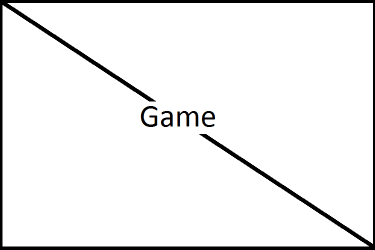
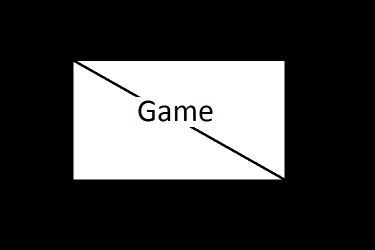
My fullscreen looks windowed and has the same resolution. Eg: I have 1366x768 monitor and the game is originally 640x480 window but can be played on fullscreen. It worked till now, but suddenly instead of stretching and scaling full screen, it became centered and maintained the same resolution. I've been trying to fix this for a few hours now, and found it was from Intel Graphics control panel which is suddenly set into centered. The only catch is, whenever I apply either maintain aspect ratio or scale fullscreen and close, whenever I open the Control panel since it didn't work and looked the same, it has been set back to centered! I've tried locating the program within system32 which is named GfxUi.exe and tried running it on system user, right clicking and running as Administrator and every other thing which came to mind but it ends with the same result. No result. It's not a game problem, tried whatever alt+enter, creating shortcut and going to properties and set it to run as maximized and everything else. The game either has windowed or fullscreen, nothing like scale or don't scale. I know it's from the Intel but I don't know how to fix it! Attachment shows before and after whatever-god-knows-happened to the control panel with a mind of it's own...Should I label it a rogue AI

I've tried to explain, and thanks for listening, any help would be much desperately appreciated.

Ps-Sorry for crappy paint work on attachment, not in the mood for photoshop extravaganza!

So help, please?

Attached Thumbnails
Intel Graphics Control Panel Scaling Issue-fullscreen-before.png   Intel Graphics Control Panel Scaling Issue-fullscreen-now.png  

Last edited by addictorator; 11-29-2011 at 02:09 AM.. Reason: attachment so it helps!
My System SpecsSystem Spec
11-29-2011   #2


Windows 7 Home Premium 64 bit


My System SpecsSystem Spec
11-29-2011   #3


Windows 7 Ultimate x32


That one intel says he is using fullscreen, but my one says centered. I know that is the problem but I can't change it no matter how I try...The methods I used are in the first post. Shortly, I cant, SYSTEM account can't, Run as Administrator can't, and I am SURE it's not a game problem. And I checked that topic before postic a new topic, since I shouldn't ask for help while the solution is already there, but the problem was different and it said "Notice: The last post in this thread was 346 days ago. If your post is not directly related to this discussion please consider making a new thread."

Could it be a virus? Maybe a driver bug, I haven't updated my drivers...CAN a bug like that exist???But then why did it change to 'centered' for no reason in the first place?

Last edited by addictorator; 11-29-2011 at 04:36 AM.. Reason: A Solution?
My System SpecsSystem Spec
.


11-29-2011   #4


Windows 7 Ultimate x32


THANK GOD!!! I didn't do anything and in a final desperate attempt I tried it again and now I can change it to scale fullscreen! But I have to check whether it works in the game or not. In a panic I deleted the game so I'm downloading it again, lucky I got my save files...So just bear with me for just a few hours guys, just gotta make sure before changing to solved!!!

SOLVED!!!

Last edited by addictorator; 11-29-2011 at 09:49 AM.. Reason: It worked!
My System SpecsSystem Spec
Reply

 Intel Graphics Control Panel Scaling Issue problems?


Thread Tools


Similar Threads for: Intel Graphics Control Panel Scaling Issue
Thread Forum
Dell Optiplex 760- Intel 4 Graphics Issue Graphic Cards
Cant find graphics control panel Graphic Cards
Dell Latitude X1 Intel Graphics Control Graphic Cards
How to change the color of the top panel in control panel Themes and Styles
Display scaling issue (not just in Windows) Chillout Room


All times are GMT -5. The time now is 08:06 PM.


Windows 7 Forums is an independent web site and has not been authorized,
sponsored, or otherwise approved by Microsoft Corporation.
"Windows 7" and related materials are trademarks of Microsoft Corp.
© Designer Media Ltd
  

1 2 3 4 5 6 7 8 9 10 11 12 13 14 15 16 17 18 19 20 21 22 23 24 25 26 27 28 29 30