
Two of my favorite game crash randomly some minutes after gameplay.
I've searched around the net (it seems random), tried sfc and chkdsk (nothing found), and reinstallng the game
As I check system viewer I noticed that all crashes originated from kernelbase.dll (at least I think so)
Some of them:
For the record the games are Command & Conquer 3, Command & Conquer 3 Kane's Wrath (both are updated to latest version)
Thanks
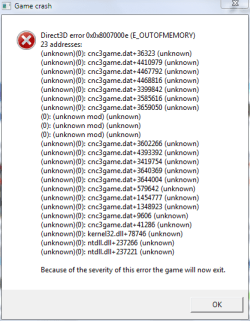
Screenshot in attachment
I've searched around the net (it seems random), tried sfc and chkdsk (nothing found), and reinstallng the game
As I check system viewer I noticed that all crashes originated from kernelbase.dll (at least I think so)
Some of them:
Code:
Faulting application name: cnc3game.dat, version: 1.9.2801.21826, time stamp: 0x00000000
Faulting module name: KERNELBASE.dll, version: 6.1.7601.17651, time stamp: 0x4e211319
Exception code: 0x04560123
Fault offset: 0x0000b9bc
Faulting process id: 0xb78
Faulting application start time: 0x01ccc57181f64ccd
Faulting application path: D:\Games\Command & Conquer 3\RetailExe\1.9\cnc3game.dat
Faulting module path: C:\Windows\syswow64\[COLOR="Red"]KERNELBASE.dll[/COLOR]
Report Id: b1253ad8-3166-11e1-a0c3-1c4bd60c856d
Code:
Faulting application name: cnc3ep1.dat, version: 1.2.0.0, time stamp: 0x49418bfa
Faulting module name: KERNELBASE.dll, version: 6.1.7601.17651, time stamp: 0x4e211319
Exception code: 0x04560123
Fault offset: 0x0000b9bc
Faulting process id: 0x18c4
Faulting application start time: 0x01ccc580d7c1eb5d
Faulting application path: D:\Games\Command & Conquer 3 Kane's Wrath\RetailExe\1.2\cnc3ep1.dat
Faulting module path: C:\Windows\syswow64\[COLOR="red"]KERNELBASE.dll[/COLOR]
Report Id: f3525637-3179-11e1-a0c3-1c4bd60c856d
For the record the games are Command & Conquer 3, Command & Conquer 3 Kane's Wrath (both are updated to latest version)
Thanks
Screenshot in attachment
Attachments
Last edited:
My Computer
At a glance
Windows 7 Ultimate x64 SP1Intel Core i7 3630QM8GBNVIDIA GeForce 740M 2GB
- Computer type
- Laptop
- Computer Manufacturer/Model Number
- ASUS N56VB
- OS
- Windows 7 Ultimate x64 SP1
- CPU
- Intel Core i7 3630QM
- Motherboard
- ASUS N56VB
- Memory
- 8GB
- Graphics Card(s)
- NVIDIA GeForce 740M 2GB
- Sound Card
- Realtek
- Screen Resolution
- 1920*1080
- Hard Drives
- 1 Drive 1TB 5400RPM:
C Drive : 149GB
D Drive : 781GB
- Mouse
- Logitech M325


