Windows 7 Forums Search

Go Back Windows 7 Forums > Windows 7 help and support > Gaming » My Windows 7 came with no games!

Welcome to Windows 7 Forums. Our forum is dedicated to helping you find solutions with any problems, errors or issues you are experiencing with Windows 7. The Windows 7 forum also covers news and updates and has an extensive Windows 7 tutorial section that covers a wide range of tips and tricks.

Windows 7 - My Windows 7 came with no games!


08-27-2009   #1 (permalink)


Windows 7 Ultimate and Ubuntu 9.04


My Windows 7 came with no games!

Is that normal?

I open Games Explorer and it's completely blank. I've always known Microsoft operating systems to come with a few "stock" games, but it seems I was duped!

I'm using the 64-bit RTM release from MSDNAA.

What gives?

My System SpecsSystem Spec
08-27-2009   #2 (permalink)


Windows 7 Ultimate
The Southern Hinterlands


I guess they figured since its for academic purposes, that you wont have time to play games...
My System SpecsSystem Spec
08-27-2009   #3 (permalink)


Windows 7 Ultimate x64
Trinidad and Tobago


People actually play those games... ?

>.>
My System SpecsSystem Spec
.
08-27-2009   #4 (permalink)


Windows 7 Ultimate and Ubuntu 9.04


LOL, seriously?

I thought the one MSDNAA was the same thing the manufacturers got.

And yes, those games are fun! Sure, I don't spend hours at a time playing Chess, but it's nice if I have to wait 5 minutes for a teacher or something and I'm bored...

Anyway, is there an easy way to install the Microsoft games? Or do I have to download them each separately and put them in that Games manager?
(I also read about Inkball not being included in Windows 7... but would the EXE from Vista work?)
My System SpecsSystem Spec
08-27-2009   #5 (permalink)


Windows 7 Ultimate x64
Trinidad and Tobago


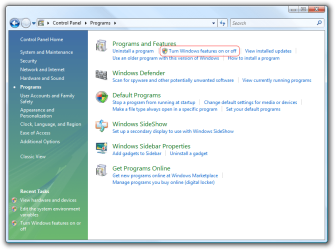
Go to Control Panel..Turn Windows Features ON/OFF.. Make sure the games are ticked off there...
My System SpecsSystem Spec
08-27-2009   #6 (permalink)


Windows 7 Ultimate and Ubuntu 9.04


I couldn't find it under Control Panel, but I did it by searching for "Windows Features" in the Start Menu.

Thanks for the tip though!
My System SpecsSystem Spec
08-27-2009   #7 (permalink)


Windows 7 Ultimate x64
Trinidad and Tobago


Sorry.. My bad.. In control Panel, to go programs

I attached an image to help you out.

My Windows 7 came with no games!-windows-features-control-panel.png
My System SpecsSystem Spec
08-27-2009   #8 (permalink)


Windows 7 Ultimate and Ubuntu 9.04


Oh, I see...

I prefer having my Control Panel with the items though, because that way it shows all the options. But typing "Windows Features" in the Start Menu works too.
My System SpecsSystem Spec
08-27-2009   #9 (permalink)


Windows 7 Ultimate x64
Trinidad and Tobago


Oh. So were you able to tick off the games? Did that work?
My System SpecsSystem Spec
08-27-2009   #10 (permalink)


Vista Home Premium 32-bit & Vista Ultimate 64-bit both Service Pack 2 W7 Pro RTM 7600 32 & 64
Doncaster, UK


I found that as well (I'm running the Pro edition). It seems that, although the games are included, they are disabled by default and you simply need to reenable them in Program Features.
My System SpecsSystem Spec
Reply

Thread Tools


Similar Threads for: My Windows 7 came with no games!
Thread Forum
Games Explorer Folder - Add Games To Tutorials
Low Fps in Games, Slow Flash Games Gaming
Games Explorer Folder - Restore Default Games Tutorials
Games on Demand for Games for Windows – LIVE News
Games Explorer Folder - Hide or Unhide Games Tutorials


All times are GMT -5. The time now is 08:18 AM.


Windows 7 Forums is an independent web site and has not been authorized,
sponsored, or otherwise approved by Microsoft Corporation.
"Windows 7" and related materials are trademarks of Microsoft Corp.
© Designer Media Ltd

1 2 3 4 5 6 7 8 9 10 11 12 13 14 15 16 17 18 19 20 21 22 23 24 25 26 27 28