| Windows 7: "Unable to remove read-only attribute" when install game from CD ROM |
05 Jul 2012
|
#1 | | windows 7 ultimate 64 bit |
"Unable to remove read-only attribute" when install game from CD ROM Hi all,
i running windows 7 64 bit.
i am trying to install a Game called "Real Flight G4" From 4 CD Roms,
But when i Click "Setup.exe" on th first cd, it comes up with this error
"Unable to remove read-only attribute from copied file:
C:\Users\COREYB~1\AppData\Local\Temp\Installer\setup2.exe"
I have trid righ clicking on the Setup2.exe file and changing the Attribute, but hen it gives this error
"An error occured applying attributes to the file:
D:\SETUP.EXE
Access Denied"
I have googled i and i cant find anything.
I know i can install thison a windows 7 64 bit pc, as i used to ue this game on my old pc, which ran the same OS.
Please Can someone help, as i really need this game, as i use it t practice for when i Fly My Radio Controlled Helicopters.
Thanks in advance
Cheers Corey | My System Specs |
| OS windows 7 ultimate 64 bit |
05 Jul 2012
|
#2 | | Windows 7 x64 Professional SP1 Geordieland, Tyne and Wear |
Hello fishigfon and welcome to the forums!
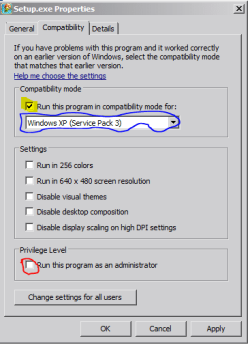
Try running Setup.exe on the installation media in Windows Compatibility mode with Administrator access by following the steps below:- Right click on the setup.exe file|Properties|Compatibility Tab|Tick the box for Run this program in compatibility mode and a select Windows 98 (or the version of windows which worked for the game on your old PC) from the drop box|and at the very bottom of the box tick the Run this program as an administrator|Apply|OK
Next, try to disable any active anti-virus/malware software you have on the system for the duration of the installation; it may be interfering with the setup process. This is just temporary, you will of course need to re-enable protections after you're done installing the software.
Another potential solution is copy all the installation files from all 4 CDs onto your local hard drive and run setup.exe from your local hard drive, pointing to the next file in each folder from the next disc when the setup prompts you for the next cab file to be installed...
Hope that helps! | My System Specs | | System Manufacturer/Model Number DELL SXPS 1640 OS Windows 7 x64 Professional SP1 CPU Intel C2D T9550 2.66 GHz @ 2.793 GHz (Thanks ThrottleStop!!) Motherboard Intel PM45 Memory 8 GB DDR3 Graphics Card ATI MOBILITY RADEON 4670 Sound Card CREATIVE XFI AUDIO NOTEBOOK Monitor(s) Displays 16.1 WLED Screen Resolution 1920x1080 Keyboard Built-in backlighted Keyboard Mouse Logitech Wireless Mini Mouse PSU 90W Dell Power Brick Case Dell Chassis Cooling Coolermaster Cooling Pad Hard Drives Seagate ST9500420AS 500GB (465GiBi) 7200 RPM Drive
External Drives:-
2 TB WD Essentials x 3
1 TB WD Mybook Gen 1
1 TB WD Mybook Gen 2
1 TB Seagate
1 TB Seagate
320 GB WD Scorpio Black (enclosed)
320 GB WD Scorpio Black (enclosed) Internet Speed 4/0.5 |
06 Jul 2012
|
#3 | | windows 7 ultimate 64 bit |

Quote: Originally Posted by solarmystic Hello fishigfon and welcome to the forums!
Try running Setup.exe on the installation media in Windows Compatibility mode with Administrator access by following the steps below:- Right click on the setup.exe file|Properties|Compatibility Tab|Tick the box for Run this program in compatibility mode and a select Windows 98 (or the version of windows which worked for the game on your old PC) from the drop box|and at the very bottom of the box tick the Run this program as an administrator|Apply|OK
Next, try to disable any active anti-virus/malware software you have on the system for the duration of the installation; it may be interfering with the setup process. This is just temporary, you will of course need to re-enable protections after you're done installing the software.
Another potential solution is copy all the installation files from all 4 CDs onto your local hard drive and run setup.exe from your local hard drive, pointing to the next file in each folder from the next disc when the setup prompts you for the next cab file to be installed...
Hope that helps! Hi,
i Tried changing the Compatibility mode, but the box where i can enable it is greyed out.
And i tried copying the files to my HDD, but it says it cant do it because of th read only attribute.
and i will try disableing the anti virus software now
Cheers
Corey | My System Specs | | OS windows 7 ultimate 64 bit |
06 Jul 2012
|
#4 | | Windows 7 x64 Professional SP1 Geordieland, Tyne and Wear |
Before we continue any further, can you fill up your system specs by using the following tutorial? System Info - See Your System Specs
What do you mean the by the box is greyed out?
Are you referring to the highlighted box in yellow, or the oulined box in blue?
Also can you tick the checkbox marked in red?
Can you take a screenshot of your setup.exe property box and the error that pops up when you try and copy the files to your HDD and upload both of them following the tutorials below? How to Use the Snipping Tool in Vista - Vista Forums Screenshots and Files - Upload and Post in Seven Forums
Thanks in advance! | My System Specs | | System Manufacturer/Model Number DELL SXPS 1640 OS Windows 7 x64 Professional SP1 CPU Intel C2D T9550 2.66 GHz @ 2.793 GHz (Thanks ThrottleStop!!) Motherboard Intel PM45 Memory 8 GB DDR3 Graphics Card ATI MOBILITY RADEON 4670 Sound Card CREATIVE XFI AUDIO NOTEBOOK Monitor(s) Displays 16.1 WLED Screen Resolution 1920x1080 Keyboard Built-in backlighted Keyboard Mouse Logitech Wireless Mini Mouse PSU 90W Dell Power Brick Case Dell Chassis Cooling Coolermaster Cooling Pad Hard Drives Seagate ST9500420AS 500GB (465GiBi) 7200 RPM Drive
External Drives:-
2 TB WD Essentials x 3
1 TB WD Mybook Gen 1
1 TB WD Mybook Gen 2
1 TB Seagate
1 TB Seagate
320 GB WD Scorpio Black (enclosed)
320 GB WD Scorpio Black (enclosed) Internet Speed 4/0.5 |
06 Jul 2012
|
#5 | | windows 7 ultimate 64 bit |
i have attached the screen shots
Cheers
Corey | My System Specs | | OS windows 7 ultimate 64 bit |
06 Jul 2012
|
#6 | | Windows 7 x64 Professional SP1 Geordieland, Tyne and Wear |
Oh.. you tried to move the files? The dialogue box is right, you can't do that.
How about just copying them instead?
Select all the files on the disc by going to the disc window, pressing Ctrl-A to highlight all the files, then Ctrl-C to copy, followed by Ctrl-V in your target destination window...
Moving files from a Read-Only source like CD or a DVD is obviously impossible but copying them should be possible unless your installation media has been scracthed or deformed..
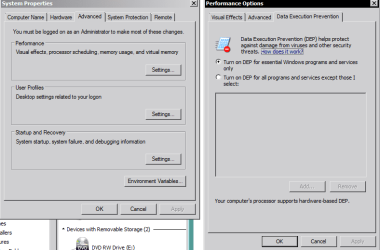
Also can you check your DEP (Data execution Prevention) settings for me and post a screenshot of that too, apparently there are issues with getting the installer to run properly under certain DEP settings.
Go to start|type in systempropertiesadvanced|enter|advanced tab|Performance Options|Data Execution Prevention Tab|Ensure the Turn On DEP for essential Windows programs and services only is selected| Apply| Reboot PC | My System Specs | | System Manufacturer/Model Number DELL SXPS 1640 OS Windows 7 x64 Professional SP1 CPU Intel C2D T9550 2.66 GHz @ 2.793 GHz (Thanks ThrottleStop!!) Motherboard Intel PM45 Memory 8 GB DDR3 Graphics Card ATI MOBILITY RADEON 4670 Sound Card CREATIVE XFI AUDIO NOTEBOOK Monitor(s) Displays 16.1 WLED Screen Resolution 1920x1080 Keyboard Built-in backlighted Keyboard Mouse Logitech Wireless Mini Mouse PSU 90W Dell Power Brick Case Dell Chassis Cooling Coolermaster Cooling Pad Hard Drives Seagate ST9500420AS 500GB (465GiBi) 7200 RPM Drive
External Drives:-
2 TB WD Essentials x 3
1 TB WD Mybook Gen 1
1 TB WD Mybook Gen 2
1 TB Seagate
1 TB Seagate
320 GB WD Scorpio Black (enclosed)
320 GB WD Scorpio Black (enclosed) Internet Speed 4/0.5 |
06 Jul 2012
|
#7 | | Windows 7 x64 Professional SP1 Geordieland, Tyne and Wear |
Also, if all else fails, disable the AutoRun/AutoPlay dialogue box of the CD when you put it in, go into the CD drive and run the install.exe file directly, and not the setup.exe file...
There's some good advice also from the RC forums over at these links you can try out:- Real Flight G4 install problem - Page 1 - RunRyder RC Helicopter http://www.knifeedge.com/forums/showthread.php?t=27027 http://www.rcgroups.com/forums/showthread.php?t=1018113 | My System Specs | | System Manufacturer/Model Number DELL SXPS 1640 OS Windows 7 x64 Professional SP1 CPU Intel C2D T9550 2.66 GHz @ 2.793 GHz (Thanks ThrottleStop!!) Motherboard Intel PM45 Memory 8 GB DDR3 Graphics Card ATI MOBILITY RADEON 4670 Sound Card CREATIVE XFI AUDIO NOTEBOOK Monitor(s) Displays 16.1 WLED Screen Resolution 1920x1080 Keyboard Built-in backlighted Keyboard Mouse Logitech Wireless Mini Mouse PSU 90W Dell Power Brick Case Dell Chassis Cooling Coolermaster Cooling Pad Hard Drives Seagate ST9500420AS 500GB (465GiBi) 7200 RPM Drive
External Drives:-
2 TB WD Essentials x 3
1 TB WD Mybook Gen 1
1 TB WD Mybook Gen 2
1 TB Seagate
1 TB Seagate
320 GB WD Scorpio Black (enclosed)
320 GB WD Scorpio Black (enclosed) Internet Speed 4/0.5 |
06 Jul 2012
|
#8 | | windows 7 ultimate 64 bit |
Hi,
i tried all the above, and i looked at thoses forums, but nothing i tried worked 
and the is no install.exe file to click on, the is only a setup.exe
Thanks anyway for all your Help
Cheers Corey | My System Specs | | OS windows 7 ultimate 64 bit |
06 Jul 2012
|
#9 | | Windows 7 x64 Professional SP1 Geordieland, Tyne and Wear |
I'm sorry I couldn't help you solve it... you're sure you tried to copy the files to your HDD not move them right?
It could turn out to be faulty installation media, or just have a problem with your particular laptop.
Do you have another computer to try the installation discs on? | My System Specs | | System Manufacturer/Model Number DELL SXPS 1640 OS Windows 7 x64 Professional SP1 CPU Intel C2D T9550 2.66 GHz @ 2.793 GHz (Thanks ThrottleStop!!) Motherboard Intel PM45 Memory 8 GB DDR3 Graphics Card ATI MOBILITY RADEON 4670 Sound Card CREATIVE XFI AUDIO NOTEBOOK Monitor(s) Displays 16.1 WLED Screen Resolution 1920x1080 Keyboard Built-in backlighted Keyboard Mouse Logitech Wireless Mini Mouse PSU 90W Dell Power Brick Case Dell Chassis Cooling Coolermaster Cooling Pad Hard Drives Seagate ST9500420AS 500GB (465GiBi) 7200 RPM Drive
External Drives:-
2 TB WD Essentials x 3
1 TB WD Mybook Gen 1
1 TB WD Mybook Gen 2
1 TB Seagate
1 TB Seagate
320 GB WD Scorpio Black (enclosed)
320 GB WD Scorpio Black (enclosed) Internet Speed 4/0.5 |
06 Jul 2012
|
#10 | | Windows 7 Ultimate x64 (desktop) / x64 (laptop) |
I was thinking of suggesting to just copy all the files in the disc into your PC's HDD, then change the attribute of the necessary files from there. | My System Specs | | OS Windows 7 Ultimate x64 (desktop) / x64 (laptop) CPU AMD Phenom 2 X3 720 2.8 GHz (desktop) / AMD Dual-Core E-350 Motherboard ASRock N68-VS3 UCC / Acer Aspire 5253 Memory 4 Gb DDR3 / 4Gb DD3 Graphics Card Nvidia GeForce GTS 450 2048 Mb / AMD Radeon HD 6310 Sound Card High Definition Audio Device Monitor(s) Displays ViewSonic Screen Resolution 1024 x 768 / 1366 x 768 Keyboard Logitech Keyboard Mouse A4tech Infrared Mouse / Philips Infrared Mouse PSU Electron ATX-600W Case Some Case Cooling AMD built-in cooling fan Hard Drives 313GB Seagate ST332041 8AS SCSI Disk Device (ATA) / 500 Gb HDD Internet Speed 1 Mbps Other Info Information of the PC's specs courtesy of Speccy freeware. Lol. "Unable to remove read-only attribute" when install game from CD ROM problems? All times are GMT -5. The time now is 03:59 PM. | |