Windows 7 Forums


Windows 7: Games not running on full screen.

27 Dec 2009   #1

windows 7 ultimate x64
 
 
Games not running on full screen.

i am running windows7 ultimate x64 but my problem is,that when i run doom3,it does not come in full screen,it has 1inch border left from both left side and right side...it does never come on full screen.i even changed option to use highe resolution,full screen but it didnt solve problem,then somewhere on net i read,hit alt+enter,i did this too.but still problem didnt solve.
i am using dell studio laptop 1737,and it has intel GMA 4500MHD vga,i hav downloaded the driver which is latest for it even for windows 7 (from dell...i couldn't find it on intel)
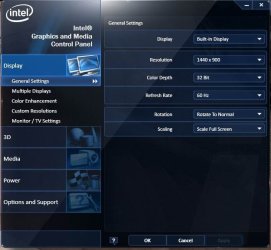
lately i installed NFS most wanted,then NFS carbon..both had same problem as doom3.they are not using full screen.but in my intel vga properties,it says that it is using full screen.i have attached the image of my vga panel.

Attached Thumbnails
Games not running on full screen.-untitled.jpg  
My System SpecsSystem Spec

28 Dec 2009   #2

Windows 7 Ultimate x64 SP1
Pittsburgh


This is a resolution issue. the game is running at 1024x769 and your screen is running at 1440x900 which is widescreen. you have to enable widescreen support in the game. you might have to googel doom3 + widescreen to find the answer here. Im currently at work so a lot of the sites get blocked I will try to help more once i get home if no one else pops in here.
My System SpecsSystem Spec
28 Dec 2009   #3

Windows 7 RTM 64bit


Select widescreen resolution
If Doom 3 doesn't list your widescreen resolution you can try to set it manually like this:
r_mode -1 - custom resolutions on
r_customwidth 1440 - custom screen width
r_customheight 900 - custom screen height
My System SpecsSystem Spec
.


21 Oct 2010   #4

Windows 7 Professional 32 bit
 
 
Similar Problem - How I solved it

I had a similar problem, with many programs not working correctly...
But how I solved it:
(Note, this particular method may only apply to those with similar computers)

Screen Resolution > Advanced Settings > Intel Graphics and Media Control Panel > Scaling > SET TO: "Scale Full Screen" (if it isn't already) > OK

What did NOT work:
Adjusting program settings (inside programs)
Setting programs to administrator
Adjusting screen resolution
Disabling visual themes / desktop composition / scaling on high DHP settings
My System SpecsSystem Spec
19 Dec 2010   #5

Windows 7
 
 
Suggestion Worked

Thanks a lot. It indeed worked
My System SpecsSystem Spec
Reply

 Games not running on full screen. problems?


Thread Tools


Similar help and support threads for: Games not running on full screen.
Thread Forum
Nvidia GeForce GT 555M, games in full-screen cause black screen? Gaming
There is no full screen while running some programs or games. General Discussion
Solved Full Screen Games no full screen on Windows Seven Graphic Cards
Solved Can't play games in full screen Gaming
Cannot full screen in games Gaming


All times are GMT -5. The time now is 08:41 AM.


Seven Forums Android App Seven Forums IOS App Follow us on Facebook

Windows 7 Forums is an independent web site and has not been authorized,
sponsored, or otherwise approved by Microsoft Corporation.
"Windows 7" and related materials are trademarks of Microsoft Corp.
© Designer Media Ltd
  

1 2 3 4 5 6 7 8 9 10 11 12 13 14 15 16 17 18 19 20 21 22 23 24 25 26 27 28 29 30 31 32