| | Welcome to Windows 7 Forums. Our forum is dedicated to helping you find solutions with any problems, errors or issues you are experiencing with Windows 7. The Windows 7 forum also covers news and updates and has an extensive Windows 7 tutorial section that covers a wide range of tips and tricks. | Windows 7 - Fallout 3 Windows 7 64-bit premium
|
04-02-2010
|
#1 | | |
Fallout 3 Windows 7 64-bit premium I have fallout 3 with all of the addon content and latest patch. I can not run the program normally as it will freeze randomly in game and quite quickly. My computer can run it on full graphics smoothly and finely yet however the game freezes randomly.
Here is some info regarding my computer: Windows 7 Home Premium 64-bit, Intel Core i3 processor 530, 6gb ddr3, integrated intel gma hd graphics (i added in a geforce 8600 GT graphics card), 1 tb HDD, dvd super multi drive, multi-inone digital media manager, realtek high definition audio.
I see people had problems with multi processors and were able to fix it HOWEVER! I am using a single core processor and get freezing problems, what happens is when i start playing the game itll freeze within the next minute or five minutes or even 10 seconds!
I have tried running it on compatibility mode on windows 7 vista service pack 2 and with run as administrator yet it did not work, i also tried windows xp service pack 3 compatibility mode as administrator yet no avail. I also noticed some people think it is a permissions issue regarding the documents/mygames/fallout3 and they all have full permissions in fact my computer and account has full permissions to everything on my computer so I found that to not be the issue. I have also tried the suggestion I saw someone had with a similar but not same error with changing the theme to basic, still did not help. I think it is the 64 bit, if possible is there a way to change it to 32 bit to run the game and then switch it back when im not? The game is useless not working ): I hope I can fix this
Also if internet has anything to do with it im using t1 fiber optic cable
It is disappointing that many still have this issue and the game developers have yet to have a easy patch update for this problem.
Last edited by Jass; 04-02-2010 at 03:08 AM..
| My System Specs | | System Manufacturer/Model Number Gateway OS what is os? CPU intel core I3 processor 530 Motherboard n/a Memory 6gb DDR3 Graphics Card Geforce 8600 GT Sound Card n/a Monitor(s) Displays 1 acer 20 inch LCD Cooling higher than satisfactory Hard Drives 1 tb HDD |
04-02-2010
|
#2 | | Win7 Ultimate SP1 x64 / Windows 8 Dev Preview |
| My System Specs | | System Manufacturer/Model Number Custom Build OS Win7 Ultimate SP1 x64 / Windows 8 Dev Preview CPU Intel Core 2 Quad Q8200 OC'd 3.08GHz Motherboard Asus Rampage formula LGA775 Memory 8GB DDR2 900Mhz Graphics Card Zotac GTX 460OC 2GB GDDR5/Asus EN9600GT 1GB DDR3 PhyX Sound Card Supreme FX2 Monitor(s) Displays AOC 22' Screen Resolution 1680x1050 Keyboard Prolink keyboard Mouse Prolink optical mouse PSU Cooler Master GX 650W Cooling Cooler Master V6 + 3X fans Hard Drives 3X500GB hitachi, 2TB internal, 500GB Seagate FreeAgent, 640GB Samsung Internet Speed 1MiB/s Other Info 5.1 System + 2.1 System |
04-02-2010
|
#3 | | |
yes my drivers are completely updated and i recently tried the disable desktop configuration under compatibility for the application and it made it last about a minute or half longer ingame before freezing. | My System Specs | | System Manufacturer/Model Number Gateway OS what is os? CPU intel core I3 processor 530 Motherboard n/a Memory 6gb DDR3 Graphics Card Geforce 8600 GT Sound Card n/a Monitor(s) Displays 1 acer 20 inch LCD Cooling higher than satisfactory Hard Drives 1 tb HDD |
04-02-2010
|
#4 | | Windows 7 Ultimate x64 SP1 |
Have you updated your Direct X Files? Contrary to popular belief even though Windows 7 is DX11 capable, you STILL need to update the DX9 files. And Microsoft continues to update all the DX files so updates are still in order.
Web installer - Download details: DirectX End-User Runtime. if you have issues getting it to update, then download the entire 104MB file here Download details: DirectX Redist (February 2010) Also have you seen/looked through this thread? - Fallout 3 on Windows 7. | My System Specs | | System Manufacturer/Model Number Built by me OS Windows 7 Ultimate x64 SP1 CPU Intel Core i7-950 (3.06GHz) OC to 3.8GHz Motherboard Gigabyte GA-X58A-UD5 rev 1, F6 Bios Memory Corsair Dominator -TR3X6G1600C8D (6GB - 3X2GB) Graphics Card AMD Radeon HD6950 2gig (Sapphire) Sound Card X-Fi Titanium Fatality Pro Monitor(s) Displays HP ZR22w 22" LCD Monitor Screen Resolution 1920 x 1080 Keyboard Logitech Wireless Wave Mouse Logitech Performance MX PSU Antec Signature - SG-850 Case Cooler Master HAF X Cooling Noctua NH-C12P SE14 Hard Drives Primary - OCZ Vertex 2 SSD (120GB). Storage - One 1TB WD Caviar Black, One 750 WD Caviar Black. Internet Speed High Speed Cable Other Info Memory Timings - 1600MHz @ 8-8-8-20-1T @ 1.640 volts |
04-02-2010
|
#5 | | |
yes i have seen the thread and read through it carefully, the majority of their errors are not like mine, theirs are merely launching errors. My error consists of freezing when ingame for 10-30 seconds of playing, also thank you for the update i have ran it and installed and downloaded all the updates within that listed program. But don't i use direct x 10? or is it just with the game? The error still happens either way at the moment unfortunately | My System Specs | | System Manufacturer/Model Number Gateway OS what is os? CPU intel core I3 processor 530 Motherboard n/a Memory 6gb DDR3 Graphics Card Geforce 8600 GT Sound Card n/a Monitor(s) Displays 1 acer 20 inch LCD Cooling higher than satisfactory Hard Drives 1 tb HDD |
04-02-2010
|
#6 | | Windows 7 Ultimate x64 SP1 |
Even though Fallout 3 is a Direct x 10 you'll still want to update your DX files anyway as Microsoft is alway updating the older as well as newer DX files.
More suggestions here - Fallout 3 on Windows 7.
Something else to consider, and is posted in that rather long thread, is to clean out your save files. Delete or move all but the last five save games. Whenever I had lagging or crashes I'd that, in addition to turning off the radio, and things would go back to normal.
Give it a try. | My System Specs | | System Manufacturer/Model Number Built by me OS Windows 7 Ultimate x64 SP1 CPU Intel Core i7-950 (3.06GHz) OC to 3.8GHz Motherboard Gigabyte GA-X58A-UD5 rev 1, F6 Bios Memory Corsair Dominator -TR3X6G1600C8D (6GB - 3X2GB) Graphics Card AMD Radeon HD6950 2gig (Sapphire) Sound Card X-Fi Titanium Fatality Pro Monitor(s) Displays HP ZR22w 22" LCD Monitor Screen Resolution 1920 x 1080 Keyboard Logitech Wireless Wave Mouse Logitech Performance MX PSU Antec Signature - SG-850 Case Cooler Master HAF X Cooling Noctua NH-C12P SE14 Hard Drives Primary - OCZ Vertex 2 SSD (120GB). Storage - One 1TB WD Caviar Black, One 750 WD Caviar Black. Internet Speed High Speed Cable Other Info Memory Timings - 1600MHz @ 8-8-8-20-1T @ 1.640 volts |
04-02-2010
|
#7 | | |
Yes, however; the suggestions in those forums i have looked at all yet they do not encounter the same exact issue i do, not crashing but freezing my whole system. During gameplay it freezes my whole system and In attempt to fix the problem ive restarted about 60ish times. The driver update made it take longer to freeze I think.
I have tried like everyway possible to fix this yet it has not work it has come to my attention that the game developers need to work some and create a windows 7 64 bit working patch they have had more than enough time & all latest sold computers issue windows 7. | My System Specs | | System Manufacturer/Model Number Gateway OS what is os? CPU intel core I3 processor 530 Motherboard n/a Memory 6gb DDR3 Graphics Card Geforce 8600 GT Sound Card n/a Monitor(s) Displays 1 acer 20 inch LCD Cooling higher than satisfactory Hard Drives 1 tb HDD |
04-02-2010
|
#8 | | Windows 7 Ultimate x64 SP1 |

Quote: Originally Posted by Jass
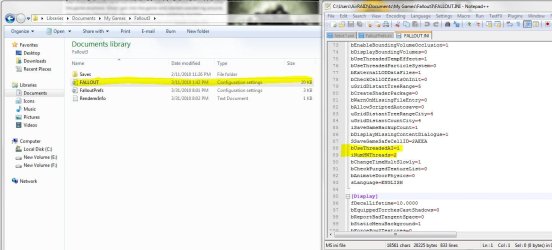
I see people had problems with multi processors and were able to fix it HOWEVER! I am using a single core processor and get freezing problems, what happens is when i start playing the game itll freeze within the next minute or five minutes or even 10 seconds! Isn't a corei3 530 a dual core processor? That's not a single core. Have you tried that fix for the dual core use? I did it, and don't ever get any more freezing like I did. Not sure if the entry is already in there, with a dual core processor, if it's not, might add it in there to test it out at least. Never know.. Fallout 3: Video/Display Freezes, sound keeps going
Also, have you tried turning off Hyper Threading if you have it on? Might be worth a shot to test that out as well. | My System Specs | | System Manufacturer/Model Number Airbot 2.0 OS Windows 7 Ultimate x64 SP1 CPU Core i7 920 (D0) @ 4Ghz, *26c idle *65c full load on air Motherboard Asus P6X58D Premium - Sata 6Gb/s - USB 3.0 Memory 12GB DDR3 Corsair Dominator -CMD12GX3M6A1600C8 at 1600MHz Graphics Card EVGA GeForce GTX 480 -Aftermaket Accelero Xtreme Plus cooler Sound Card ASUS Xonar D2X Monitor(s) Displays 1 LG 24" Flatron W2453V-PF 1 Samsung 24" P2450H both 2ms RT Screen Resolution 1920x1080@60hz Keyboard Logitech Wireless MK700 Mouse Logitech Wireless MK700 PSU Corsair HX1000W Case Cooler Master HAF 932 Cooling Case Fans *3 230mm, *1 140mm/CPU - *Tuniq Tower 120 Extreme Hard Drives 1 OCZ Vertex2 180GB SSD
1 TB Samsung Spinpoint F1 7200RPM 32MB cache
2 500GB WD Caviar Blacks 7200RPM 32MB cache (WD5001AALS)
Pioneer DVD Burner DVR-S18M Internet Speed DL 15 Mbps UL 0.98 Mbps Other Info Processor-7.7 *RAM- 7.9 *Graphics-7.9 *Gaming Graphics- 7.9 *SSD- 7.8 W.E.I final score= 7.7
*Phone- Samsung Galaxy Nexus |
04-02-2010
|
#9 | | |
From what I was told by the store manager, i3 is a single core processor its just a super strong one, thank you i will try this and keep you updated | My System Specs | | System Manufacturer/Model Number Gateway OS what is os? CPU intel core I3 processor 530 Motherboard n/a Memory 6gb DDR3 Graphics Card Geforce 8600 GT Sound Card n/a Monitor(s) Displays 1 acer 20 inch LCD Cooling higher than satisfactory Hard Drives 1 tb HDD |
04-02-2010
|
#10 | | Windows 7 Ultimate x64 SP1 |
Every information I can find on it says it's a dual core processor, and it has Hyper threading, not a single core. Even from Intel itself. Intel® Core? i3-530 Processor (4M Cache, 2.93 GHz) with SPEC Code(s) SLBLR
Still try the suggestions, it's not going to hurt to try both. | My System Specs | | System Manufacturer/Model Number Airbot 2.0 OS Windows 7 Ultimate x64 SP1 CPU Core i7 920 (D0) @ 4Ghz, *26c idle *65c full load on air Motherboard Asus P6X58D Premium - Sata 6Gb/s - USB 3.0 Memory 12GB DDR3 Corsair Dominator -CMD12GX3M6A1600C8 at 1600MHz Graphics Card EVGA GeForce GTX 480 -Aftermaket Accelero Xtreme Plus cooler Sound Card ASUS Xonar D2X Monitor(s) Displays 1 LG 24" Flatron W2453V-PF 1 Samsung 24" P2450H both 2ms RT Screen Resolution 1920x1080@60hz Keyboard Logitech Wireless MK700 Mouse Logitech Wireless MK700 PSU Corsair HX1000W Case Cooler Master HAF 932 Cooling Case Fans *3 230mm, *1 140mm/CPU - *Tuniq Tower 120 Extreme Hard Drives 1 OCZ Vertex2 180GB SSD
1 TB Samsung Spinpoint F1 7200RPM 32MB cache
2 500GB WD Caviar Blacks 7200RPM 32MB cache (WD5001AALS)
Pioneer DVD Burner DVR-S18M Internet Speed DL 15 Mbps UL 0.98 Mbps Other Info Processor-7.7 *RAM- 7.9 *Graphics-7.9 *Gaming Graphics- 7.9 *SSD- 7.8 W.E.I final score= 7.7
*Phone- Samsung Galaxy Nexus | Fallout 3 Windows 7 64-bit premium | All times are GMT -5. The time now is 12:15 AM. |  |