Windows 7 Forums


Windows 7: Steam Games on Win 7.

06 May 2009   #1

Windows 7 Ultimate Edition x64
Viva Las Vegas
 
 
Steam Games on Win 7.

So.. if I install Steam on Win 7. and sign in. How do I play all the games that were installed on my old Vista HD.. as Win 7 is installed on a new HD.

will steam just install them all?

My System SpecsSystem Spec

06 May 2009   #2

Windows 7 7100


You would have to download then reinstall the games through steam or if you have the cds you could install them that way.
My System SpecsSystem Spec
06 May 2009   #3

Windows 7 Ultimate Edition x64
Viva Las Vegas


yup... it's going to take a while. steam already started reinstalling and downloading. I copied the Appdata file inside of steam. from my old HD, to the new. and most of the games are 100% ready now.. just a few need to be downloaded and stuff.. so hopefully that worked.
My System SpecsSystem Spec
.


07 May 2009   #4

Windows 7 Ultimate Edition x64
Viva Las Vegas


Fixed.. for anyone updating and does need to save everything over from steam and doesn't want to have to re wait for steam on the new system to redownload, and install ALL the games in your steam folder. there is an easier, and faster way.

I went to Computer/c drive/program files(x86)/Steam/Steamapps

the steam app's folder had about 5 or so GFC files for each game that I had, COD4, Source, CS, HL, Bioshock, TF2 and others.. I just copied ALL those into my new Steam apps folder on the new system. and then when I started steam. all of them just needed a refresh in the Games list and they worked.. some needed updates though. other than that they are all working.

That is what worked for me.
My System SpecsSystem Spec
07 May 2009   #5

windows 7


you guys do know steam has a backup option

file> backup games

just be sure to do it in its default location or it doesnt create the exe that restores them.
My System SpecsSystem Spec
07 May 2009   #6

Win 7


If you install windows 7 on a new partition or drive so you maintain your vista files all you have to do is start steam and it will install the service for windows 7.
My System SpecsSystem Spec
07 May 2009   #7

Windows 7 Professional 64-bit


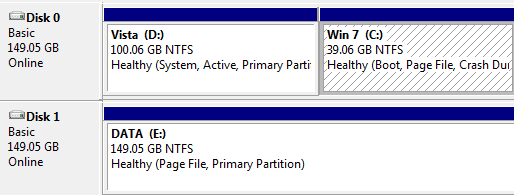
Where are you games installed atm?
My System SpecsSystem Spec
07 May 2009   #8

Windows 7 RC 7100


YupYup has it right, i did not bother with a backup of files via the steam method, had my steam install on a different hard drive anyways so i just left it there. Installed windows, launched steam installed service and was gaming.
My System SpecsSystem Spec
07 May 2009   #9

Win 7


Quote   Quote: Originally Posted by swarfega View Post
Where are you games installed atm?
On a separate drive (E) from the windows drive.
Attached Thumbnails
Steam Games on Win 7.-disk.png  
My System SpecsSystem Spec
08 May 2009   #10

Genuine Windows 7 SP1 Home Premium 64Bit
Newcastle Upon Tyne


Install steam again within windows 7 (E: in your case) but point to the directory youve already installed steam on your other hard drive, let it install and sign in.

When you sign into your Vista partation to play steam you will have to input your password and the same if you went to play in Vista then back to Win 7!

You wont have to reinstall your games but you might have to set screen resoulotion, sound settings etc.
My System SpecsSystem Spec
Reply

 Steam Games on Win 7. problems?


Thread Tools


Similar help and support threads for: Steam Games on Win 7.
Thread Forum
Steam Games Question Gaming
adding steam games to windows Games Explorer Gaming
steam games co-op Gaming
steam games Gaming
Games Explorer Folder - Add Games to (Steam) Tutorials


All times are GMT -5. The time now is 10:48 PM.


Seven Forums Android App Seven Forums IOS App Follow us on Facebook

Windows 7 Forums is an independent web site and has not been authorized,
sponsored, or otherwise approved by Microsoft Corporation.
"Windows 7" and related materials are trademarks of Microsoft Corp.
© Designer Media Ltd
  

1 2 3 4 5 6 7 8 9 10 11 12 13 14 15 16 17 18 19 20 21 22 23 24 25 26 27 28 29 30 31 32