|
Welcome to Windows 7 Forums. Our forum is dedicated to helping you find solutions with any problems, errors or issues you are experiencing with Windows 7. The Windows 7 forum also covers news and updates and has an extensive Windows 7 tutorial section that covers a wide range of tips and tricks.
Windows 7 - Extending volume |
08-01-2010
|
#1 | | Windows 7 Ultimate 64 bit |
Extending volume Hey everyone.
Not too long ago I created a new partition in order to store a full system backup on my laptop. Recently, I've tried to extend my main partition over that one to utilize the space I'd set apart for the backup since I was going to start backing up using optical media.
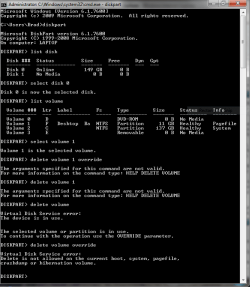
When trying to extend the main partition, it doesn't give me the option since the main partition is to the right of the other partition. I tried using the command prompt to delete the partition and get it to 'unallocated space' so that I could use the command prompt to extend the main partition over, but now I'm getting the error: "Delete is not allowed on the current boot, system, pagefile,
crashdump or hibernation volume." How do I remove the pagefile from this partition? The pagefile is also part of the main partition.
Is this the only problem that I will run into? I should be able to format the partition, and then use the cmd prompt to extend the main partition left right? Any help would be much appreciated! Thanks
| My System Specs | | System Manufacturer/Model Number Gateway OS Windows 7 Ultimate 64 bit CPU Intel Core2 Duo 2GHz Motherboard n/a Memory 3 GB Graphics Card Integrated Sound Card Integrated Monitor(s) Displays Single laptop display PSU n/a Case n/a Cooling n/a Hard Drives Single 150 GB HDD |
08-01-2010
|
#2 | | Windows 7 Home Premium x86-64 |
Delete it in disk management and then extend the main one over it. | My System Specs | | System Manufacturer/Model Number Built by me OS Windows 7 Home Premium x86-64 CPU AMD Athlon x2 250 @ 3.0GHz (2MB L2 cache, no L3) Motherboard Gigabyte MA-785GM-US2H mATX/785G/DDR2 (F11 BIOS, IGP disable Memory Elixir 4GB DDR2 800MHz 5-5-5-15 (2x2GB) Graphics Card Gigabyte ATI Radeon 5570 1GB GDDR3 (670MHz core/800MHz memor Sound Card Onboard Realtek 889A Monitor(s) Displays 1) BenQ M2200HD 21.5" (HDMI, TN, 1920x1080p); 2) Phillips 17 PSU Antec True Power New 550w Case Antec Two Hundred v2 [with SSD bracket] Cooling 1 x 140mm fan top [low], 1 x 120mm fan rear [low] Hard Drives HARD DRIVE 1: Samsung HD103UJ 1TB 7200RPM 32MB cache
HARD DRIVE 2: Seagate Barracuda 7200.12 500GB 7200RPM 16MB cache |
08-01-2010
|
#3 | | MS Windows 7 Ultimate SP1 64-bit |

Quote: Originally Posted by berkleysdad09 Hey everyone.
Not too long ago I created a new partition in order to store a full system backup on my laptop. Recently, I've tried to extend my main partition over that one to utilize the space I'd set apart for the backup since I was going to start backing up using optical media.
When trying to extend the main partition, it doesn't give me the option since the main partition is to the right of the other partition. I tried using the command prompt to delete the partition and get it to 'unallocated space' so that I could use the command prompt to extend the main partition over, but now I'm getting the error: "Delete is not allowed on the current boot, system, pagefile,
crashdump or hibernation volume." How do I remove the pagefile from this partition? The pagefile is also part of the main partition.
Is this the only problem that I will run into? I should be able to format the partition, and then use the cmd prompt to extend the main partition left right? Any help would be much appreciated! Thanks Please attach a pic of the output of DISKMANAGEMENT.MSC to your next post.
You can use MS Paint or the Snipping tool (WIN | type Snipping Tool |Enter key to capture the disk management output.
Here's a link to a tutorial: How to Post a Screenshot in Seven Forums - Windows 7 Forums | My System Specs | | System Manufacturer/Model Number Toshiba Satellite L305D laptop OS MS Windows 7 Ultimate SP1 64-bit CPU AMD Athlon X2 Dual-Core QL-64, 2100 Mhz, 2 Cores Motherboard TOSHIBA Portable PC (Socket M2/S1G1) Memory 4.0GB (2x2GB) DDR2 @ 333MHz 5-5-5-15 Graphics Card ATI Radeon 3100 Graphics (Toshiba) Sound Card Realtek High Definition Audio Monitor(s) Displays Generic PnP Monitor @ 1280x800 Screen Resolution 1280 x 800 Keyboard standard PS/2 Keyboard Mouse HP Wireless Optical Mobile Mouse Model FHA-3410 Hard Drives 125.03GB Corsair CSSD-V128GB2 ATA Device (IDE)
Depending upon testing, organized as 1,2, or 3 partitions with/without a 100mb system partition at the front. Internet Speed What the local pub, local coffee shop offers. Other Info Optical Drives HL-DT-ST DVDRAM GSA-T50N ATA Device
Synaptics PS/2 Port TouchPad
Speakers (Realtek High Definition Audio)
Atheros AR5007EG Wireless Network Adapter
Also have an Asus ha1002xp netbook with Win 7 Ultimate installed. |
08-01-2010
|
#4 | | Windows 7 Ultimate x64, XP Mode(VPC and VMLite), VM Player 4.02, W8 CPreview |
Welcome to the Seven Forums! berkleysdad09
You won't be able to resize the C primary while booted in the OS installed on it. For this you would need to boot live from a 3rd party drive tool program's own live cd to effectively remove the second partition and expand the present C primary into that space.
The first thing to do since you are planning to use removable media would be backing up anything important first before any partition changes are made in case the partition table is damaged. That would trash the entire C primary resulting in the need to restart fresh with everything if unable to be repaired.
The resize option seen in the drive tools included with the 7 recovery dvd wouldn't be advised for this while other free drive programs are available. Partition Wizard is one more popular here. Free Download Magic Partition Manager Software – Partition Wizard Online
The free Linux drive tool GParted or Gnome Partition Editor is another drive program you use while booted live from cd or even usb flash drive in order to repartition drives. That requires a program that can burn iso disk images onto cd or a program like the shareware download of UltraISO to see written to a flash drive made bootable. | My System Specs | | OS Windows 7 Ultimate x64, XP Mode(VPC and VMLite), VM Player 4.02, W8 CPreview CPU AMD Phenom II X4 Deneb 3.4 Motherboard Gigabyte GA-790XTA-UD4 Memory Kingston Hyper X DDR3 1600 8gb 1.5v Graphics Card MSI Radeon 5750 1gb Sound Card Creative Labs X-Fi XtremeGamer Monitor(s) Displays 2 x Acer P191W 19" widesscreen Screen Resolution 1440x900 native Keyboard Microsoft Recusa Razor Mouse MS Trackball Explorer PSU Corsair 750TX Case Antec 900-2 - SSD compatible Cooling Zalman CNPS9900A Hard Drives WD Black Edition 1tb Sata 6.0 = 2
WD Black Edition 1tb Sata 3.0 = 2 (OS drives)
WD 1tb Green Power sata = 2 1 external
usb flash drives = 15 Internet Speed 30mbps upgrade |
08-01-2010
|
#5 | | MS Windows 7 Ultimate SP1 64-bit |
Berkeleysdad,
The pic of the disk management output could very well influence our recommendation.
I do suspect that you will be best served with a 3rd party tool.
Do NOT use Partition Magic. This has caused problems with Win 7.
The big favorite with the contributors here is Partition Wizard.
I'm going to give you a list of partition/backup/restore software and also a link to a tutorial on using Partition Wizard. DISK COPY/CLONE/PARTITION/BACKUP/RESTORE SOFTWARE PARTITION WIZARD (a favorite of many SevenForum contributors)
Free download partition magic, partition manager and partition wizard online. Free Download Magic Partition Manager Software – Partition Wizard Online MACRIUM REFLECT Macrium Reflect Backup and Hard Disk Imaging for Windows 7, Vista, XP and Server 2003/2008
Macrium Reflect. A complete hard disk image and backup software solution for your PC. Protect your personal documents, photos, music and emails. Upgrade your hard disk or try new operating systems in the safe knowledge that everything is securely saved in an easily recovered backup file PARAGON BACKUP AND RECOVERY SOFTWARE Free Backup Software: Paragon Backup & Recovery Free Edition - Overview
Backup & Recovery Free Edition
Total PC Protection for Serious Users! Take complete control of your PC’s safety. Based on solid commercial backup and recovery software from Paragon, the new Backup & Recovery Free Edition will give you a rich set of features that you can trust. Smart people backup; Backup & Recovery is smart backup. EASEUS
EASEUS Disk Copy is a FREE reliable disaster recovery, hard disk copy, disk clone, partition copy, backup freeware. Support for all Hard Drive and removable drive. EASEUS Disk Copy: Free Disk Copy, Disk Clone, Partition Copy Software. Sector by Sector for hard drive backup freeware. WINDOWS 7
Backup & Restore (WIN | type back | Enter)
Disk Management (DiskMgmt.msc)
Disk Partitioning (DiskPart)
==================================
==================================
Didn't find the tutorial. Maybe it didn't make it into the tutorial index yet.
Maybe someone else will point you to the tutorial. | My System Specs | | System Manufacturer/Model Number Toshiba Satellite L305D laptop OS MS Windows 7 Ultimate SP1 64-bit CPU AMD Athlon X2 Dual-Core QL-64, 2100 Mhz, 2 Cores Motherboard TOSHIBA Portable PC (Socket M2/S1G1) Memory 4.0GB (2x2GB) DDR2 @ 333MHz 5-5-5-15 Graphics Card ATI Radeon 3100 Graphics (Toshiba) Sound Card Realtek High Definition Audio Monitor(s) Displays Generic PnP Monitor @ 1280x800 Screen Resolution 1280 x 800 Keyboard standard PS/2 Keyboard Mouse HP Wireless Optical Mobile Mouse Model FHA-3410 Hard Drives 125.03GB Corsair CSSD-V128GB2 ATA Device (IDE)
Depending upon testing, organized as 1,2, or 3 partitions with/without a 100mb system partition at the front. Internet Speed What the local pub, local coffee shop offers. Other Info Optical Drives HL-DT-ST DVDRAM GSA-T50N ATA Device
Synaptics PS/2 Port TouchPad
Speakers (Realtek High Definition Audio)
Atheros AR5007EG Wireless Network Adapter
Also have an Asus ha1002xp netbook with Win 7 Ultimate installed. |
08-01-2010
|
#6 | | Windows 7 Ultimate x64, XP Mode(VPC and VMLite), VM Player 4.02, W8 CPreview |
If you have a live repair cd which is one option available in 7 for creating a cd containing the repair tools found on the 7 upgrade or full version disks you could also see the C primary extended using the DiskPart tool. You would still have to be booted live however as far as the main partition is concerned.
First you have to take into account the hidden recovery partition the laptop has if 7 came preinstalled and get to know how the drive is layed out. Once booted live you then go to the command prompt option and type diskpart at the dos type prompt followed by the use of the "list volume" command.
Each partition will be labeled as Volume 0, Volume 1, and Volume 2 depending on where the recovery partition is found at the start or rear of the drive. On some laptops that may be seen at the back end about 7gb or larger in size. On others that will proceed the main C primary.
So assuming C is Volume 2 you would then type "select volume 2" and press enter for that command. The confirmation when the command is entered correctly will then be displayed in the command prompt window.
The next and last step before typing exit or clicking on the corner to close out the command prompt is simply typing "extend" and pressing enter to watch for "DiskPart successfully extended the volume". That will automatically see the C primary fill in the unallocated drive space left behind when removing the secondary backup partition you were using.
Simply type "exit" to close up the window and restart the laptop to see if all goes well. With favorable results the main C primary is now seen using the full capacity less recovery partition(7-10+gb on average). | My System Specs | | OS Windows 7 Ultimate x64, XP Mode(VPC and VMLite), VM Player 4.02, W8 CPreview CPU AMD Phenom II X4 Deneb 3.4 Motherboard Gigabyte GA-790XTA-UD4 Memory Kingston Hyper X DDR3 1600 8gb 1.5v Graphics Card MSI Radeon 5750 1gb Sound Card Creative Labs X-Fi XtremeGamer Monitor(s) Displays 2 x Acer P191W 19" widesscreen Screen Resolution 1440x900 native Keyboard Microsoft Recusa Razor Mouse MS Trackball Explorer PSU Corsair 750TX Case Antec 900-2 - SSD compatible Cooling Zalman CNPS9900A Hard Drives WD Black Edition 1tb Sata 6.0 = 2
WD Black Edition 1tb Sata 3.0 = 2 (OS drives)
WD 1tb Green Power sata = 2 1 external
usb flash drives = 15 Internet Speed 30mbps upgrade |
08-02-2010
|
#7 | | |
Need the Disk Mgmt screenshot. If both partitions are Primary then use free Partition Wizard bootable CD linked above.
Rightclick partition to Delete, OK.
Then rightclick adjacent partition to Resize over deleted space, OK. Apply all steps.
If any of these partitions sit on boot sector, Windows 7 might not now start. Make sure it is marked Active with PW, then boot Windows 7 DVD Repair console or Repair CD, click through to Recovery Tools list to run Startup Repair up to 3 separate times with reboots to repair MBR until Windows 7 starts.
Backup a System Image and your files externally as 3rd party software Resizing operations can fail, although we haven't had one fail with PW CD in hundreds we've helped with here.
Last edited by gregrocker; 08-02-2010 at 02:47 PM..
| My System Specs | | |
08-02-2010
|
#8 | | Windows 7 Ultimate x64, XP Mode(VPC and VMLite), VM Player 4.02, W8 CPreview |
You won't have to worry about marking anything active when simply expanding the C primary out to fill the drive space in since that is already an active primary.
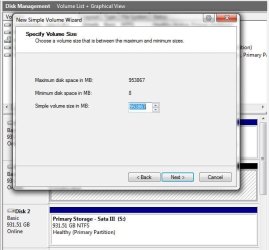
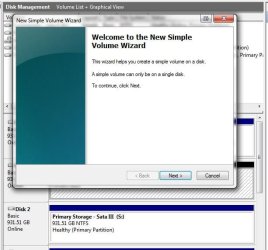
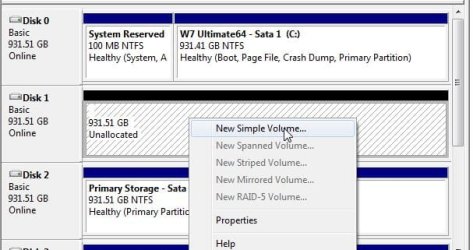
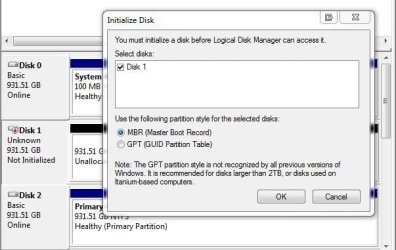
If you were adding a new partition instead of removing one once the new volume wizard is followed and a drive letter is assigned for a new volume the new partition is then made active when Windows mounts it as a new logical drive. Another hard drive being added on would be initialized at that time and be seen as online.
The main concern would be making sure to back up anything important from the drive before proceeding with either method or program just in case something fails like the partition table getting corrupted in the process.
If you were working with an external the advice on creating a system image of the entire drive would be a thought just in case of any mishap when going to resize was seen you would simply restore the image. karlsnooks posted a few links for some free home versions earlier as well as the builtin image tool available in 7. | My System Specs | | OS Windows 7 Ultimate x64, XP Mode(VPC and VMLite), VM Player 4.02, W8 CPreview CPU AMD Phenom II X4 Deneb 3.4 Motherboard Gigabyte GA-790XTA-UD4 Memory Kingston Hyper X DDR3 1600 8gb 1.5v Graphics Card MSI Radeon 5750 1gb Sound Card Creative Labs X-Fi XtremeGamer Monitor(s) Displays 2 x Acer P191W 19" widesscreen Screen Resolution 1440x900 native Keyboard Microsoft Recusa Razor Mouse MS Trackball Explorer PSU Corsair 750TX Case Antec 900-2 - SSD compatible Cooling Zalman CNPS9900A Hard Drives WD Black Edition 1tb Sata 6.0 = 2
WD Black Edition 1tb Sata 3.0 = 2 (OS drives)
WD 1tb Green Power sata = 2 1 external
usb flash drives = 15 Internet Speed 30mbps upgrade |
08-02-2010
|
#9 | | MS Windows 7 Ultimate SP1 64-bit |
Berkeleysdad,
Please follow GregRocker's advice.
He has much real world experience in this very area.
I always listen to him. | My System Specs | | System Manufacturer/Model Number Toshiba Satellite L305D laptop OS MS Windows 7 Ultimate SP1 64-bit CPU AMD Athlon X2 Dual-Core QL-64, 2100 Mhz, 2 Cores Motherboard TOSHIBA Portable PC (Socket M2/S1G1) Memory 4.0GB (2x2GB) DDR2 @ 333MHz 5-5-5-15 Graphics Card ATI Radeon 3100 Graphics (Toshiba) Sound Card Realtek High Definition Audio Monitor(s) Displays Generic PnP Monitor @ 1280x800 Screen Resolution 1280 x 800 Keyboard standard PS/2 Keyboard Mouse HP Wireless Optical Mobile Mouse Model FHA-3410 Hard Drives 125.03GB Corsair CSSD-V128GB2 ATA Device (IDE)
Depending upon testing, organized as 1,2, or 3 partitions with/without a 100mb system partition at the front. Internet Speed What the local pub, local coffee shop offers. Other Info Optical Drives HL-DT-ST DVDRAM GSA-T50N ATA Device
Synaptics PS/2 Port TouchPad
Speakers (Realtek High Definition Audio)
Atheros AR5007EG Wireless Network Adapter
Also have an Asus ha1002xp netbook with Win 7 Ultimate installed. |
08-02-2010
|
#10 | | Windows 7 Ultimate 64 bit |
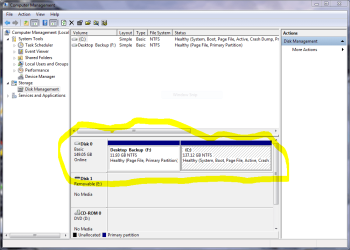
screenshot of disk management I've included a screenshot of disk management to see if that will help clarify what is going on. Thanks to everyone who has taken the time to respond already. | My System Specs | | System Manufacturer/Model Number Gateway OS Windows 7 Ultimate 64 bit CPU Intel Core2 Duo 2GHz Motherboard n/a Memory 3 GB Graphics Card Integrated Sound Card Integrated Monitor(s) Displays Single laptop display PSU n/a Case n/a Cooling n/a Hard Drives Single 150 GB HDD Extending volume problems? All times are GMT -5. The time now is 09:06 PM. |  |