Removing a Hard Drive while in dual boot

devan5

New member
Local time
5:17 PM
Messages
15
I am in a dual boot system with Win7 on 1st HD and Win Xp on my 2nd HD.

I want to remove the HD with just XP on it from the system and only have the HD with Win 7. When i tried removing the xp HD i could not boot back into win7.

How do i boot back into win 7, will it be a repair install?

I am prepared to lose all the stuff on the drive if worst comes to worst but if there is a way to keep the stuff it would be great

thanks
 

My Computer My Computer

At a glance

Windows 7/XP Dual BootIntel Core i5 7504GB G.SKILLXFX HD 5770
OS
Windows 7/XP Dual Boot
CPU
Intel Core i5 750
Motherboard
ASUS P7P55D-E
Memory
4GB G.SKILL
Graphics Card(s)
XFX HD 5770
Hard Drives
1 x Samung F3 SpinPoint 500GB
1X WD Caviar 80GB
PSU
Antec TruePower Modular 550w
Case
Coolermaster Storm Scout

My Computer My Computer

At a glance

Windows 7/XP Dual BootIntel Core i5 7504GB G.SKILLXFX HD 5770
OS
Windows 7/XP Dual Boot
CPU
Intel Core i5 750
Motherboard
ASUS P7P55D-E
Memory
4GB G.SKILL
Graphics Card(s)
XFX HD 5770
Hard Drives
1 x Samung F3 SpinPoint 500GB
1X WD Caviar 80GB
PSU
Antec TruePower Modular 550w
Case
Coolermaster Storm Scout

I'm sorry but can you explain what that is and is this the option for booting into win 7 with all my stuff there?
 

My Computer My Computer

At a glance

Windows 7/XP Dual BootIntel Core i5 7504GB G.SKILLXFX HD 5770
OS
Windows 7/XP Dual Boot
CPU
Intel Core i5 750
Motherboard
ASUS P7P55D-E
Memory
4GB G.SKILL
Graphics Card(s)
XFX HD 5770
Hard Drives
1 x Samung F3 SpinPoint 500GB
1X WD Caviar 80GB
PSU
Antec TruePower Modular 550w
Case
Coolermaster Storm Scout
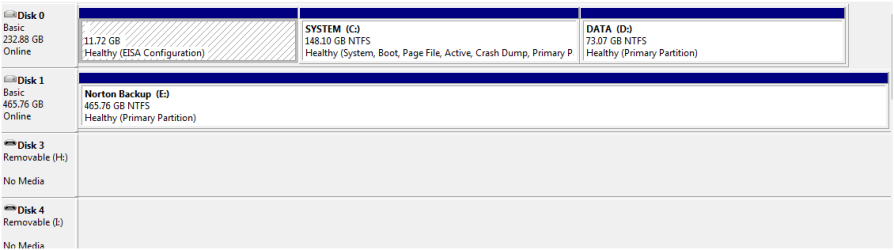
Your image is to small to read.

Capture22222.PNG
 

My Computer My Computer

At a glance

ME/XP/Vista/Win7
OS
ME/XP/Vista/Win7
Is DISK0 XP? It doesn't appear to hold the System MBR which is on the Sys Reserved partitiion of Win7 on DISK1.

Unplug the XP HD, enter BIOS setup to set Win7 HD as first to boot (after DVD drive), then boot the WIn7 DVD Repair console or Repair CD, click through to Recovery Tools list to run Startup Repair up to 3 separate times with reboots until Win7 starts on its own.

http://www.sevenforums.com/tutorials/2083-system-repair-disc-create.html
 
Is DISK0 XP? It doesn't appear to hold the System MBR which is on the Sys Reserved partitiion of Win7 on DISK1.

Unplug the XP HD, enter BIOS setup to set Win7 HD as first to boot (after DVD drive), then boot the WIn7 DVD Repair console or Repair CD, click through to Recovery Tools list to run Startup Repair up to 3 separate times with reboots until Win7 starts on its own.

http://www.sevenforums.com/tutorials/2083-system-repair-disc-create.html

yes disk 0 is XP. I will give this a go and post the results back
 

My Computer My Computer

At a glance

Windows 7/XP Dual BootIntel Core i5 7504GB G.SKILLXFX HD 5770
OS
Windows 7/XP Dual Boot
CPU
Intel Core i5 750
Motherboard
ASUS P7P55D-E
Memory
4GB G.SKILL
Graphics Card(s)
XFX HD 5770
Hard Drives
1 x Samung F3 SpinPoint 500GB
1X WD Caviar 80GB
PSU
Antec TruePower Modular 550w
Case
Coolermaster Storm Scout

My Computer My Computer

At a glance

Windows 7/XP Dual BootIntel Core i5 7504GB G.SKILLXFX HD 5770
OS
Windows 7/XP Dual Boot
CPU
Intel Core i5 750
Motherboard
ASUS P7P55D-E
Memory
4GB G.SKILL
Graphics Card(s)
XFX HD 5770
Hard Drives
1 x Samung F3 SpinPoint 500GB
1X WD Caviar 80GB
PSU
Antec TruePower Modular 550w
Case
Coolermaster Storm Scout
Back
Top